Operating the monitor | 41
Icon Menu and
Submenus
Description
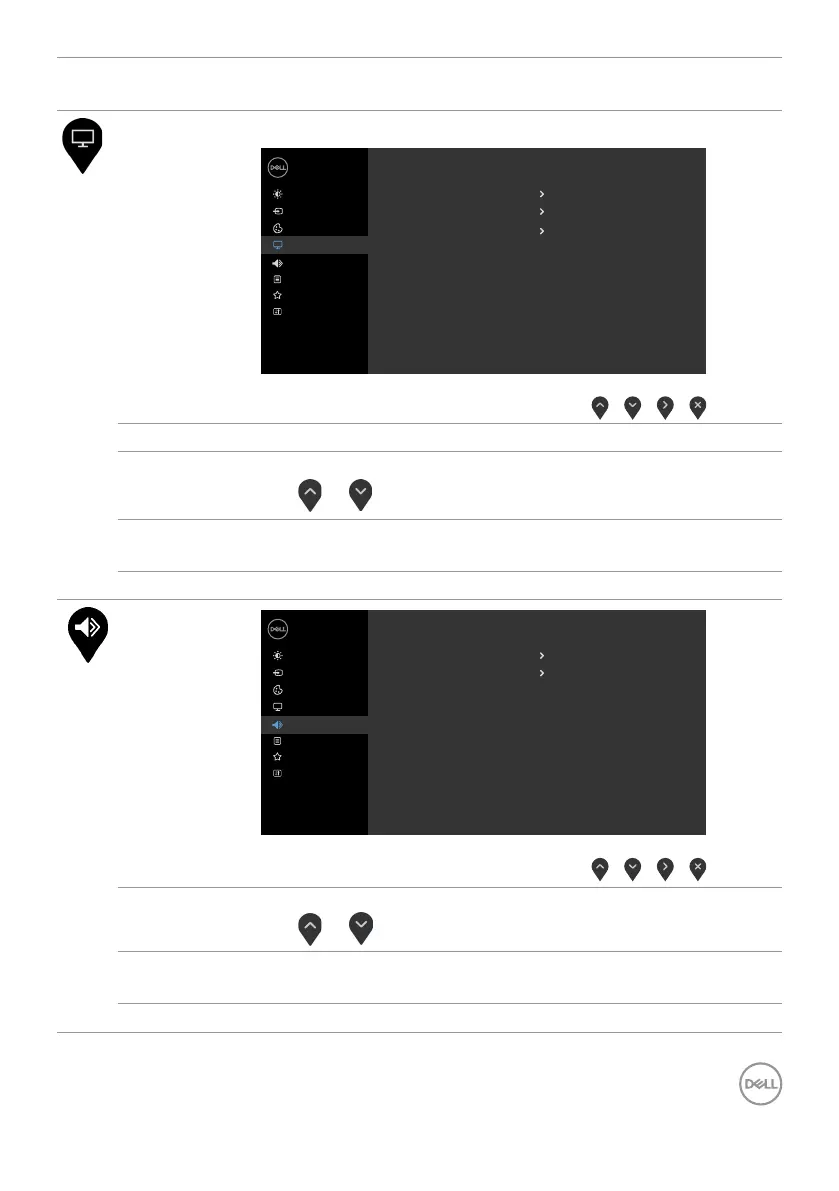
Display Use the Display menu to adjust image.
Dell 24/27 Monitor
Input Source
Color
Display
Brightness/Contrast
Sharpness
Response Time
50
Normal
Wide 16:9
Aspect Ratio
Reset Display
Personalize
Menu
Others
Audio
Aspect Ratio Select the image ratio between 16:9 (wide), 4:3, and 5:4.
Sharpness Makes the image look sharper or softer.
Use
or to adjust the sharpness from ‘0’ to ‘100’.
Response
Time
Allows you to set the Response Time to Normal, Fast or
Extreme.
Reset Display Restores the display settings to factory defaults.
Audio
Dell 24/27 Monitor
Input Source
Color
Display
Brightness/Contrast
Speaker
Reset Audio
Enable
50
Volume
Personalize
Menu
Others
Audio
Volume Allows you to set the volume level of audio source.
Use
or to adjust the volume level from ‘0’ to ‘100’.
Speaker Allows you to enable (turn On) or disable (turn Off) the
speakers.
Reset Audio Select this option to restore default audio settings.


 To Next Page
 Loading...