44 | Operating the monitor
Icon Menu and
Submenus
Description
Reset
Persona-
lization
Restores shortcut keys to factory defaults.
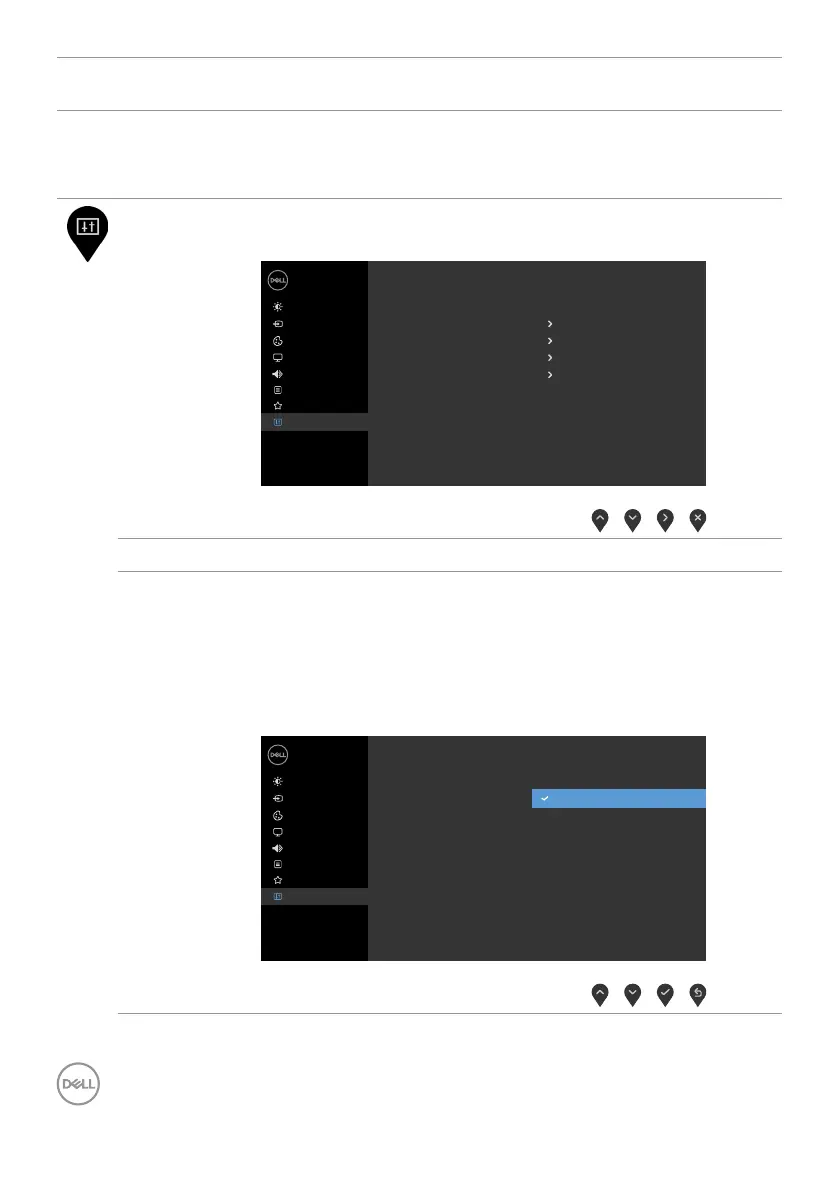
Others Select this option to adjust the OSD settings suchas the
DDC/CI, LCD conditioning, and so on.
Dell 24/27 Monitor
Input Source
Color
Personalize
Display
Menu
Others
Brightness/Contrast
O
On
ABCDEF
00X000
LCD Conditioning
DDC/CI
Firmware
Service Tag
Factory Reset
Display Info
Reset Others
Audio
ENERGY STAR
®
Display Info Displays the monitor’s current settings.
DDC/CI DDC/CI (Display Data Channel/Command Interface) allows
you to adjust the monitor settings using software on your
computer.
Select Off to turn off this feature.
Enable this feature for best user experience and optimum
performance of your monitor.
Dell 24/27 Monitor
Input Source
Color
Personalize
Display
Menu
Others
Brightness/Contrast
O
On
LCD Conditioning
DDC/CI
Firmware
Reset Others
Factory Reset
Display Info
Service Tag
Audio



 To Next Page