Back to Contents Page
Setting Up the Monitor
Dell™ST2210B/ST2310B/ST2410BFlatPanelMonitorUser's Guide
Attaching the Base
Connecting the Monitor
Attaching the Soundbar (Optional)
Removing the Base
Attaching the Base
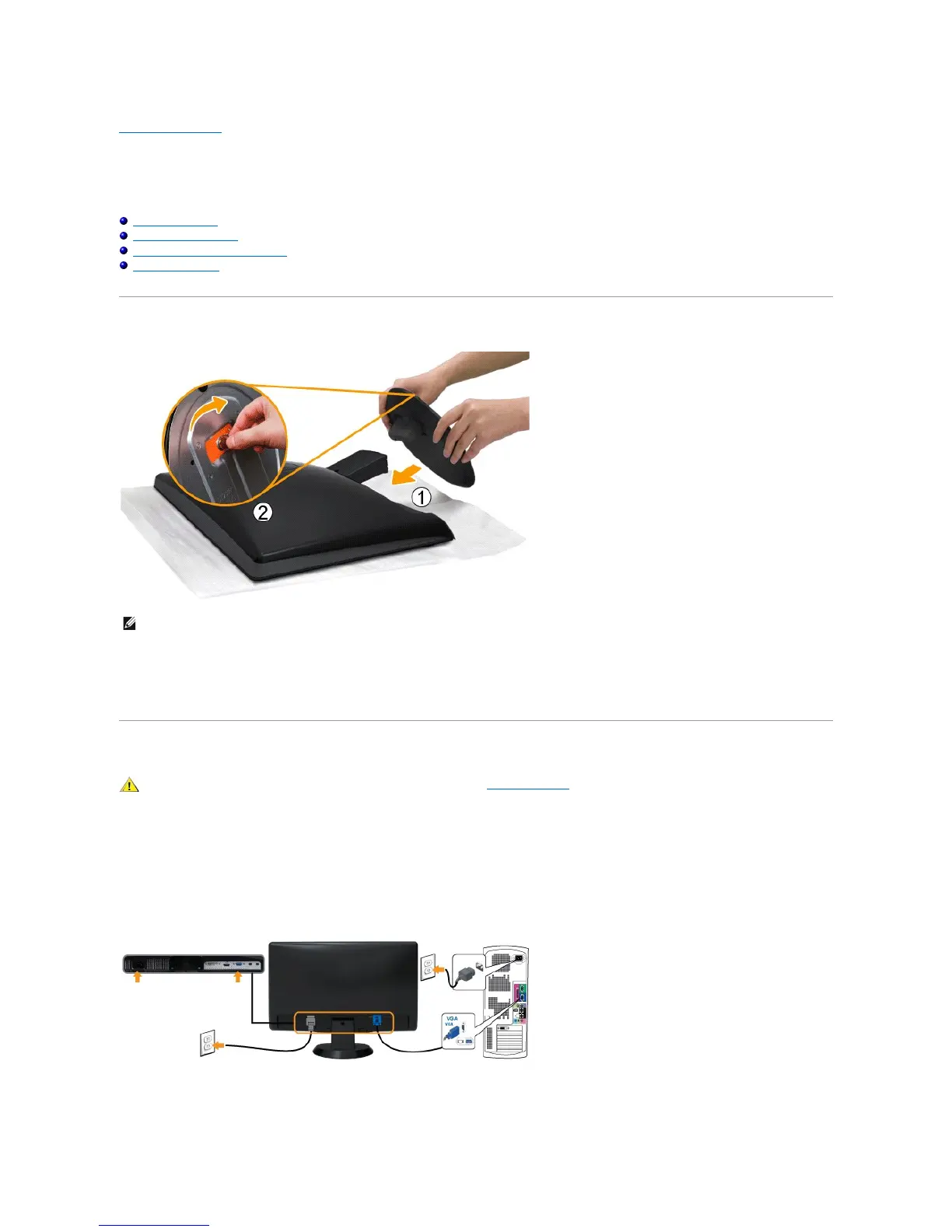
Complete the following steps to attach the base.
1. Place the monitor on a soft cloth or cushion.
2. Attach the base to the monitor.
3. Tighten the screw located below the stand.
Connecting the Monitor
To connect your monitor to the computer perform the following steps/instructions:
1. Turnoffyourcomputeranddisconnectthepowercable.
2. Connect the HDMI cable, white (digital DVI-D), or blue (analog VGA) display connector cable to the corresponding video port on the back of your
computer.Donotuseallthecablesonthesamecomputer. Use all of the cables only when they are connected to different computers with appropriate
video systems.
Connecting the blue VGA cable
Connecting the White DVI Cable*



 To Next Page