
 Need help?
Do you have a question about the Dell UltraSharp 1907FP and is the answer not in the manual?
Connect the monitor to its base securely.
Position the monitor to facilitate cable connections.
Connect the monitor to the computer using the blue VGA cable.
Connect the USB cable to the computer.
Firmly connect the power cord to the monitor and electrical outlet.
Return the monitor to its position and power it on.
Press Input Select if no image appears on the screen.
Identifies USB ports, video input select, OSD menu, navigation buttons, power button, and lock features.
Guide on locating detailed information in the User's Guide on the CD.
This document outlines the setup, usage, and maintenance features of the Dell™ 1907FP Flat Panel Monitor, a display device designed for general computing tasks.
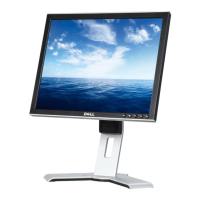
The Dell 1907FP Flat Panel Monitor serves as a visual output device for computers, displaying graphical user interfaces, documents, images, and videos. It connects to a computer via either a blue VGA cable or an optional white DVI cable, allowing for flexible compatibility with various graphics cards. The monitor is designed to be mounted on a dedicated stand, which provides stability and allows for some degree of rotation to facilitate cable connection. An integrated power input ensures the monitor receives the necessary electrical supply to operate.
For enhanced connectivity, the monitor includes a USB downstream port, enabling it to act as a USB hub, extending the number of available USB ports for peripherals. It also features a power output specifically for a Dell Soundbar, suggesting an integrated audio solution can be easily attached and powered directly from the monitor, reducing cable clutter.
User interaction with the monitor's settings is managed through an On-Screen Display (OSD) menu, accessible via dedicated buttons. These controls allow users to adjust various display parameters to optimize their viewing experience. The monitor also incorporates a "Video Input Select" button, which is crucial for switching between different video sources (VGA or DVI) if multiple inputs are connected or if the monitor fails to automatically detect a signal.
Setting up the Dell 1907FP monitor is a straightforward process. Users begin by attaching the monitor panel to its stand, ensuring a secure fit. The monitor's design allows for rotation on its stand, which is a practical feature for easily accessing the rear ports to connect cables. This rotation capability simplifies the initial connection of the blue VGA cable (standard) or the optional white DVI cable to the computer. Following video cable connection, the USB cable is connected from the monitor to the computer to enable the integrated USB hub functionality. Finally, the power cord is firmly connected to both the monitor and an electrical outlet. Once all cables are connected, the monitor can be rotated back to its original viewing position, and the power button can be pressed to turn it on.
In cases where the screen remains blank after powering on, the "Input Select" button is a key troubleshooting tool. Pressing this button allows the user to manually cycle through the available video inputs (VGA, DVI) until the correct signal from the computer is detected and displayed.
The monitor's front panel features several control buttons:
On the rear of the monitor, additional features enhance its usability:
While the document primarily focuses on setup and usage, it implicitly suggests several maintenance practices. The "Cable Management Hole" aids in organizing cables, which can prevent damage from tangling or accidental disconnections, thereby contributing to the longevity of the cables and ports. The physical security features, such as the "Security Lock Slot," are important for protecting the device in shared or public environments.
For detailed maintenance and troubleshooting, the document repeatedly directs users to consult the "Product Information Guide" and the "User's Guide" provided on the accompanying CD. These guides would contain comprehensive instructions on cleaning the monitor, handling potential issues, and performing any user-serviceable tasks. The emphasis on referring to these guides underscores the importance of proper care and adherence to manufacturer recommendations for optimal performance and lifespan of the Dell 1907FP Flat Panel Monitor. The "Caution" notes at the beginning of the document also highlight the importance of reviewing safety instructions before setup and operation, which is a fundamental aspect of device maintenance and user safety.
 General
| Screen Size | 19 inches |
|---|---|
| Resolution | 1280 x 1024 |
| Aspect Ratio | 5:4 |
| Panel Type | TN |
| Brightness | 250 cd/m² |
| Contrast Ratio | 800:1 |
| Response Time | 8 ms |
| Ports | VGA, DVI-D |
| USB Ports | 4 x USB 2.0 |
| Color Support | 16.7 million colors |
| Power Consumption | 40W (typical) |
| Weight | 14.3 lbs (with stand) |
| VESA Mount | 100 x 100 mm |
| Viewing Angles | 160° (horizontal), 160° (vertical) |







 To Next Page