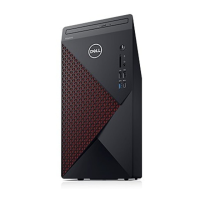
The Dell Vostro 5890 is a desktop computer designed for everyday use, offering a balance of performance and essential features. It is intended for users who need a reliable machine for tasks such as web browsing, document creation, multimedia consumption, and light productivity. The Vostro 5890 is a tower-style desktop, typically placed vertically on or under a desk, and requires external peripherals like a monitor, keyboard, and mouse to operate.
Function Description
The primary function of the Vostro 5890 is to serve as a personal computer, executing a wide range of software applications and managing digital data. It acts as the central processing unit for your digital tasks, allowing you to interact with various programs and services. The computer is designed to be user-friendly, with straightforward setup procedures that enable quick integration into your home or office environment. It supports common operating systems, providing a familiar interface for most users.
Usage Features
Setting up the Vostro 5890 is a simple process. To begin, you connect essential peripherals such as a keyboard and mouse to the available USB ports on the back of the computer. The rear panel offers multiple USB 2.0 and USB 3.2 Gen 1 Type-A ports, ensuring compatibility with a variety of input devices. For network connectivity, you can either connect an Ethernet cable to the RJ45 network port or, if equipped with a wireless module, connect to a wireless network. Display connectivity is achieved by plugging your monitor into one of the video output ports, which may include HDMI 1.4b or DisplayPort 1.4, depending on the configuration. If your computer includes a discrete graphics card, you should connect the display cable to the ports on that card for optimal performance. Finally, you connect the power cable to the power connector port and press the power button located on the front of the chassis to turn on the computer.
Once powered on, the Vostro 5890 guides you through the operating system setup, particularly for Windows. During this process, Dell recommends connecting to a network to receive important updates. If connecting to a secured wireless network, you will be prompted to enter the network password. Users can sign in with an existing Microsoft account or create a new one; an offline account option is also available if internet access is not immediately possible. The setup typically includes a "Support and Protection" screen where you can enter contact details.
The Vostro 5890 features several ports for diverse connectivity needs. On the front, it typically includes an optical drive (optional) for reading and writing CDs and DVDs, an SD-card reader (optional) compatible with Secure Digital (SD), Secure Digital High Capacity (SDHC), Secure Digital Extended Capacity (SDXC), and MultiMediaCard (MMC) formats, a Universal Audio Jack for headphones or headsets, and multiple USB ports, including USB 2.0 with PowerShare and USB 3.2 Gen 1 Type-C with Power Delivery. The PowerShare feature allows you to charge other USB devices even when the computer is off or in sleep mode. The USB 3.2 Gen 1 Type-C port provides faster data transfer speeds but does not support video/audio streaming.
The rear panel expands connectivity with additional ports. These include a line-out audio port for connecting external speakers, an HDMI 1.4b port and a DisplayPort 1.4 for video output (note that these ports may not be available on configurations with certain Intel Core F-series processors), a serial port for connecting legacy devices like printers or modems, more USB 3.2 Gen 1 ports, and USB 2.0 ports with Smart Power On functionality. Expansion card slots are also available, providing access to ports on any installed PCI Express cards. A PSU indicator light helps monitor the power supply status.
For security, the Vostro 5890 includes a Kensington lock slot, allowing you to connect a security cable to prevent unauthorized movement of the computer. Additionally, a padlock ring is provided to attach a standard padlock, securing the interior of your computer from unauthorized access.
Dell provides several pre-installed applications to enhance the user experience and facilitate maintenance. "Dell Product Registration" allows you to register your computer with Dell. "Dell Help & Support" offers access to support resources. "SupportAssist" proactively checks the health of your computer's hardware and software, and allows you to renew or upgrade your warranty. "Dell Update" ensures your computer receives critical fixes and important device drivers. "Dell Digital Delivery" helps download purchased software applications that are not preinstalled.
Maintenance Features
The Vostro 5890 is designed with ease of maintenance in mind, although specific internal access procedures are not detailed in this manual. The computer's design allows for potential upgrades or servicing of components such as memory modules and storage drives. The memory slots are typically accessible, allowing users to upgrade or replace RAM modules. The storage options, including 3.5-inch hard drives and M.2 solid-state drives, also suggest that these components can be managed or replaced if needed.
For troubleshooting and support, Dell offers various resources. The "Contact Support" feature, accessible through Windows search, provides direct access to support options. Dell's website, www.dell.com/support, is a comprehensive resource for solutions, diagnostics, drivers, downloads, videos, manuals, and documents. Your computer is uniquely identified by a Service Tag or Express Service Code, which can be used on the Dell support website to find relevant support resources tailored to your specific machine. The website also features a "Knowledge Base" with articles covering a wide range of topics and concerns, searchable by keyword, topic, or model number.
The Vostro 5890 is built with environmental considerations, featuring recyclable packaging and, in some configurations, BFR/PVC-free chassis. It also supports Energy-Efficient Power Supply and is ENV0424 compliant, reflecting Dell's commitment to sustainability. The operating and storage environment specifications, including temperature and humidity ranges, are provided to help users ensure the longevity and optimal performance of their device. Adhering to these environmental guidelines is crucial for preventing potential damage to components and maintaining performance.
In summary, the Dell Vostro 5890 is a versatile desktop computer that emphasizes user-friendliness, essential connectivity, and robust support, making it a suitable choice for a variety of computing needs in a home or office setting.


 To Next Page
 General