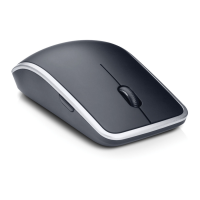
This document describes the DELL 2.4GHz Cordless Mouse & Transceiver, with model numbers WM311 and C-U0003. This device is a wireless mouse system designed for general computer use, offering freedom of movement without the constraints of a wired connection.
Function Description:
The DELL Cordless Mouse & Transceiver system provides wireless input for a computer. The mouse, model WM311, communicates wirelessly with the transceiver, model C-U0003, which plugs into a computer's USB port. This allows the user to control the computer's cursor and interact with the graphical user interface from a short distance without a physical cable connecting the mouse to the computer. The 2.4GHz frequency band is commonly used for wireless peripherals due to its balance of range and data transfer rates, making it suitable for typical desktop and laptop environments.
Important Technical Specifications:
- Wireless Technology: 2.4GHz Cordless
- Mouse Model: WM311
- Transceiver Model: C-U0003
- Connectivity: USB (for the transceiver)
- Power Source (Mouse): Batteries (likely AA or AAA, as indicated by the battery compartment in the diagrams)
- Compliance:
- FCC Part 15 Class B Digital Device (for interference limits)
- Industry Canada RSS-210
- Taiwan NCC (National Communications Commission) compliant for low-power radio-frequency devices.
Usage Features:
- Simple Setup: The system is designed for plug-and-play functionality. The transceiver (C-U0003) is inserted into an available USB port on the computer. The mouse (WM311) then establishes a wireless connection with the transceiver.
- Wireless Freedom: The 2.4GHz wireless connection allows the user to operate the mouse without being tethered to the computer, providing greater flexibility and reducing cable clutter on the desk.
- Ergonomic Design (Implied): While not explicitly detailed, the mouse's shape, as depicted in the images, suggests a design intended for comfortable hand placement during prolonged use.
- On/Off Switch: The mouse features an "OFF" switch, likely located on its underside, to conserve battery life when not in use or during transport. This is a crucial feature for extending the operational time between battery replacements.
- Transceiver Storage: The transceiver is designed to be small and can be stored within the mouse body itself when not in use. This feature is particularly useful for portability, preventing the small transceiver from being lost when the mouse is carried in a bag. The diagrams show the transceiver being inserted into a dedicated slot on the underside of the mouse.
- Battery Compartment: The mouse includes an accessible battery compartment, allowing users to easily replace batteries when needed. The visual instructions show the process of opening this compartment and inserting batteries.
- Scroll Wheel: A scroll wheel is visible on the mouse, enabling vertical scrolling in documents and web pages, a standard feature for modern computer mice.
- Optical Tracking (Implied): While not explicitly stated, most modern wireless mice utilize optical sensors for tracking movement, offering precise cursor control on various surfaces.
Maintenance Features:
- Battery Replacement: The primary maintenance task for the wireless mouse is battery replacement. The manual illustrates how to open the battery compartment, remove old batteries, and insert new ones. This ensures continuous operation of the mouse.
- Transceiver Management: The integrated storage for the USB transceiver within the mouse body helps prevent loss and damage to the transceiver, which is essential for the wireless functionality of the system.
- Troubleshooting (FCC/IC Guidelines): The manual includes standard regulatory statements that also serve as basic troubleshooting guidelines for interference issues. If the device experiences or causes interference, users are advised to:
- Reorient or relocate the receiving antenna (though for a mouse, this usually means repositioning the computer or transceiver).
- Increase the separation between the equipment and receiver.
- Connect the equipment into an outlet on a circuit different from that to which the receiver is connected (for the computer, not the mouse itself).
- Consult the dealer or an experienced radio/TV technician for help.
These guidelines help users address potential connectivity or performance problems related to radio frequency interference.
- FCC Caution: Users are warned that any changes or modifications not expressly approved by the party responsible for compliance could void the user's authority to operate the equipment, emphasizing the importance of using the device as intended without unauthorized alterations.
In summary, the DELL 2.4GHz Cordless Mouse & Transceiver (WM311 & C-U0003) is a user-friendly wireless input device designed for convenience and portability, featuring easy setup, battery-powered operation, and integrated storage for its USB transceiver.

 Need help?

 To Next Page
 General