EasyManua.ls Logo

Dell WM514 - User Manual

Dell WM514
16 pages
Print Icon
To Next Page IconTo Next Page
Loading...
Cover
Owner’s Manual
Dell
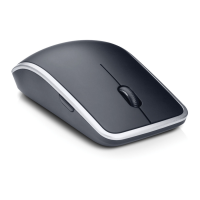
Wireless Mouse WM514
Question and Answer IconNeed help?

Do you have a question about the Dell WM514 and is the answer not in the manual?

Summary

Setup

System Requirements

Details the necessary hardware and operating systems for the mouse.

Contents of the Box

Lists the items included with the Dell Wireless Mouse WM514.

Setting up your Dell Wireless Mouse WM514

Step-by-step instructions for installing batteries and connecting the receiver.

Dell Universal Receiver Feature for Windows

Explains the functionality and setup of the Dell Universal Receiver.

Features

Top View

Identifies and describes the buttons and features visible on the top of the mouse.

Bottom View

Identifies and describes the laser sensor and power button on the bottom of the mouse.

Shortcut Gestures

Details various mouse gestures and their corresponding functions in different Windows versions.

Increasing the Battery Life of your Mouse

Explains the different power-saving modes (Sleep, Deep Sleep, Cut-off) of the mouse.

Troubleshooting

Specifications

General

Provides general information like model number and supported operating systems.

Electrical

Details the operating voltage and battery requirements for the mouse.

Physical Characteristics

Lists the dimensions (height, width, length) and weight of the mouse.

Environmental

Specifies operating and storage temperature and humidity ranges.

2.4 GHz Wireless

Provides technical details about the wireless radio transmission range.

Warranty

Limited Warranty and Return Policies

Outlines the terms of the limited hardware warranty and return policies for Dell products.

Certifications

Microsoft WHQL Logo

Details the mouse's compliance with Microsoft Windows Hardware Quality Labs standards.

Summary

Setup

System Requirements

Details the necessary hardware and operating systems for the mouse.

Contents of the Box

Lists the items included with the Dell Wireless Mouse WM514.

Setting up your Dell Wireless Mouse WM514

Step-by-step instructions for installing batteries and connecting the receiver.

Dell Universal Receiver Feature for Windows

Explains the functionality and setup of the Dell Universal Receiver.

Features

Top View

Identifies and describes the buttons and features visible on the top of the mouse.

Bottom View

Identifies and describes the laser sensor and power button on the bottom of the mouse.

Shortcut Gestures

Details various mouse gestures and their corresponding functions in different Windows versions.

Increasing the Battery Life of your Mouse

Explains the different power-saving modes (Sleep, Deep Sleep, Cut-off) of the mouse.

Troubleshooting

Specifications

General

Provides general information like model number and supported operating systems.

Electrical

Details the operating voltage and battery requirements for the mouse.

Physical Characteristics

Lists the dimensions (height, width, length) and weight of the mouse.

Environmental

Specifies operating and storage temperature and humidity ranges.

2.4 GHz Wireless

Provides technical details about the wireless radio transmission range.

Warranty

Limited Warranty and Return Policies

Outlines the terms of the limited hardware warranty and return policies for Dell products.

Certifications

Microsoft WHQL Logo

Details the mouse's compliance with Microsoft Windows Hardware Quality Labs standards.

Dell WM514 Specifications

General IconGeneral
ConnectivityWireless
Buttons3
ColorBlack
Device TypeMouse
Movement Detection TechnologyOptical
Scroll WheelYes
DPI1000
Battery Life12 months
Wireless Technology2.4 GHz
Battery TypeAA

Related product manuals