-9-
English
Switch-o Setting
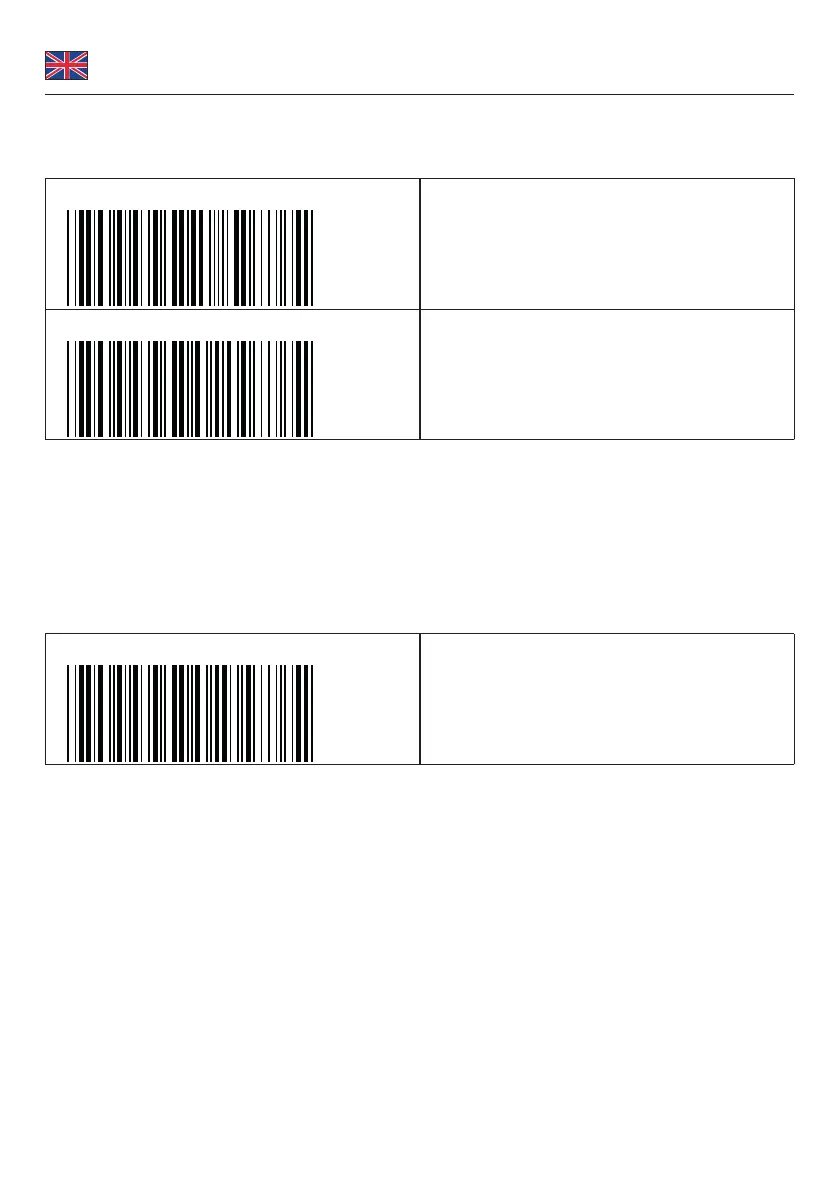
User-dened switch-o
The default switch-o is 3 minutes and 0 seconds.
.B030$
SET MINUTE
(Range: 00 ~ 60)
.B029$
SET SECOND
(Range: 00 ~ 60)
Follow below steps, to set a switch-o after for example 5 minutes and 30 seconds.
1. Scan [Set Minute]
2. Scan [0] & [5] on page 3.
3. Scan [Set Minute]
4. Scan [Set Second]
5. Scan [3] & [0] on page 3.
6. Scan [Set Second]
Deactivate switch-o
Scan [DISABLE TIMEOUT]
.B021$
DISABLE TIMEOUT
Smartphone connection
Follow the instruction Establish a Bluetooth connection - [BT mode - HID]. You can skip number 5, as iOS and Android do
not need a pin.
Support Delock
If you have further questions, please contact our customer support support@delock.de
You can nd current product information on our homepage: www.delock.com
Final clause
Information and data contained in this manual are subject to change without notice in advance. Errors and misprints
excepted.
Copyright
No part of this user manual may be reproduced, or transmitted for any purpose, regardless in which way or by any
means, electronically or mechanically, without explicit written approval of Delock.
Edition: 07/2020


 To Next Page