16
How to dehumidify (Models with humidistat)
1) Plug the appliance into a mains socket.
2) Check that the “tank full/tank missing” light is off; if not, place the tank to the correct
position.
3) The dehumidification standby light switches on in the first 3 minutes (safety device), after
which the appliance starts dehumidifying.
4) The humidistat knob is used to adjust the humidity level as desired (MIN/MED/MAX). When the
knob is on MIN, the dehumidifier will slightly lower the humidity in the room; on MAX, on the other
hand, the appliance will considerably lower the humidity in the room. To dehumidify simply
turn the humidistat to one of the positions available.
How to dehumidify (Models with humidistat and function knob)
1) Plug the appliance into a mains socket.
2) ) Check that the “tank full/tank missing” light is off.
3) Select the or or the dehumidification standby light switches on in the
first 3 minutes (safety device), after which the dehumidification light switches on. The
mode is only used to purify the air, without dehumidifying.
4) The humidistat knob is used to adjust the humidity level as desired (MIN/MED/MAX). When the
knob is on MIN, the dehumidifier will slightly lower the humidity in the room; on MAX, on the other
hand, the appliance will considerably lower the humidity in the room. Then turn the humidistat
to one of the positions available.
How to dehumidify
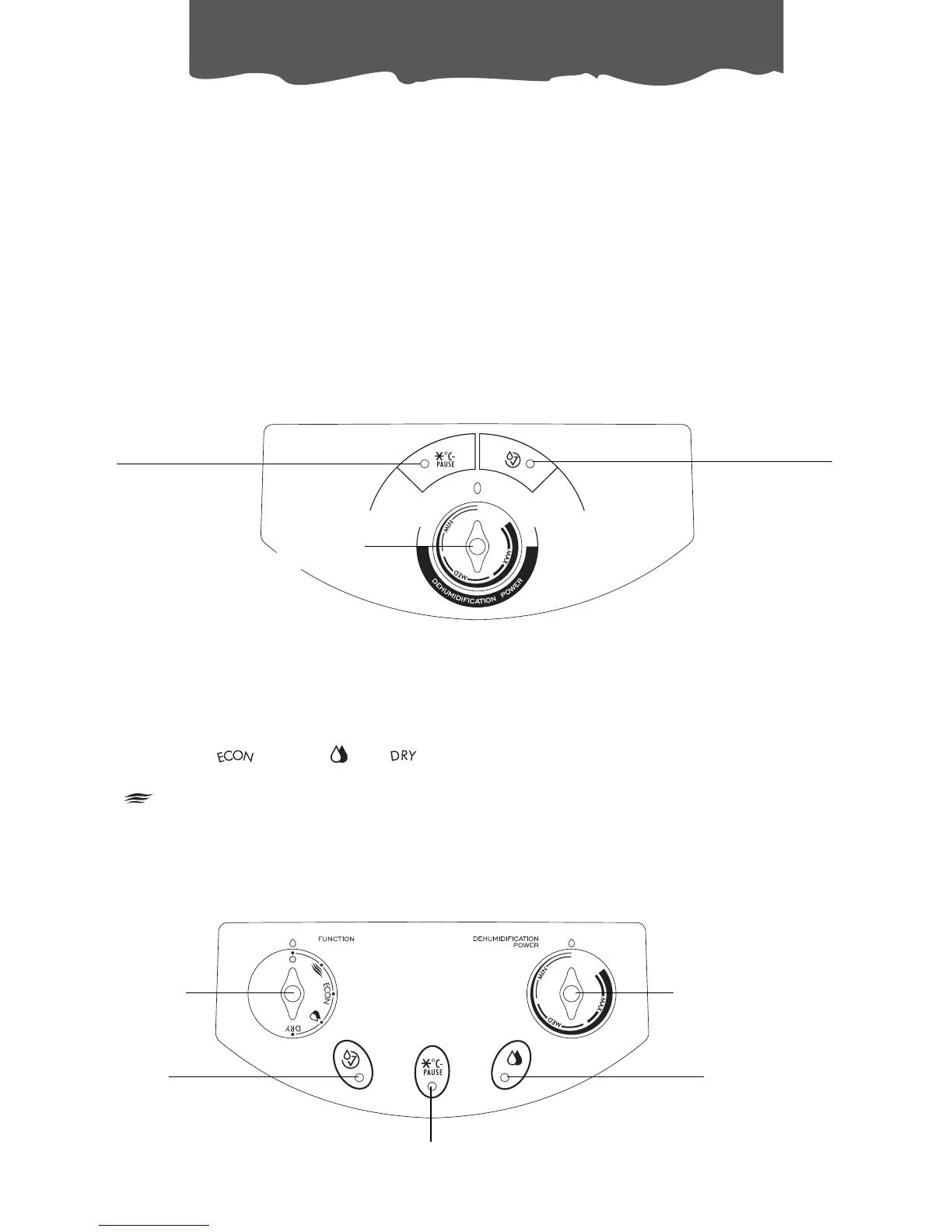
Dehumidifying
standby light /anti-
frost function
Humidistat
knob
“Tank full / no tank”
indicator light
Dehumidifying
indicator light
Functions
selector
Dehumidifying standby light /antifrost function
Humidistat
knob
“Tank full / no tank”
indicator light



 To Next Page