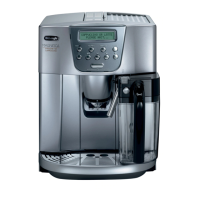
Why does my DeLonghi EAM 4500 display a 'GENERIC ALARM'?
- XxgoodmanSep 9, 2025
The 'GENERIC ALARM' message on your DeLonghi Coffee Maker indicates that the inside of the appliance is very dirty. Clean the inside of the appliance thoroughly.
Why does my DeLonghi EAM 4500 display a 'GENERIC ALARM'?
The 'GENERIC ALARM' message on your DeLonghi Coffee Maker indicates that the inside of the appliance is very dirty. Clean the inside of the appliance thoroughly.
How to fix DeLonghi Coffee Maker when coffee is not hot?
If the coffee from your DeLonghi Coffee Maker is not hot enough, it could be due to the cups not being preheated. Heat the cups by rinsing them in hot water or leaving them on the cup warmer tray. Alternatively, the infuser may be too cold. Heat the infuser by pressing the button before making the coffee.
What to do if my DeLonghi EAM 4500 Coffee Maker doesn't turn on when pressing the button?
If your DeLonghi Coffee Maker doesn't turn on when the button is pressed, check that the power cable is plugged into the outlet.
Why does my DeLonghi EAM 4500 say 'FILL TANK'?
The 'FILL TANK' message on your DeLonghi Coffee Maker indicates that the water tank is either empty, positioned incorrectly, dirty, or encrusted with lime scale. Make sure to fill the water tank and insert it fully. If the tank is dirty, rinse or descale it.
What to do if DeLonghi EAM 4500 Coffee Maker displays 'EMPTY GROUNDS CONTAINER'?
If your DeLonghi Coffee Maker shows 'EMPTY GROUNDS CONTAINER', it means the grounds container is either full or missing. Empty the grounds container, clean it, and then replace it.
Why doesn't my DeLonghi Coffee Maker deliver coffee when using ground coffee?
If your DeLonghi Coffee Maker doesn't deliver coffee when using ground coffee, too much ground coffee may have been added. Remove the infuser and thoroughly clean the inside of the appliance. Repeat the operation using a maximum of 1 measuring scoop of ground coffee. Alternatively, the button may not have been pressed, and the appliance used both the ground coffee added and the coffee ground by the mill. Thoroughly clean the inside of the appliance. Repeat the operation, first pressing the button. It is also possible that ground coffee was added when the appliance was off. Remove the infuser and thoroughly clean the inside of the appliance. Repeat the operation, but switch the appliance on first.
Why does my DeLonghi Coffee Maker only deliver water when using coffee beans?
If your DeLonghi Coffee Maker only delivers water when using coffee beans, the ground coffee may be blocked in the funnel. Remove the ground coffee inside the funnel using a knife. Then clean the infuser and the inside of the appliance.
Why can't I remove the infuser from my DeLonghi EAM 4500?
If the infuser cannot be removed from your DeLonghi Coffee Maker, it's because the appliance is on. Turn the appliance off and remove the infuser. Attempting to remove the infuser when the appliance is on may cause serious damage.
What to do if DeLonghi Coffee Maker displays 'ADD PRE-GROUND COFFEE'?
If your DeLonghi Coffee Maker shows 'ADD PRE-GROUND COFFEE', it means that with the function selected, the pre-ground coffee has not been poured into the funnel. Add the ground coffee.
Why does my DeLonghi EAM 4500 Coffee Maker say 'CLOSE DOOR'?
The 'CLOSE DOOR' message on your DeLonghi Coffee Maker indicates that the service door is open. If the service door cannot be closed, check that the infuser is inserted correctly.
Details the electrical specifications of the coffee maker, including voltage and power.
Identifies and explains the function of each button and display element on the control panel.
Provides safety guidelines related to the use of the appliance's power cord.
Instructions for cleaning the exterior, drip tray, water tank, and coffee spout.
Detailed steps for removing, cleaning, and reinserting the internal infuser unit.
Details the meaning of specific error messages and the steps to resolve them.
Addresses common problems related to coffee temperature, creaminess, and flow rate.
Covers issues like the appliance not turning on, infuser removal, and ground coffee problems.
Solutions for problems concerning coffee spout flow and milk frothing.
Information on how to obtain service, contact customer support, and find replacement parts.
Details the electrical specifications of the coffee maker, including voltage and power.
Identifies and explains the function of each button and display element on the control panel.
Provides safety guidelines related to the use of the appliance's power cord.
Instructions for cleaning the exterior, drip tray, water tank, and coffee spout.
Detailed steps for removing, cleaning, and reinserting the internal infuser unit.
Details the meaning of specific error messages and the steps to resolve them.
Addresses common problems related to coffee temperature, creaminess, and flow rate.
Covers issues like the appliance not turning on, infuser removal, and ground coffee problems.
Solutions for problems concerning coffee spout flow and milk frothing.
Information on how to obtain service, contact customer support, and find replacement parts.
| Type | Automatic Espresso Machine |
|---|---|
| Water Tank Capacity | 1.8 liters |
| Pump Pressure | 15 bar |
| Power | 1450 W |
| Coffee Grinder | Yes |
| Adjustable Grinder Settings | Yes |
| Programmable | Yes |
| Milk Frother | Yes |
| Coffee Types | Coffee, Cappuccino |
| Product Type | Automatic Coffee Machine |
Loading...