Doc. Nr.: DSDL_23016_A
[12]
- Insert the grounds container and press one of the buttons indicated in the next paragraphs to start the
corresponding test function.
IMPORTANT NOTICE: The access to the desired test function must be done within 10 seconds,
otherwise the machine will automatically come back to stand-by mode.
5.2. LOAD TEST MODE
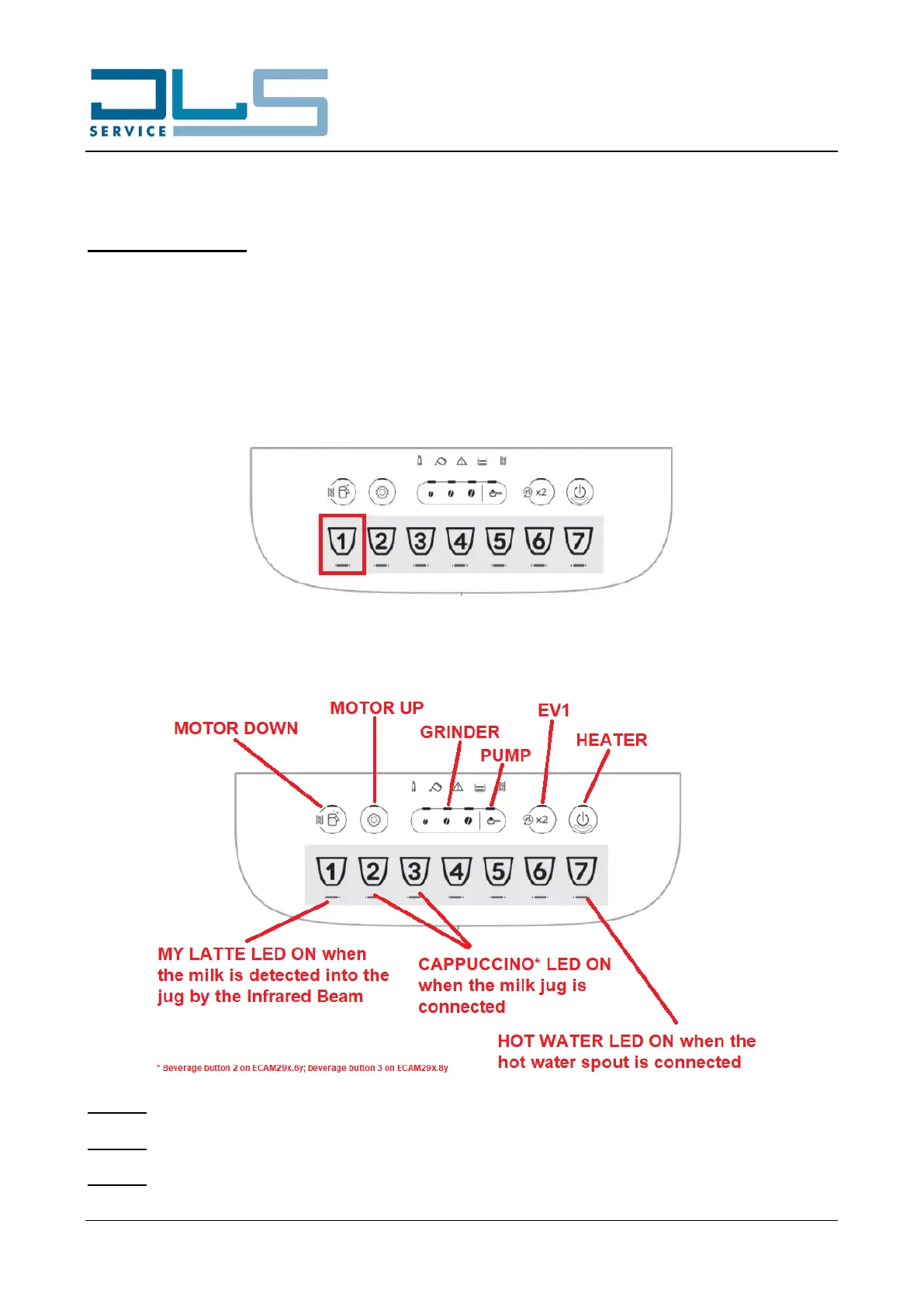
After having accessed the test mode as indicated on paragraph 5.1, press the first beverage icon from the left
(MY LATTE button) to access the LOAD TEST MODE:
The LED of each button linked to the activation of a component will illuminate steadily white. Hold the desired
button pressed to activate the corresponding load, the LED of the button will flash slowly to indicate the
activation of the load:
NOTICE: When the DOWN micro switch is reached by the infuser, the MILK JUG CLEAN LED will blink fast.
NOTICE: When the UP micro switch is reached by the infuser, the SETTINGS LED will blink fast.
NOTICE: Multiple components can be activated at the same time (e.g. the pump and EV1).





 To Next Page