4
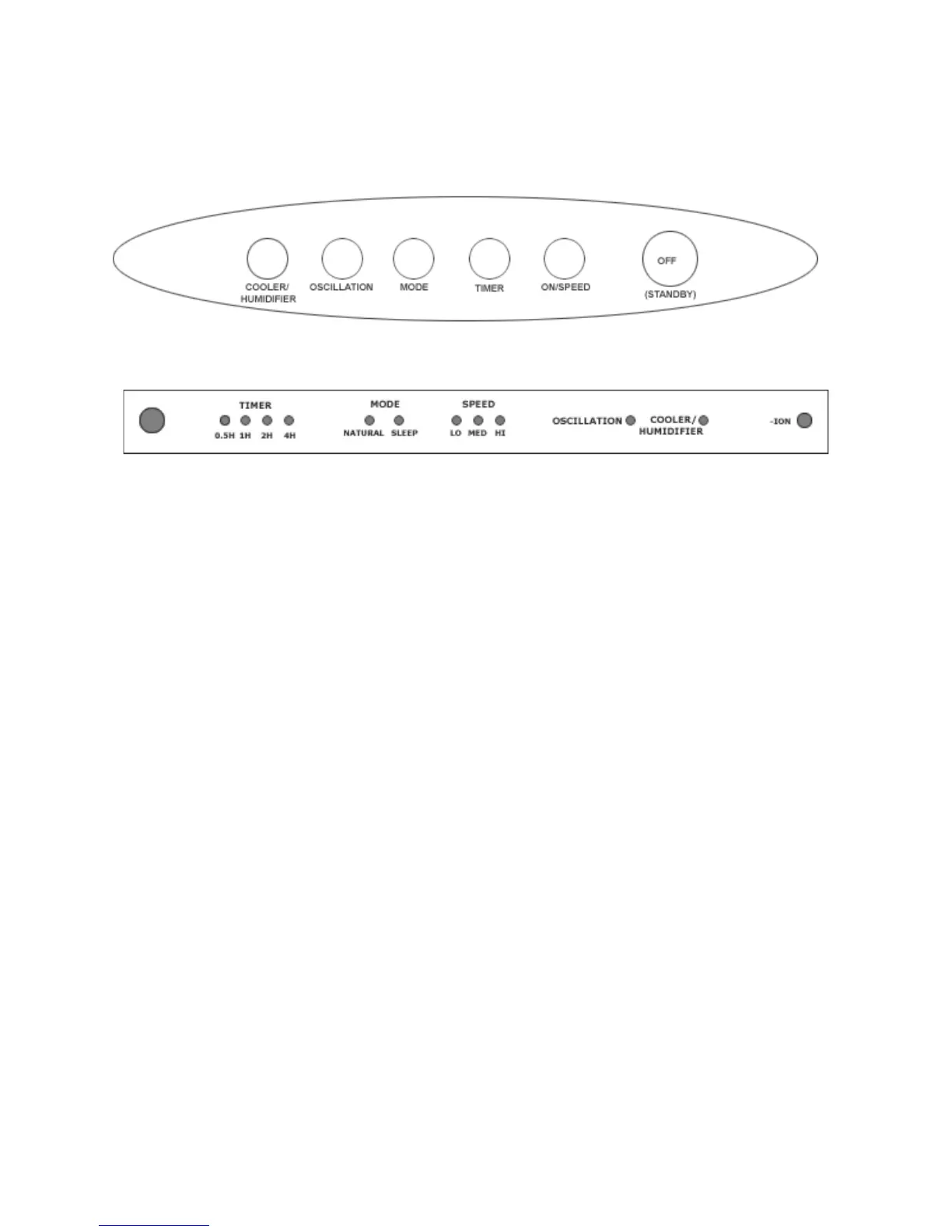
CONTROL PANEL
INDICATOR PANEL
Control Panel Operation
ON/SPEED
There are three speeds – High / Medium / Low.
Press this button to start the unit at medium speed, after 3 seconds it
changes to low speed, then you can select the desired speed.
COOLER/HUMIDIFIER
After you have filled the water tank with water, you can start the
humidifier by pressing this button, after 20 seconds the humidity
indicator lights.
OSCILLATION
Press this button to oscillate air direction from left to right & vice versa.
TIMER
To use the timer function press the timer button to increase the time by 30 minute
increments up to a maximum time of 7 hrs 30 mins.
IONIZER INDICATOR
The ionizer automatically starts when the unit is turned on & the ionizer
indicator lights to show it is operating.
MODE
There are three modes of fan speed: normal, natural & sleep mode.
Fuzzy logic controls the speed randomly but each mode can be selected
manually by pressing the MODE button.
• Normal Mode (two mode indicators are off)
The fan constantly cycles from LOW to MED to HI as set.
• Natural Mode
The fan operates in a cycle of HI, MED and LOW for 90 secs.



 To Next Page