8
Control panel
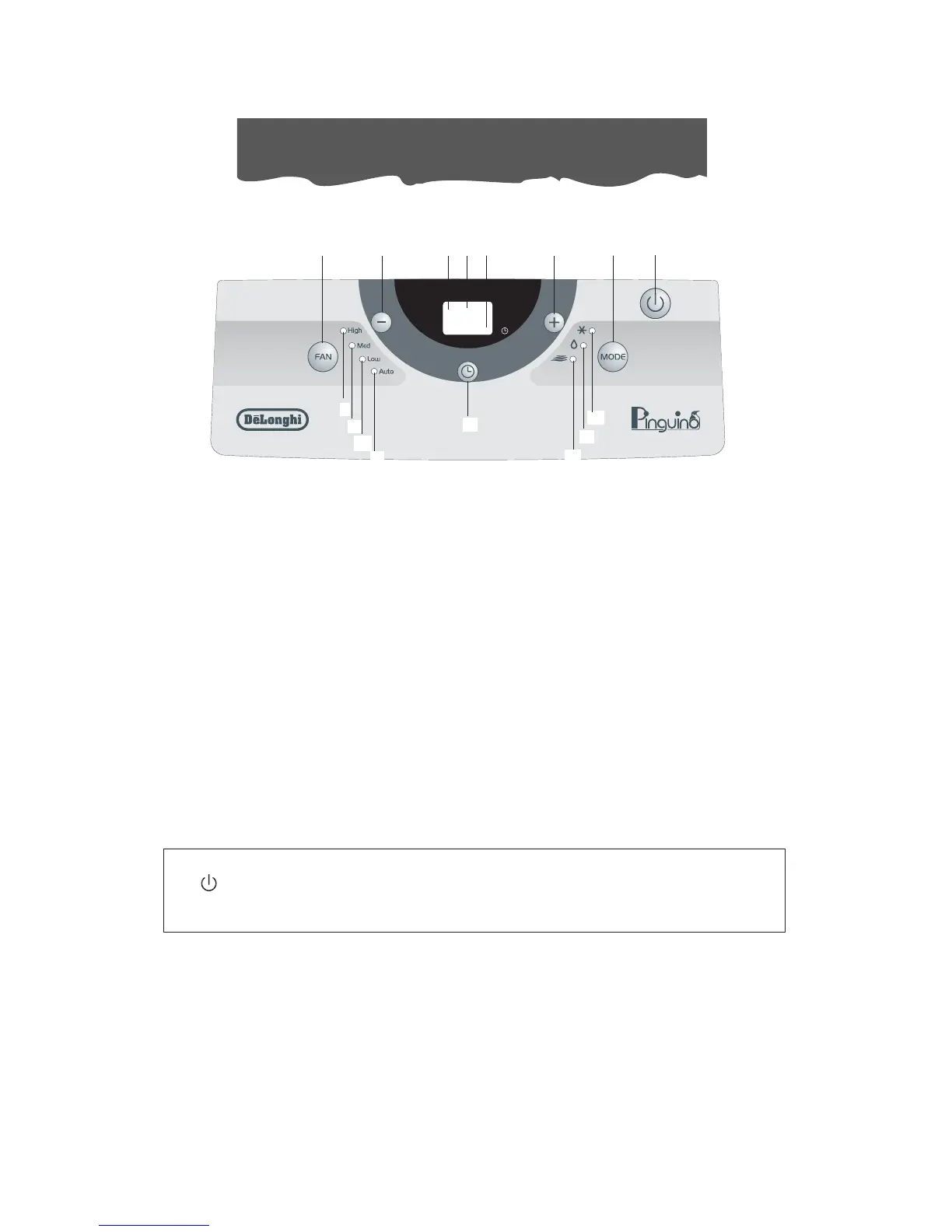
DESCRIPTION OF THE CONTROL PANEL
A ON/STAND-BY button
B MODE selection button:
Air conditioning, dehumidifying, fan.
C Fan speed selection button (HIGH/MED/LOW/AUTO)
D Timer button
E Programmed operation increase temperature/time button
F Programmed operation decrease temperature/time button
G Display Displays the temperature values set and the programmed operating time
H Timer in operation indicator light
I/L/M/N Fan speed lights and AUTO lights
O Fan mode light
P Dehumidifying mode light
Q Air conditioning mode light
R Remote control receiver
THE CONTROL PANEL
Never turn the air conditioner off by unplugging from the outlet. Always press the
button, then wait for a few minutes before unplugging. This allows the applian-
ce to perform a cycle of checks to verify operation.
Q
A
BEF
N
HRG
C
P
O
D
M
L
I




 To Next Page