9
• The CST remote control must be handled with care. Do not
drop it or expose it to direct sunlight or sources of heat. It is
advisable to keep the CST remote control placed on a table
or a at surface.
Do not hold the CST remote control in your hand for long
time to avoid altering the reading of the sensors.
• The CST sensors are also disabled if the CST remote control
is positioned at a distance less than 3.3ft (1 m) from the
unit.
• The CST remote control is equipped with touch sensitive
buttons.
•
The CST remote control is equipped with a double color built-
in LED (D10) (white/red). White indications are used for:
- signaling the touching of each button with 3 fast ashes
- every 30 seconds it blinks for data transmission
- signaling the entering of pairing phase with periodic
blinking
- signaling the batteries good status
• The same indications but in red color mean that the batter-
ies begin to be exhausted.
Please note: The remote control can be safely stored in the ap-
propriate compartment (A11).
TURNING THE APPLIANCE ON/OFF
• Plug into the outlet.
• Touch the
ON/STAND-BY button (D1). When turned on,
the air conditioner starts operating in the same mode as
when it was turned o.
• Touch the
ON/STAND-BY button (D1) again to switch the
appliance o.
Please note: Never switch the appliance o by removing the plug.
Always switch it o by touching the
ON/STAND-BY button (D1)
and waiting few minutes before removing the plug. Only in this
way the appliance will perform the standard checkings.
SELECTING THE OPERATING MODES
The operating modes available on the CST remote control
through the MODE button (D2) correspond to those on the ap-
pliance control panel (C).
SELECTING THE TEMPERATURES
In conditioning mode touch button (D3) or (D4) to select
the desired temperature.
SELECTING THE AIR FLOW
In conditioning and fan modes, touch button (D7) to select
the desired air ow.
The air ows available are:
Minimum air ow: when room has cooled
down and you want a quieter operation.
Medium air ow: when the noise level needs
to be low but with a good comfort level.
Maximum air ow: for maximum perfor-
mance.
Auto: the appliance automatically chooses the
air ow based on the temperature selected and
the environmental conditions. This selection is
only available in conditioning mode.
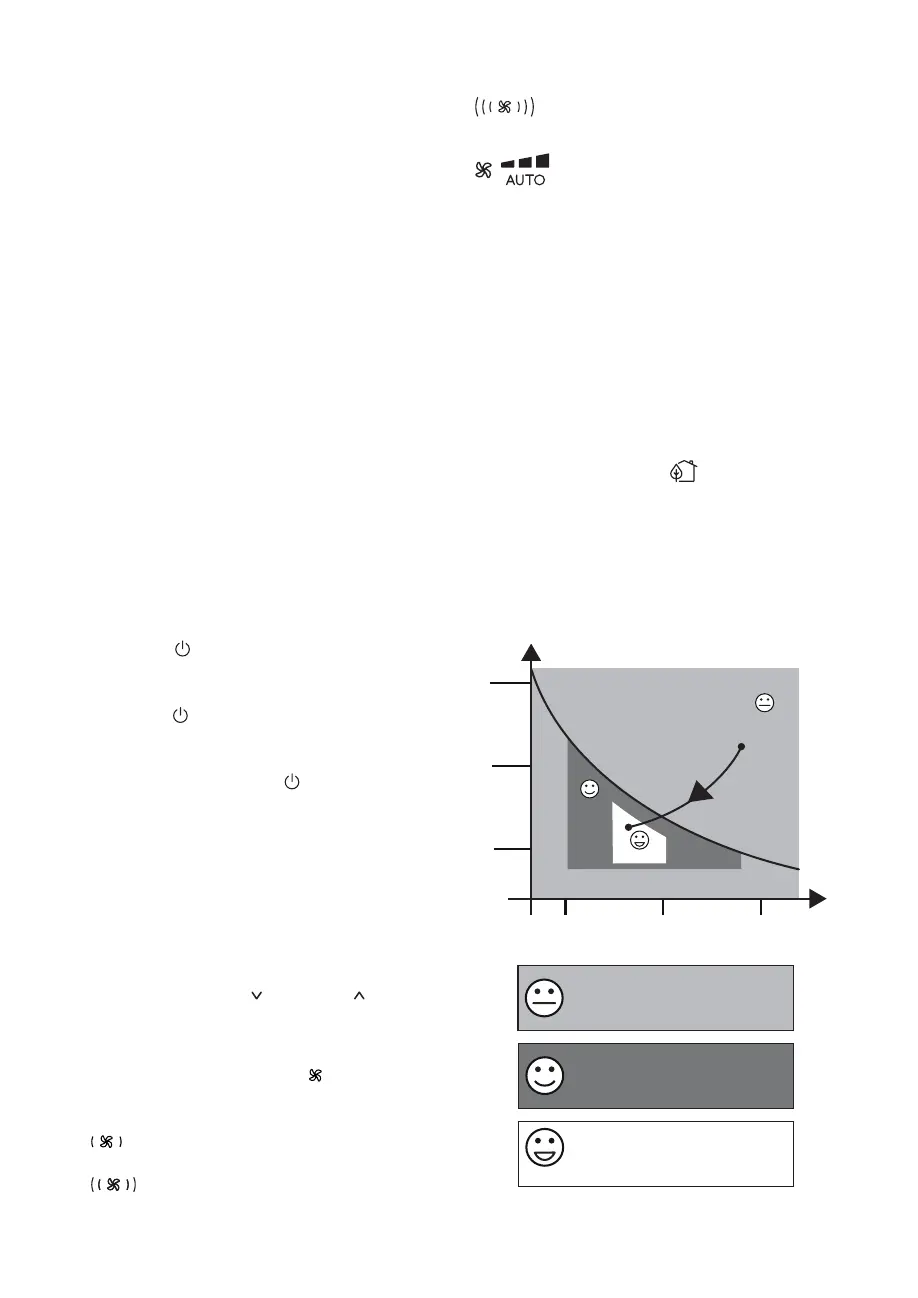
ECO REAL FEEL FUNCTION
ECO REAL FEEL is the innovative De’Longhi technology that
works simultaneously on temperature reduction and humidity
control, securing best comfort level. With traditional systems,
during working time, optimal comfort conditions may be
reached but not secured over time. With ECO REAL FEEL, once
optimal comfort is reached, PAC automatically modulates com-
pressor action and air ow, to keep it over time which can save
up to 30% on energy usage.
To activate the function, touch the
button (D9) on remote
control and the ECO REAL FEEL symbol appears.
The “ECO REAL FEEL” status indicator (C9) becomes white for approx.
1 min. to indicate that the appliance is checking the room conditions.
Afterwards the “ECO REAL FEEL” status indicator (C9) changes col-
our as it approaches comfort conditions (see following diagram).
For this type of use, the appliance must be set up as for air con-
ditioning mode.
Perfect!
HUMIDITY
TEMPERATURE
HIGH
MEDIUM
LOW
HIGH
MEDIUM
LOW
Operating curve
Perfect!
ORANGE LIGHT: Room conditions far
from optimal level.
GREEN LIGHT: Most people feel good
room conditions, near optimal level.
BLUE LIGHT: Best comfort level.



 To Next Page