Why is the brewed quantity not enough from DeLonghi Vertuo Lattissima?
- JJoshua KnoxSep 8, 2025
If the brewed quantity from your DeLonghi Coffee Maker is not enough, ensure the water tank is filled and check if the milk carafe is filled.
Why is the brewed quantity not enough from DeLonghi Vertuo Lattissima?
If the brewed quantity from your DeLonghi Coffee Maker is not enough, ensure the water tank is filled and check if the milk carafe is filled.
Why are the lights blinking and the DeLonghi Vertuo Lattissima is not running?
If the lights are blinking and your DeLonghi Coffee Maker isn't running, allow some time for the coffee to flow due to code reading and pre-wetting. Ensure a fresh capsule is correctly inserted, the handle is locked, and the start button is pressed. Check the water tank is full and press the start button. If the issue continues, turn the machine off by holding the coffee button for 3 seconds, then turn it back on and wait about 20 minutes for it to cool down.
What causes leakage or unusual coffee flow in my DeLonghi Vertuo Lattissima?
If you notice leakage or unusual coffee flow with your DeLonghi Coffee Maker, check that the water tank is well-positioned and empty the drip tray.
What to do if lights blink irregularly and DeLonghi Coffee Maker is not running?
If the lights blink irregularly and your DeLonghi Coffee Maker is not running: * During regular Coffee/Espresso preparation: Unlock the handle and open the machine head to ensure a fresh, undamaged capsule is correctly inserted, the handle is locked, and the water tank is filled. * During Descaling, Emptying, and Cleaning: Ensure the capsule is ejected and the handle is locked. If the problem persists, unlock the handle, open the machine head, replace the capsule if needed, disconnect the power cord for 10 seconds, plug it back in, close the head, and press the button to turn on and brew. If it still doesn't work, contact Nespresso.
Why my DeLonghi Vertuo Lattissima doesn't start but the lights are steady on?
If your DeLonghi Coffee Maker doesn’t start and the lights are steady on, ensure the handle is properly locked. If you're brewing coffee or espresso, check that a fresh capsule is correctly inserted and the handle is locked before pressing the start button. For cleaning, descaling, or emptying, ensure no capsule is inside, then lock the machine and press the button.
Why is there no light on the button of my DeLonghi Vertuo Lattissima?
The machine has turned OFF automatically; push the button or “UNLOCK” the machine. Also, check the mains, plug, voltage, and fuse.
Why are there coffee grounds in the cup from my DeLonghi Vertuo Lattissima?
If you find coffee grounds in your cup when using your DeLonghi Coffee Maker, perform the cleaning procedure twice.
Why I cannot enter the Menu Mode on DeLonghi Vertuo Lattissima Coffee Maker?
If you cannot enter the Menu Mode on your DeLonghi Coffee Maker, ensure the milk carafe and the descaling pipe are disconnected from the connector door. Then, press and hold the hot foam button until the descale and rinse alerts blink.
Why lever cannot be closed completely on DeLonghi Coffee Maker?
If the lever on your DeLonghi Coffee Maker cannot be closed completely, empty the capsule container and ensure no capsule is blocked inside.
Why are the Hot foam, Latte macchiato and Cappuccino buttons blinking alternatively on my DeLonghi Vertuo Lattissima?
If the Hot foam, Latte macchiato, and Cappuccino buttons are blinking alternatively on your DeLonghi Coffee Maker, the machine is overheating. Wait until it cools down.
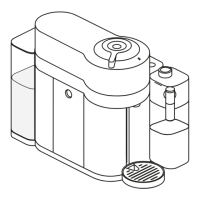
Details the different parts and components of the coffee machine with numbered labels.
Explains the various buttons and indicators on the coffee machine's display interface.
Illustrates and labels all the components of the milk carafe for assembly and cleaning.
Lists all items included in the coffee machine packaging.
Step-by-step instructions for connecting the Nespresso machine to a smartphone app.
Guides the user on how to determine and set the water hardness level for the machine.
Detailed steps and diagrams for taking apart the milk carafe for cleaning.
Instructions for correctly putting the milk carafe components back together.
Explains how to clean the milk carafe, either by hand or in a dishwasher.
Guides the user through the initial setup and rinsing process before the first coffee brew.
Step-by-step instructions for preparing a coffee beverage using the machine.
Instructions for preparing milk-based beverages and performing daily rinsing.
Details how to prepare a cappuccino, including coffee and cup size recommendations.
Details how to prepare a latte macchiato, including coffee and cup size recommendations.
Instructions on how to use the hot foam function for milk beverages.
Information on how to activate or manage the machine's energy-saving features.
How to adjust and save the desired coffee volume for each capsule type.
Steps to restore the machine to its original factory default settings.
Instructions for enabling or disabling the machine's wireless connectivity features.
Procedure to empty the machine's internal water and milk systems.
Steps to follow to prepare the machine for use after it has been stored for a long time.
Instructions for running the machine's automatic cleaning cycle.
Guides the user through the descaling process when the alert appears.
Solutions for problems like no lights, no coffee, slow dispensing, or no heat.
Interprets blinking lights, alerts, and issues entering menu or connectivity modes.
Addresses milk froth quality, lever, carafe issues, and button status interpretations.
Technical details and specifications of the coffee machine.
Guidelines for the proper disposal and environmental impact of the appliance.
| Brand | DeLonghi |
|---|---|
| Model | Vertuo Lattissima |
| Category | Coffee Maker |
| Language | English |