EasyManua.ls Logo

Delphi SA10034-11B1 - User Manual

Delphi SA10034-11B1
19 pages
Print Icon
To Next Page IconTo Next Page
Loading...
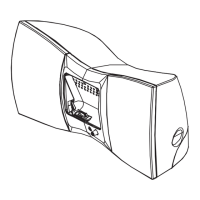
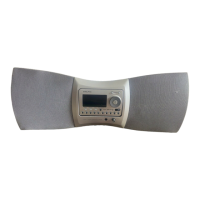
CD audio system
This symbol is
intended to alert the
user to the presence
of important operating
and maintenance
(servicing) instructions
in the literature
accompanying the
appliance.
SA10034-11B1
Requires a subscription from XM Satellite Radio.
Owner’s Manual

Questions and Answers

  • B
    Brenda ScottJul 28, 2025
    What to do if there is no audio from my Delphi SA10034-11B1?
    • C
      Christina BerryJul 28, 2025
      First, check if the desired function is displayed. If not, adjust the mode of your Delphi CD Audio System. Then, adjust the volume. Also, make sure headphones are unplugged. If you are in SKYFi mode, remove the SKYFi Receiver from its cradle and re-insert it.
  • D
    donaldwilliamsAug 1, 2025
    How to fix Delphi Stereo System if it has no power?
    • K
      kennethtaylorAug 1, 2025
      Ensure the A/C power adapter is securely connected to a 120V A/C wall outlet. Also, check that the batteries are correctly inserted and have sufficient strength. If the batteries are weak, replace them with new ones.
  • A
    asmithAug 6, 2025
    What to do if my Delphi SA10034-11B1 Stereo System displays “NO DISC” or “ERROR”?
    • G
      Gwendolyn TorresAug 6, 2025
      First, re-insert the compact disc, making sure the label faces up. Next, verify that the CD has a compatible file format. Finalize the CD-R or CD-RW with the recording device. Also, ensure the CD-R or CD-RW is not blank. Check the recording device and application software for any issues affecting the CD-R or CD-RW quality.
  • L
    Lindsay DyerAug 10, 2025
    Why does my Delphi Stereo System compact disc not play?
    • S
      suzannebrownAug 10, 2025
      Check that the CD player cover is closed. Re-insert the compact disc, ensuring the label faces up. Confirm that your Delphi CD Audio System is in CD mode with the CD panel facing forward and locked in position. Verify that the CD is a compatible file format. If the CD is dirty, clean it. Remove the CD, and leave the compartment open for at least one hour to allow moisture condensation to evaporate.
  • R
    Rachel FosterAug 14, 2025
    What causes audio to cut out or sound distorted when playing a CD on my Delphi SA10034-11B1, and how can I fix it?
    • D
      Danielle GallegosAug 14, 2025
      Reduce the volume. Check the compact disc for dirt, fingerprints, or scratches. Clean it if it's dirty, or replace it if badly damaged. Move the Delphi CD Audio System to a location free from vibration. Check the recording device and application software for any problems that might affect the quality of the CD-R or CD-RW.
  • N
    nbowmanAug 19, 2025
    Why is the audio weak or of poor quality in AM/FM mode on my Delphi SA10034-11B1 Stereo System?
    • L
      laura09Aug 19, 2025
      Check the battery strength; if they are weak, replace all batteries with new ones. Also, try moving the Delphi CD Audio System away from the television.
  • A
    Anthony CallahanAug 23, 2025
    What to do if I hear noise coming through the audio system of my Delphi SA10034-11B1 Stereo System?
    • T
      Tracey GreenAug 23, 2025
      Move portable telephones or other equipment that emits radio waves (~2.3GHz) away from the Delphi CD Audio System.

Summary

Owners Record

Delphi CD Audio System

System Components

Details the components included with the Delphi CD Audio System.

Key Functions

CD Panel Key Functions

Explains the functions of the buttons on the CD control panel.

Remote Control Key Functions

Details the functions of the buttons on the remote control.

Basic Operations

CD;MP3, AM;FM, Clock Module Operations

Covers basic functions for CD/MP3 playback, AM/FM radio, and clock.

Playing Audio CD and MP3 Files

Instructions for playing compact discs and MP3 files.

Compact Disc Care and Storage

Guidelines for maintaining the quality and longevity of compact discs.

CD;MP3 Programming Options

How to program the playback order of CD/MP3 tracks or directories.

Displaying Information

How to view elapsed time, remaining time, and ID3 tag information.

Cancel and Delete Programs

Steps to cancel or delete programmed playback sequences.

Random Playback

Instructions for enabling random playback of tracks using the remote.

Repeat Play Options

How to set repeat play for single tracks, all tracks, or directories.

About MP3 Files

Explanation of the MP3 format and requirements for playback.

AM;FM Radio Operation

Instructions for listening to AM and FM radio stations.

Seeking and Scanning Radio Stations

How to manually search or scan for AM/FM radio stations.

Adjusting Tone (Bass and Treble)

How to adjust bass and treble levels for audio output.

Activating Bass Boost (BBS)

Instructions for enabling the Bass Boost feature.

Adjusting Treble Level

Procedure for fine-tuning the treble audio response.

Equalizing Bass and Treble (EQ)

How to use preset equalization settings for bass and treble.

Clock Functions

Setting the current time and wake time for the alarm.

SKYFI Module Setup and Operation

SKYFI Module Setup

Instructions for physically connecting and setting up the SKYFI module.

Positioning the XM Antenna

Guidance on placing the XM antenna for optimal signal reception.

Optimizing XM Antenna Signal

Steps to adjust the antenna for the strongest satellite or terrestrial signal.

Antenna Mounting and Installation

Methods for mounting the XM antenna on the system or a wall.

Outdoor and Indoor Wall Antenna Mounting

Instructions for mounting the antenna vertically on walls.

Controlling Volume, Bass, and Treble

Adjusting audio settings for SKYFI mode.

Adjusting Speaker Balance

How to adjust the audio balance between left and right speakers.

Muting the Sound

Instructions for temporarily silencing the audio output.

Using Headphones and Line Output

Connecting headphones or using the line out for external systems.

Battery Operation

Information on powering the system using D-cell batteries.

Reference Information

Caring for Your System

Cleaning instructions and maintenance tips for the audio system.

Safety Precautions

Important safety warnings and precautions for operation and servicing.

Power Sources

Details on using the A/C adaptor and battery power.

System Placement Guidelines

Recommendations for positioning the unit to prevent damage and ensure stability.

Protecting from Water Damage

Warnings and advice to prevent damage from water exposure.

Troubleshooting Guide

Solutions for common problems encountered with the audio system.

Contacting Support and Service

How to get help if problems persist after troubleshooting.

Technical Information

Specifications for audio output, CD player, AM/FM, and dimensions.

Warranty Information

Limited Consumer Warranty

Details the terms and conditions of the product's limited warranty.

Getting Warranty Service

Procedure for obtaining warranty service and repairs.

Warranty and State Law

Explanation of how state laws affect warranty rights and limitations.

FCC Compliance Information

Delphi SA10034-11B1 Specifications

General IconGeneral
BrandDelphi
ModelSA10034-11B1
CategoryStereo System
LanguageEnglish

Related product manuals