EasyManua.ls Logo

Delta Electronics EXIO14RAE - Page 27

Delta Electronics EXIO14RAE
157 pages
Print Icon
To Next Page IconTo Next Page
To Previous Page IconTo Previous Page
Loading...
Chapter 3 Creating and Editing Programs|DOP-EXIO Series
3-6
Revision March, 2008, Doc. Name: 2007PDD23000014
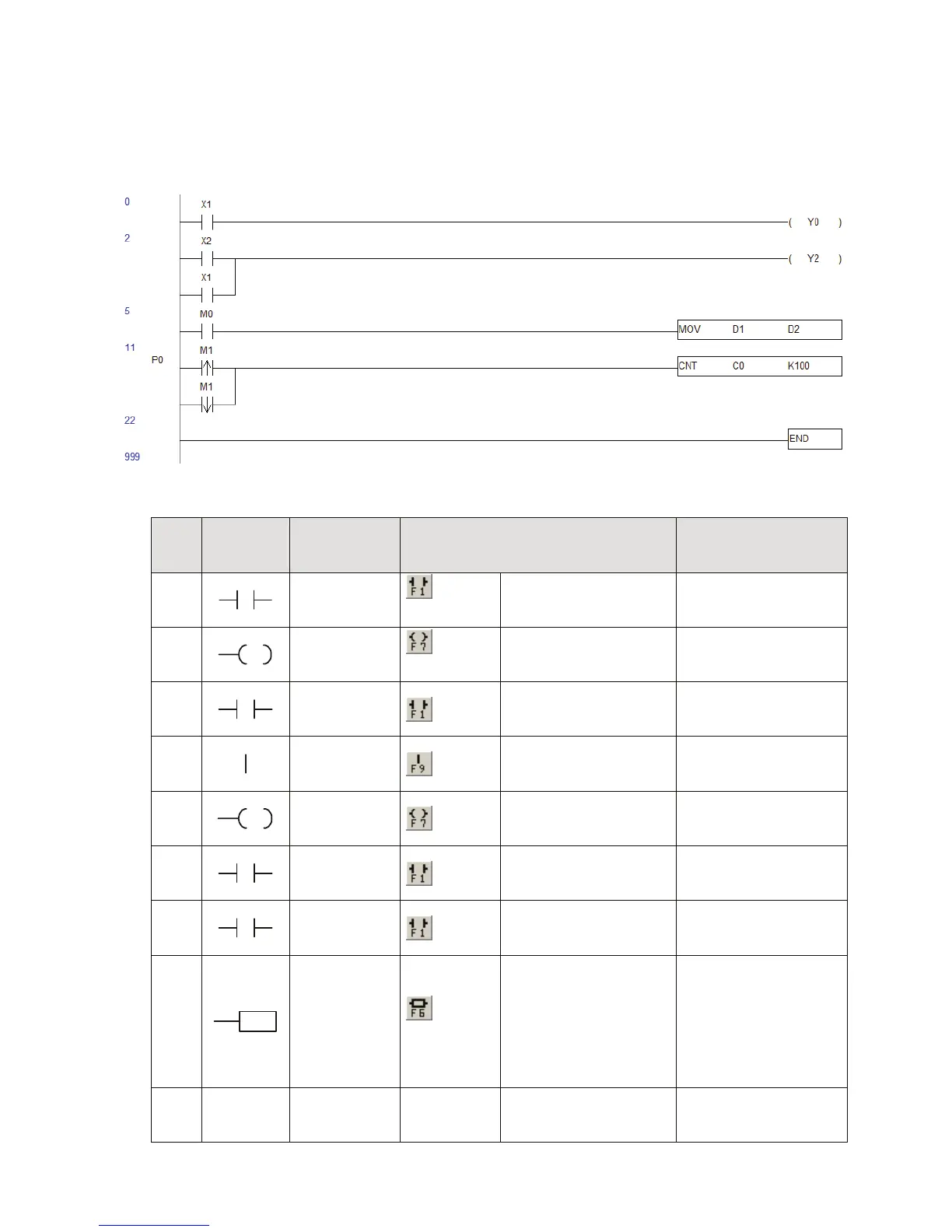
3.2 Editing Example
Ladder Diagram
Operation steps for editing the Ladder Diagram
Step
Ladder
Symbol
Cursor
Location
Input by clicking the Icon on the
toolbar
Input by using the
Keyboard
1
Row: 0,
Column: 1
*Footnote 1
Device Name: X
Device Number: 1
LD X1 or A X1
2
Row: 0,
Column:2
*Footnote 2
Device Name: Y
Device Number:0
OUT Y0 or O Y0
3
Row: 1,
Column: 1
Device Name: X
Device Number:2
LD X2 or A X2
4
Row: 1,
Column: 2
F9
5
Row: 1,
Column: 2
Device Name: Y
Device Number:2
OUT Y2 or O Y2
6
Row: 2,
Column: 1
Device Name: X
Device Number:1
LD X1 or A X1
7
Row: 3,
Column: 1
Device Name: M
Device Number:0
LD M0 or A M0
8
Row: 3,
Column: 2
*Footnote 3
MOV Instruction
Operand 1: D Device
Number:1
Operand 2: D Device
Number:2
MOV D1 D2
9
Row: 4,
Column: 0
Double click the
mouse and enter P0
P0

Related product manuals