Ethernet Communication Module IFD9507
DVP-PLC Application Manual
26
10.4 Setting up E-Mails
E-Mail is the abbreviation of electronic mail which transmits mails through the network. IFD9507 has E-Mail
functions for the user to pre-save a segment of text message, which can be a descriptive message or error
message, into the subject of the E-Mail. When the E-Mail is triggered, IFD9507 will send the messages to the
user by E-Mail.
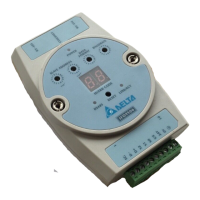
Mail settings
1. Mail alarm setup:
There are 3 mail alarms to be set up. Check the boxes to enable the alarms. The alarm can be
triggered by “low" and “high”.
2. SMTP server:
When alarm 1 is triggered, the E-Mail will first be sent to SMTP server, and the SMTP server will send
it to the designated address. For example, assume there is an E-Mail to be sent to


 To Next Page