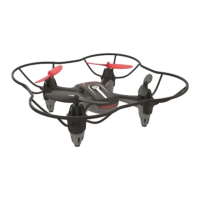
This document provides comprehensive operating instructions for the REMOTE-CONTROLLED STUNT DRONE, a recreational product designed for individuals aged 8 years and over. It is intended for private, domestic use only and should be operated in suitable weather conditions and authorized areas. The manual emphasizes safety, proper handling, and maintenance to ensure optimal performance and longevity of the device.
Function Description:
The stunt drone is a quadcopter controlled by a remote control, offering various flight modes and features. Its primary function is recreational flying, including basic ascent/descent, turning, forward/backward movement, sideways hovering, and performing 360° rollovers. The integrated height sensor automatically maintains a steady height, facilitating initial flight maneuvers. The drone also features a "Headless Mode" flight aid, which simplifies control by allowing the drone to always fly in the direction it is steered, regardless of its orientation. An "Automatic Return to Pilot" function enables the drone to return to its starting point with a press of a button. The remote control includes fine-tuning options for yaw, roll, and pitch to correct any erratic movements. Speed settings can be adjusted to accommodate different skill levels, from beginners to very experienced pilots.
Important Technical Specifications:
- Power Supply for Controller (Remote Control): 2 x 1.5V LR6, AA batteries.
- Power Supply for Drive (Quadcopter): 3.7V Li-Polymer 300mAh rechargeable battery.
- Range: Approximately 30 meters.
- Flight Time: Approximately 5-7 minutes.
- Maximum Transmission Capacity: 6.82dBm.
- USB Charging Cable: Type C, Input: 5V 1A. Note: Do not use power supply units with an output current of > 1A.
- Radio Frequency: 2.4GHz.
- Operating Temperature Range: 10°C to 45°C.
- Optimum Storage Temperature: 10°C to 25°C.
- Protection Class: Quadcopter is protection class II; USB charging cable is protection class III.
- Date of Manufacture: 02/2020.
- Compliance: Meets 2014/53/EU (RED Directive) and 2011/65/EU (RoHS Directive). Full declarations of conformity are available at http://www.conformity.delta-sport.com.
Usage Features:
- Package Contents: Includes 1 quadcopter, 1 remote control, 2 replacement rotor A, 2 replacement rotor B, 1 rechargeable battery, 1 USB charging cable, 2 AA batteries, 1 Phillips screwdriver, 1 tool, and operating instructions.
- Quadcopter Components: Rotor blades A (clockwise) and B (anti-clockwise), rotor guards, on/off switch, feet, rechargeable battery compartment, and indicator lights.
- Remote Control Components: On/off switch, headless mode/automatic return button, fine-tuning buttons for clockwise and anti-clockwise rotation, speed reduction and increase switches, throttle (for up/down/right/left turn), take-off/landing button, display, 'FLIP' (360° rollover) button, control lever (forwards/backwards/sideways left/right), and fine-tuning buttons for forwards/right/backwards/left direction.
- Battery Insertion: AA batteries are inserted into the remote control's battery compartment, ensuring correct polarity. The rechargeable battery is inserted into the quadcopter's compartment until it locks.
- Charging: The rechargeable battery is charged using the provided USB cable connected to a powered-on computer or charging unit. The charging indicator light turns red during charging and green when complete (approx. 40-70 minutes).
- Under-voltage Warning: Indicator lights flash rapidly when the rechargeable battery is almost empty, signaling the need to land the quadcopter.
- Flight Preparation: Place the quadcopter on an even surface. Always switch on the remote control first, then the quadcopter. Slide the throttle all the way forward and back to establish contact.
- Taking Off: Press the 'START/LAND' button to start the rotor blades.
- Controlling Flight:
- Ascending/Descending: Use the throttle (2h) to increase/decrease rotor speed.
- Turning Left/Right (Yaw): Move the throttle (2h) left/right to rotate the quadcopter on its vertical axis.
- Moving Forwards/Backwards (Pitch): Use the control lever (2l) to move the quadcopter in the corresponding direction.
- Hovering Left/Right (Roll): Move the control lever (2l) left/right for sideways hovering.
- Yaw Trimming: Correct unwanted clockwise/anti-clockwise turning using the yaw-trim buttons (2f, 2d).
- Direction (Roll and Pitch Trim): Correct unwanted forwards/backwards movement using pitch-trim buttons (2o, 2m), and unwanted sideways movement using roll-trim buttons (2n, 2p).
- Headless Mode: Activated by pressing button (2c) after aligning the quadcopter and remote control. Deactivated by pressing (2c) again.
- Automatic Return to Pilot: Press button (2c) for approx. 3 seconds. Can be canceled by pressing (2c) repeatedly or moving the control lever (2l).
- Speed Settings: Four speed levels (1-4) can be adjusted using buttons (2e, 2g). Default is speed 2.
- 360° Rollover: Fly to approx. 10m height, press 'FLIP' button (2k), then move the control lever (2l) in the desired rollover direction. Requires sufficient flight altitude.
- Calibration: If the quadcopter flies erratically, place it on a horizontal surface, then simultaneously slide the throttle (2h) and control lever (2l) towards yourself and outwards. Indicator lights will flash, then illuminate steadily when calibration is complete.
- Ending Flight: Press the 'START/LAND' button (2i) to land. Switch off the quadcopter, then the remote control. Remove the rechargeable battery.
Maintenance Features:
- Rotor Guards: Act as protection against injuries and collisions. Ensure they are firmly mounted and undamaged before each flight. Never operate the quadcopter without rotor guards.
- Cleaning: Always keep the quadcopter dry. Remove dirt, wool fibers, hair, etc., after every flight. Use a dry cloth; do not expose electronics, rechargeable battery, or motor to water.
- Storage: Store in a dry, dust-free location away from direct sunlight, at 10°C to 25°C. Disconnect the rechargeable battery and remove AA batteries from the remote control when not in use.
- Rotor Blade Replacement: Replace damaged rotor blades (A or B) using the provided tool (7). Ensure replacement blades match the markings (A or B) on the quadcopter arms. Rotor blades A rotate clockwise, B anti-clockwise.
- Battery Safety:
- Keep batteries out of reach of children.
- Do not expose batteries to extreme conditions (radiators, direct sunlight, temperatures below 10°C or over 45°C).
- Handle damaged/leaking batteries with caution and dispose of properly.
- Never swallow batteries.
- Do not throw batteries into fire, open casing, or short-circuit contacts.
- Avoid external mechanical influences (blows, sharp objects, crushing).
- Rechargeable Battery Specifics: Never charge unattended or immediately after use (allow 5-10 minutes to cool). Only use the provided USB cable. Do not charge damaged, deformed, or bloated batteries. Ensure adequate ventilation during charging. Disconnect when fully charged. Do not store near heat sources or open fires. Extinguish burning rechargeable batteries with plenty of water.
- Disposal: Dispose of the product and packaging in an environmentally friendly manner at specialty disposal facilities. Recycle defective or used batteries according to Directive 2006/66/EC. Packaging materials should be kept away from children.
- Troubleshooting: A table of possible errors, causes, and remedies is provided, covering issues like unresponsive remote control, uncharged batteries, uncontrolled flight, and more.

 Need help?
 General

 To Next Page