DVP-ES2/EX2/EC5/SS2/SA2/SX2/SE&TP Operation Manual - Programming
API
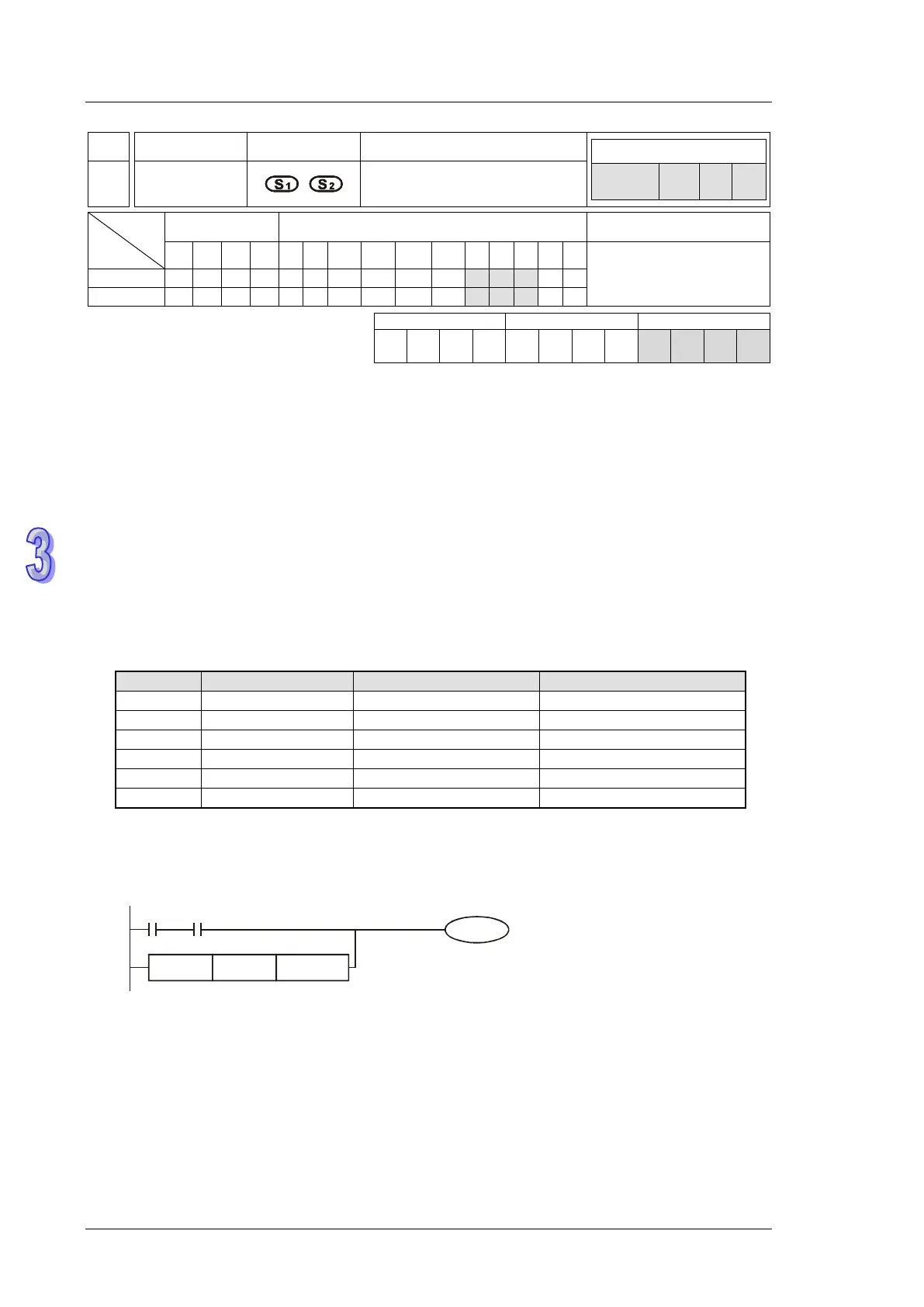
Mnemonic Operands Function
Controllers
287~
292
FOR※
Floating Point Contact Type
Comparison OR※
Type
OP
Bit Devices Word devices Program Steps
X Y M S K H KnX
KnY
KnM
KnS
T C D E F
FOR※: 9 steps
SS2
SX2
SS2
SX2
SS2
SX2
Operands:
S
1
: Source device 1 S
2
: Source device 2
Explanations:
1. This instruction compares the content in S
1
and S
2
. Take “FOR =” for example, if the result is “=”,
the continuity of the instruction is enabled. If the result is “≠”, the continuity of the instruction is
disabled
2. The user can specify the floating point value directly into operands S
1
and S
2
(e.g. F1.2) or store
the floating point value in D registers for further operation.
FOR※ instruction is used for parallel connection with contacts.
=
=
<=
>
Program Example:
When both X2 and M30 are On and the content in D100(D101) ≥ F1.234, M60 = ON..
FOR>= D100 F1.234
X2 M30
M60



 To Next Page