24
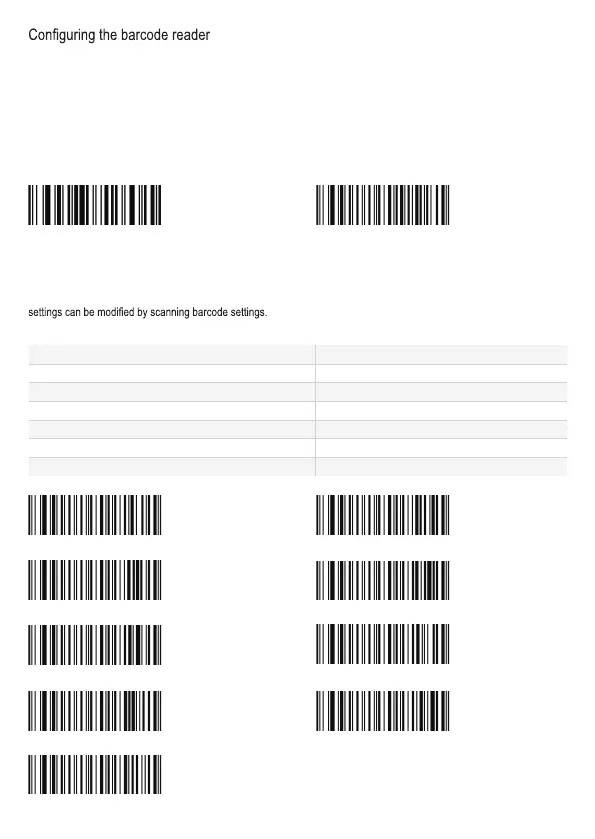
Debug mode and factory default
The barcode setting “factory default” allows normal output. If you scan “debug mode”, the barcode settings will be output to
the host when scanning barcode settings. When “debug mode” is enabled then barcode settings cannot be used to set the
scanner. When the scanner is re-powered (after being in “debug mode”), it will return to factory default. After it has returned
to factory default you can set the scanner with barcode settings.
Note: Please use the “factory default” setting with caution.
After scanning “factory default”, the scanner will lose its current settings, and change to factory default settings.
For factory default settings and functions see the factory defaults table.
Debug mode
Factory default
Communication Interface
Serial communication interface
The scanner provides TTL-232 serial communication interface and USB interface to communicate with the host.
Via the interfaces, it can receive data, control the instructions from the scanner, and modify the scanner’s settings. The
Baud rate settings
Parameters Default
Serial Communication Type Standard TTL-232
Baud Rate 9600
Check None
Data bits 8
Stop bit 1
Hardware Flow Control None
Baud rate: 9600 Baud rate: 1200
Baud rate: 2400 Baud rate: 19200
Baud rate: 38400 Baud rate: 4800
Baud rate: 57600 Baud rate: 14400
Baud rate: 115200
WFFD9D3
W401740 WFFD980
WFFD9D0
WFFD9D1 WFFD9D5
WFFD9D6 WFFD9D2
WFFD9D7
WFFD9D8
WFFD9D4



 To Next Page