25
USB interface
When the scanner is connected to the host by USB cable, the scanner will use USB DATAPIPE MODE automatically.
USB DATAPIPE
USB DATAPIPE is a custom USB transport protocol. This feature requires the installation of the corresponding driver on the host.
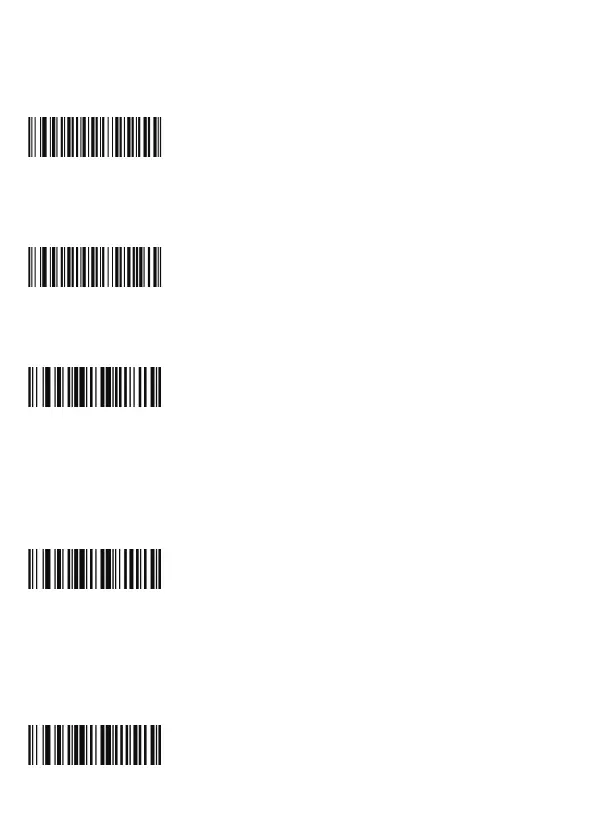
Switch to USB DATAPIPE mode
USB HID-KBW
When using the USB interface, you can simulate the scanner to be a HID-KBW (keyboard wedge). In this mode, the
scanner will become a virtual keyboard and output data to the host.
Switch to USB HID-KBW mode
Standard keyboard input mode
Standard keyboard input mode is the factory default setting. The scanner has two more input modes:
Keyboard characters emulation mode and keyboard control characters emulation mode.
Switch to standard keyboard input mode
Keyboard characters emulation mode
This mode allows ASCII characters (16 hexadecimal values from 0x00 to 0xFF) in any language. This mode has a large
data output, resulting in a slow down in speed. In this mode when ASCII characters are input, the scanner will read the
barcodes as a virtual keyboard like this:
(1) Press and hold “ALT”.
(2) According to the character code, input the number keys in the digital keyboard in turns.
(3) Release “ALT”.
Switch to keyboard character emulation mode
Note: It is recommended that you turn Num Lock on the main numeric keypad before enabling this mode.
Keyboard control characters emulation mode
Hexadecimal ASCII values from 0x00 to 0x1F can be matched to control function keys, when emulating keyboard, control
function keys:
(1) Press and hold “Ctrl”.
(2) Press the control keys (for matching keys see table: Emulation keyboard control characters pairing table.
(3) Release “Ctrl” and control keys.
Switch to keyboard control characters emulation mode
W066004
W066002
W066000
W030D01
W030D00



 To Next Page