8
Register account, login, reset the
product and add the device to the smart
life app.
Add service to Google home
Add the device to google home.
Add the service “smart life”.
Add device to Amazon Alexa
Use the menu “Skills & Games” and
search for “smart life”. Enable the app
and login. Use discover to add the
device.
Cleaning and maintenance
Do not use cleaning solvents or abra-
sives.
Do not clean the inside of the device.
Do not attempt to repair the device. If
the device does not operate correctly,
replace it with a new device.
Clean the outside of the device using a
soft cloth.
Support
More product information can be found
at www.deltaco.eu.
Contact us by e-mail: help@deltaco.eu.
Täname teid Deltaco valimise eest!
1. Kõlar
2. Passiivne infrapunaandur
3. Kaamera lääts
4. Valgusdiood
5. Lähtestusnupp
6. Valgusandur
7. USB-C laadimisport
8. Valgusdiood (laadimise olek)
9. Mikrofon
10. MicroSD pesa
Sellel kaameral on sisseehi-
tatud aku. Kasutage laadi-
miseks USB-C-kaablit.
Kaamera sisse või välja lülitamiseks va-
jutage ja hoidke seda nuppu 3 sekundit.
Paigaldamine
Tootel on paigaldamiseks 2 erinevat
konsooli. Valige oma vajadustele sobiv
konsool.
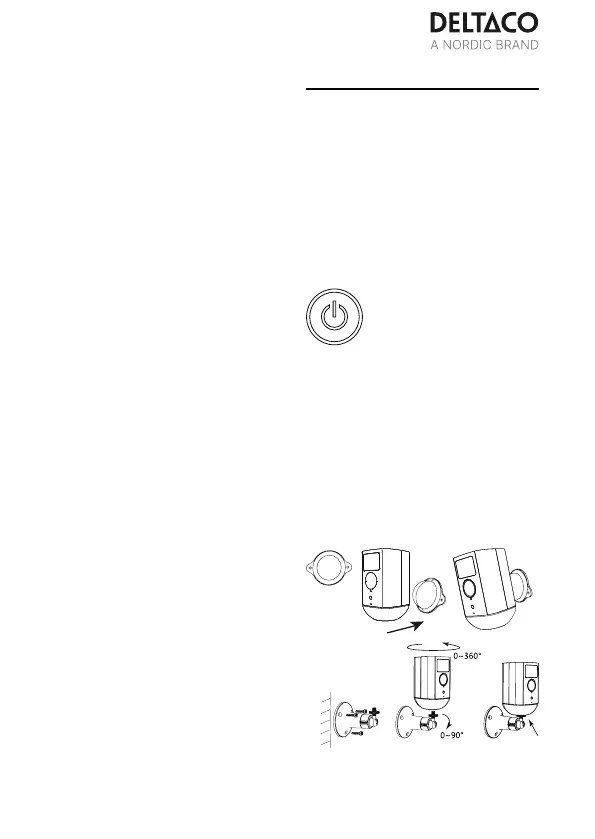
Konsooli (B) kasutatakse harilikult välis-
tingimustes. Konsool (A) on populaarne,
kuna see kasutab magnetit.
Puurige konsooli jaoks seina või lakke
augud.
Paigaldamine (A)
Paigaldamine (B)
B. Reguleerige kaamera nurka seda
sihtides ja pöörates. Kinnitage kruvi.
EST



 To Next Page