EasyManua.ls Logo

Delton K130 - User Manual

Delton K130
8 pages
Print Icon
To Next Page IconTo Next Page
Loading...






 


















 


    
   






 




   














.
:
 












·










 



 
 


 

 


 



 




K130 EXECUTIVE
HEADSET
USER MANUAL
   
  

















 






 

 
 
   

 
 





 
         


 





     


    

 





Question and Answer IconNeed help?

Do you have a question about the Delton K130 and is the answer not in the manual?

Summary

Product Specifications and Contents

Device Specifications

Details operational range, charging interface, and battery life for headset and case.

Package Contents

Lists all items included in the product box.

Pairing Procedures

Pairing Without USB Dongle

Step-by-step guide to pair the headset via Bluetooth without the dongle.

Pairing With USB Dongle

Instructions for pairing the headset using the provided USB dongle.

Charging Instructions

Charge Headset Directly

Detailed steps for charging the headset without the charging case.

Charge Case and Headset

Instructions for charging both the headset and its case.

Device Functions

Call Management

How to answer, end, and reject calls using the headset.

General Operations

Covers power on/off, clearing pairing, playback, and volume control.

Wearability and Indicators

Wearing the Headset

Guidance on how to wear the headset on either ear for optimal fit.

LED Indicator Meanings

Explanation of LED light patterns for different device statuses.

Safety, Warranty, and Legal

Safety Instructions

Important precautions to ensure safe usage and prevent damage.

Warranty Information

Details on product warranty coverage and how to claim.

Legal Warranty

Governing legislation for the product's guarantee period.

Overview

The Delton K130 Executive Headset is a wireless communication device designed for professional use, offering a blend of functionality, comfort, and extended battery life. It is engineered to provide clear audio and reliable connectivity for various communication needs.

Function Description:

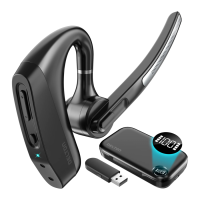
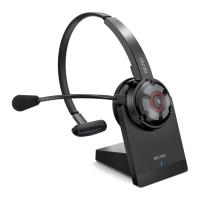
The K130 Executive Headset is primarily a Bluetooth headset for making and receiving calls, as well as for audio playback. It features a multi-function button (MFB) for call management and audio control, along with dedicated volume and microphone mute buttons. The headset can be paired with devices either directly via Bluetooth or through an included auto-pair USB dongle, offering flexibility for use with different systems like PCs, laptops, and smartphones. Its design allows for wear on either the left or right ear, with an adjustable earhook and rotatable boom microphone for optimal fit and microphone positioning. The accompanying charging case not only protects the headset but also extends its operational time significantly, featuring a digital battery display to monitor charge levels.

Important Technical Specifications:

  • Operation Range: 30 Ft, providing a good range of mobility from the connected device.
  • Charging Interface: Type-C, indicating modern and reversible connectivity for charging.
  • Headset Battery Life: 12 Hours, offering substantial talk or listening time on a single charge.
  • Charging Case Battery Life: 70 Hours, which means the case can recharge the headset multiple times, significantly extending total usage time without needing an external power source.
  • Included Accessories: Wireless Headset, Charging Case, Auto-Pair USB Dongle, Multi-Size Ear Gels, USB-C Charging Cable, and User Manual.

Usage Features:

  • Pairing: The headset supports two pairing methods.
    • Without USB Dongle: After an initial 3-hour charge, turn on the headset. It will automatically enter pairing mode. If not, plug it in to enter charging state, then press and hold the MFB for 4 seconds until the blue indicator flashes to clear existing pairings, and restart. Then, navigate to your device's Bluetooth settings, find "Delton K130," and initiate pairing. The device should show "paired" within 30 seconds.
    • With USB Dongle: After an initial 3-hour charge, plug the USB dongle into your PC/laptop. Turn on the headset. It will automatically enter pairing mode. If not, plug it in to enter charging state, then press and hold the MFB for 4 seconds until the blue indicator flashes to clear existing pairings, and restart. Wait up to 30 seconds for your device to show the headset is paired.
  • Call Functions:
    • Answer Call: Short press the MFB.
    • End Call: Short press the MFB.
    • Reject Call: Long press the MFB for 1 second.
    • Mic Mute/Unmute: Short press the dedicated Mute Microphone Button.
  • General Functions:
    • Power On/Off: Toggle the MFB button to the "On" or "Off" position.
    • Clear Pairing: While the headset is charging, press and hold both the Vol + and Vol - buttons simultaneously.
    • Playback Control:
      • Play/Pause: Press the MFB.
      • Previous Track: Long press "Vol +".
      • Next Track: Long press "Vol -".
    • Volume Control:
      • Raise Volume: Short press "Vol +".
      • Lower Volume: Short press "Vol -".
  • Wearing: The headset can be worn on either the left or right ear. To switch ears, rotate the boom microphone upwards, twist it around so the eartip is on the opposite side, then lower the boom. Adjust the eartip and the retractable earhook to ensure a comfortable and secure fit.
  • LED Indicator: Provides visual feedback on the headset's status:
    • Power On: Blue LED flashes once.
    • Power Off: Red LED flashes once.
    • Pairing Mode: Blue/Red LED alternates.
    • Low Battery: Red LED blinks repeatedly.
    • Charging: Red LED is steady on.
    • Charging Complete: Blue LED is steady on.

Maintenance Features:

  • Charging the Headset:
    • Directly: Connect the USB-A end of the charging cable (included) to a PC/laptop or a USB power adapter (not included). Connect the USB-C end to the headset. The headset LED will be solid red while charging and turn solid blue when fully charged. Remove the cable once charged.
    • Via Charging Case: Connect the USB-A end of the charging cable to a power source and the USB-C end to the charging case. The case's LED display will turn on, indicating charging for both the case and any headset placed inside. The display will show "100%" when fully charged. Remove the cable once charged.
  • Safety Instructions:
    • Avoid placing the headset near naked flames, high heat sources (like ovens), or direct sunlight.
    • Press buttons gently to prolong product life.
    • Do not drop the headset on hard surfaces.
    • Keep away from strong magnetic fields to prevent signal disruptions. If disruption occurs, turn the device off and on to reset.
    • Keep out of reach of children.
    • The product contains a lithium-ion battery; do not open or disassemble it.
    • Keep the product away from liquids.

Warranty:

Delton offers a warranty against defects in material and/or workmanship under normal use. For warranty policy details or to submit a claim, visit https://deltonstudio.com/pages/warranty. The legal warranty period and conditions are governed by the legislation of the country where the product was purchased. Users are encouraged to register their product at deltonstudio.com.

Delton K130 Specifications

General IconGeneral
BrandDelton
ModelK130
CategoryHeadsets
LanguageEnglish

Related product manuals