Need help?
Do you have a question about the Delton 95x and is the answer not in the manual?
Details Bluetooth version, operation range, talk time, case capacity, and charging times.
Lists all accessories provided with the Delton 95X Executive Headset.
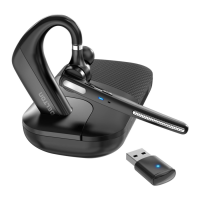
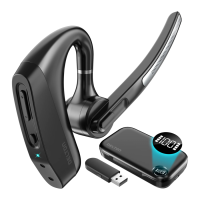
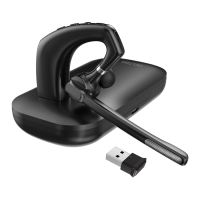
Visual representation of the headset and charging case with labeled parts.
Step-by-step guide to connect the headset to devices via Bluetooth.
Instructions for pairing the headset with a PC or laptop using the USB dongle.
Details two ways to charge: directly or via the charging case.
Explains how to answer, end, and reject calls, and mute/unmute the microphone.
Covers power, connectivity, playback controls, and volume adjustments.
Instructions on how to wear the headset on either the left or right ear.
Explains the meaning of different LED lights on the headset and charging case.
Important safety guidelines and warnings for using the headset.
Details the product warranty policy and legal guarantee conditions.
The Delton 95X Executive Headset is a sophisticated wireless communication device designed for professionals seeking clear audio and versatile functionality. This headset offers a comfortable and adaptable wearing experience, ensuring it can be used effectively for extended periods in various work environments. Its primary function is to facilitate hands-free communication, whether for calls, virtual meetings, or multimedia playback, providing a seamless audio experience.
One of the key usage features of the Delton 95X Executive Headset is its flexible pairing options. Users can connect the headset to their devices either with or without the included USB dongle. For pairing without the dongle, the headset automatically enters pairing mode when powered on. If it doesn't, a simple reset procedure involving plugging it in to enter charging state and simultaneously pressing the Volume + and Volume - buttons clears existing pairings, allowing the process to restart. Users then navigate to their device's Bluetooth settings, find "Delton 95X," and initiate the connection. When using the USB dongle, the process is similar: plug the dongle into a PC/laptop, power on the headset, and it will automatically enter pairing mode. Again, if automatic pairing doesn't occur, the same reset procedure can be used. This dual-pairing capability offers flexibility, catering to different device setups and user preferences.
The headset is designed for ease of use with intuitive controls. It features dedicated buttons for volume adjustment (Vol + and Vol -), power on/off, and a mute button for the microphone. A Multi-Function Button (MFB) serves several purposes, including answering and ending calls with a short press, and rejecting incoming calls with a long press. For media playback, the MFB acts as a play/pause control, while long presses on the Vol + and Vol - buttons allow users to navigate to the previous or next track, respectively. These controls are strategically placed for quick and convenient access during use, minimizing interruptions to workflow.
A notable feature of the Delton 95X is its noise-cancelling microphone. This technology is crucial for maintaining clear communication, especially in noisy environments, by filtering out background distractions and ensuring the user's voice is transmitted with clarity. This makes the headset particularly suitable for call centers, open-plan offices, or remote work settings where ambient noise can be a challenge.
The design of the headset prioritizes user comfort and adaptability. It can be worn on either the left or right ear. To switch ears, the boom can be rotated upwards, twisted around so the eartip is on the opposite side, and then lowered. The eartip itself is adjustable, and the retractable earhook can be manipulated to fit the unique shape of the user's ear, ensuring a secure and comfortable fit throughout the day. The inclusion of multi-size ear gels further enhances customization, allowing users to select the most comfortable option for their individual needs.
Maintenance features for the Delton 95X Executive Headset primarily revolve around its charging system. The headset can be charged in two ways: directly or via its charging case. To charge the headset directly, a USB-C cable is connected to the headset's charging port. A solid red LED indicates charging, and the LED turns off once fully charged. For charging the case and headset simultaneously, the USB-C cable is connected to the case's charging port. The case features four LED battery indicators. While charging, these LEDs will blink white. Once fully charged, all four LEDs will shine a steady white. This dual-charging capability ensures that users have options for keeping their device powered, whether they need a quick charge for the headset alone or a full charge for both the headset and its portable power source. The charging case itself contributes to the overall longevity and portability of the headset, providing protection and additional battery life on the go.
The LED indicators provide clear visual cues regarding the headset's status. For the headset, a blue LED flash indicates power on or off. A blue/red LED alternation signifies pairing mode, while a repeatedly blinking red LED warns of low battery. A steady red LED indicates that the headset is charging, and the LED turning off means charging is complete. For the charging case, one steady white LED indicates low battery, blinking white LEDs show that it's charging, and four steady white LEDs confirm that charging is complete. These indicators are essential for users to quickly ascertain the operational status and battery level of their device, facilitating timely recharging and preventing unexpected power loss during critical use.
In terms of general maintenance, the manual advises users to handle the headset gently, avoiding hard presses on buttons to preserve the product's lifetime. It also recommends against dropping the headset on hard surfaces. For optimal performance and safety, users are instructed to keep the headset away from high heat sources, naked flames, strong magnetic fields, and liquids. In case of signal disruption due to magnetic fields, simply turning the headset off and on again can reset it. The product contains a lithium-ion battery, and users are cautioned not to open or disassemble the device. These guidelines are crucial for ensuring the durability, safety, and long-term functionality of the Delton 95X Executive Headset.
 General
| Frequency Response | 20Hz - 20kHz |
|---|---|
| Connection | 3.5mm |
| Microphone | Yes |
| Microphone Frequency Response | 100Hz - 10kHz |
| Impedance | 32 Ohm |
| Microphone Sensitivity | -42dB ± 3dB |

 To Next Page