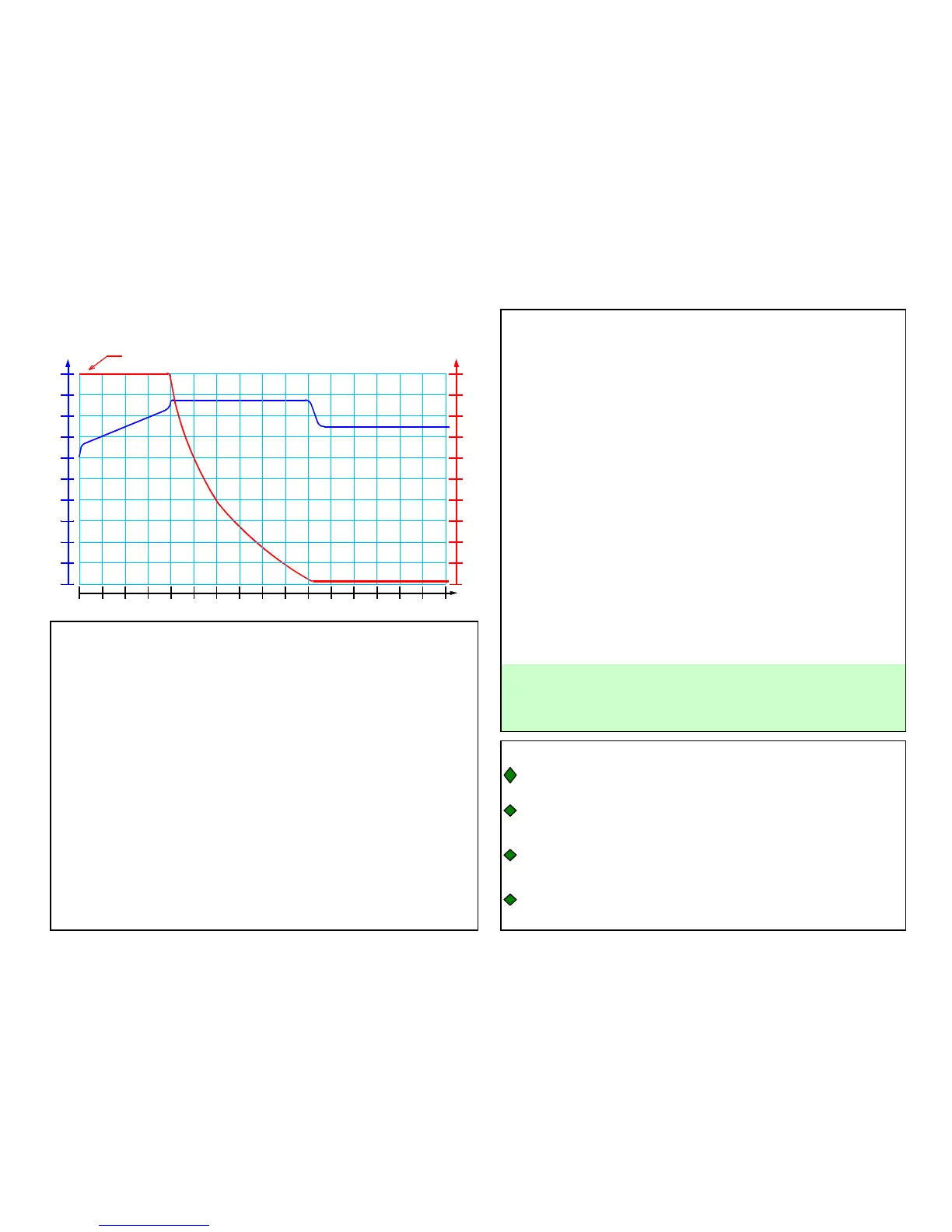
Step 2) Bulk Charge: Red Light On, Green Light Off: Constant Current
at Full Power. Bulk Charge ends at approximately 75% to 80% of full
battery recharge.
Step 3) Absorption Charge: Red Light On, Green Light Flashing:
Constant Voltage at Absorption Level. This conditions the battery for
optimum performance. Absorption charge ends when the battery
charging current drops below the optimum recharge threshold or the
absorption timer expires.
Step 4) Float Charge: Red Light Off, Green Light On. Constant
Voltage at Float / Maintenance level. Keeps battery fully charged and
maintains high specific gravity. Full charge reset monitor protects
battery against excessive appliance current draw while charging. Float
charge continues indefinitely.
¾ RED & GREEN ALTERNATING - This will indicate either a
reverse polarity connection where the charger output cables connect to
the battery, a sulfated batttery, a corroded battery terminal, or other
high resistance output connection..
Step 1) Initialization: Red Light On or Red Light Flashing: Monitor
Circuit verifies appropriate battery voltage levels and good electrical
continuity between the battery and the charger DC output.
It may take a long time for the green light to come on when
charging a large battery.
INDICATOR LIGHT OPERATION
¾ RED FLASHING - When the red light is flashing, the AC power is
applied to the charger and the microprocessor circuitry is functioning
properly. There is no battery connected or there is a problem with the
connections between the charger and the battery.
¾ RED - When the red light is on, the battery charger is in the process
of fully charging the battery. In order to properly charge large capacity
batteries, the charger may remain in this mode for several hours or even
days.
APPLICATION INFORMATION
Always operate the charger in a well ventilated area
If neither indicator light comes on after you plug in the AC
cord
er.
¾ GREEN FLASHING - When the green light is flashing, and the red
light is on, the battery is greater than 80% charged and may be removed
from the charger and used if necessary. Leave the battery on charge until
the green light is solid whenever possible. Once the green light begins to
flash, it will remain flashing until the battery charger output current drops
below the optimum recharge threshold, or until the absorption timer
expires.
¾ GREEN - When the green light is lit, the battery charger is in the
storage mode of charge. In this mode the charger will maintain the
battery at full charge.
Charging Time (Hours)
Absorption Charge:
Constant Voltage,
Current Decreases
Initialization, Bulk, Absorption, Storage (Float):
General 4 Step Charging:
Absorption Volts
Bulk Charge:
Constant Current,
Voltage Increases
0
0
Charger Current Limit
(Constant Current)
Bulk Charge Amps
Battery
Terminal
Voltage
(VOLTS)
Float Charge:
Constant Voltage,
Maintenance Current
Float / Maintenance Amps
0
Float / Maintenance Volts
Battery
Charging
Current
(AMPS)


 To Next Page