Connecting 9.1-channel speakers
o
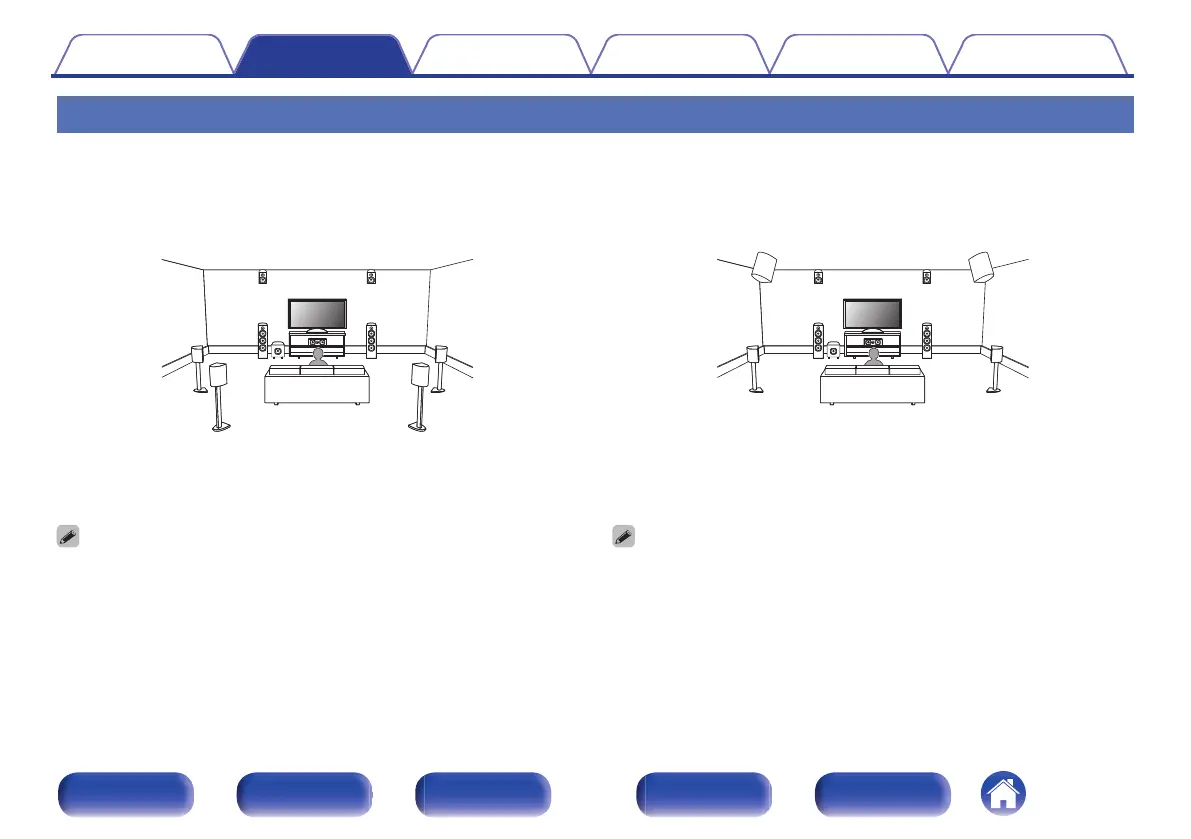
Example layout when using surround back
and one set of height speakers
C
FL FR
SBL
SBR
SW
SL SR
FHL FHR
For each speaker connection, refer to the following.
0
“Connecting speakers to the speaker terminals” (v p. 42)
0
“Connecting an external power amplifier” (v p. 43)
0
Set “Floor” to “5ch & SB” and “Height Sp” (or “Dolby Sp”) to “2ch” in the menu
when connecting in this configuration. (v p. 206)
0
You can change the Front Height Speakers to any Height/Ceiling/Dolby Atmos
Enabled speakers in the “Amp Assign” - “Layout” setting. (v p. 208)
o
Example layout when using two sets of height
speakers
C
FL FR
SW
SL SR
FHL FHR
RHL RHR
For each speaker connection, refer to the following.
0
“Connecting speakers to the speaker terminals” (v p. 42)
0
“Connecting an external power amplifier” (v p. 43)
0
Set “Floor” to “5ch” and “Height Sp” (or “Dolby Sp”) to “4ch” in the menu when
connecting in this configuration. (v p. 206)
0
You can change the Front Height Speakers and Rear Height Speakers to any
Height/Ceiling/Dolby Atmos Enabled speakers in the “Amp Assign” - “Layout”
setting. (v p. 208)
Contents
Connections Playback Settings Tips Appendix
49
Front panel Display Rear panel Remote Index


 To Next Page
 Loading...