How to handle media
0
Do not get fingerprints, oil or dirt on discs.
0
Take special care not to scratch discs when removing them from their
cases.
0
Do not bend or heat discs.
0
Do not enlarge the hole in the center.
0
Do not write on the labeled (printed) surface with ball-point pens,
pencils, etc., or stick new labels on discs.
0
Condensation may form on discs if they are moved suddenly from a
cold place (outdoors for example) to a warm place, but do not try to dry
discs with a hairdryer, etc.
0
Do not store discs in the following places:
1. Places exposed to direct sunlight for long periods of time
2. Dusty or humid places
3. Places exposed to heat from heaters, etc.
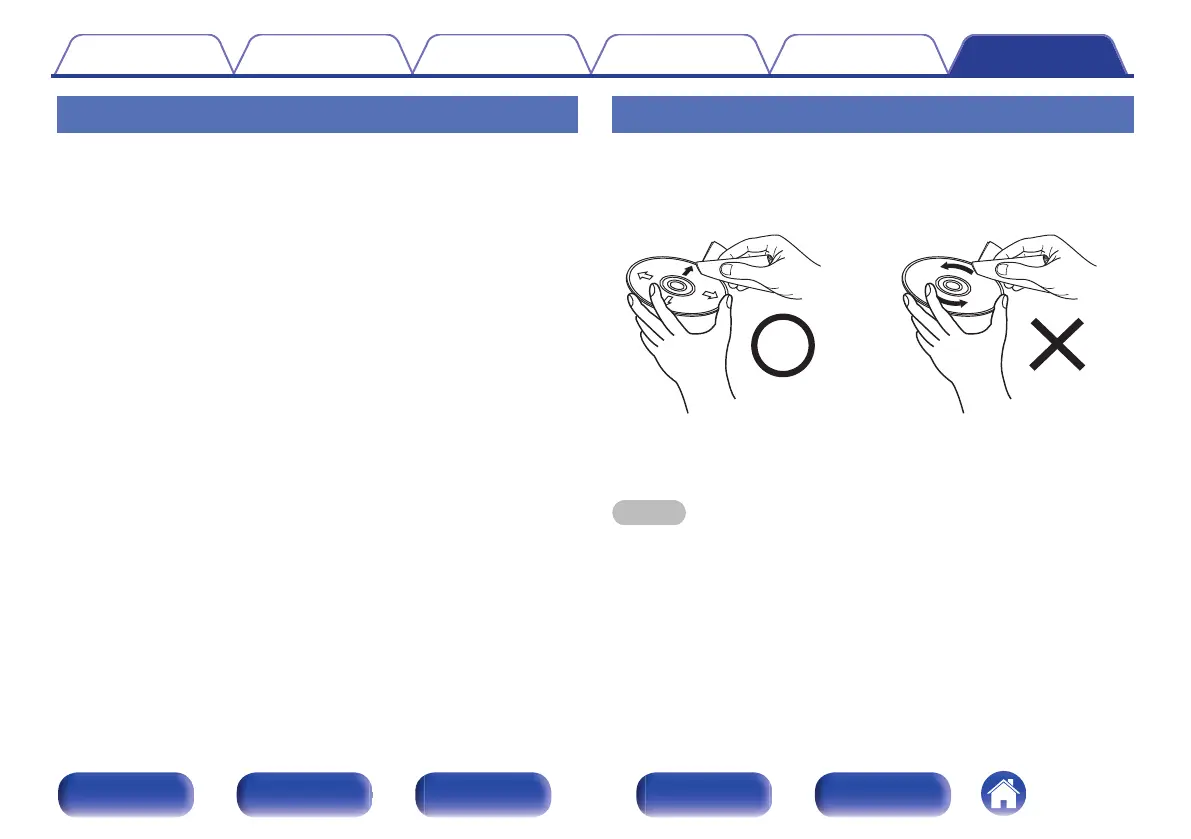
Cleaning discs
0
If there are fingerprints or dirt on a disc, wipe them off before using the
disc.
0
Use a commercially available disc cleaning set or a soft cloth to clean
discs.
.
Gently wipe the disc from the
inside towards the outside.
Do not wipe with a circular
motion.
NOTE
0
Do not use record spray, antistatic agents, benzene, thinner or other solvents.
Contents Connections Playback Settings Tips Appendix
40
Front panel Display Rear panel Remote Index



 To Next Page