EasyManua.ls Logo

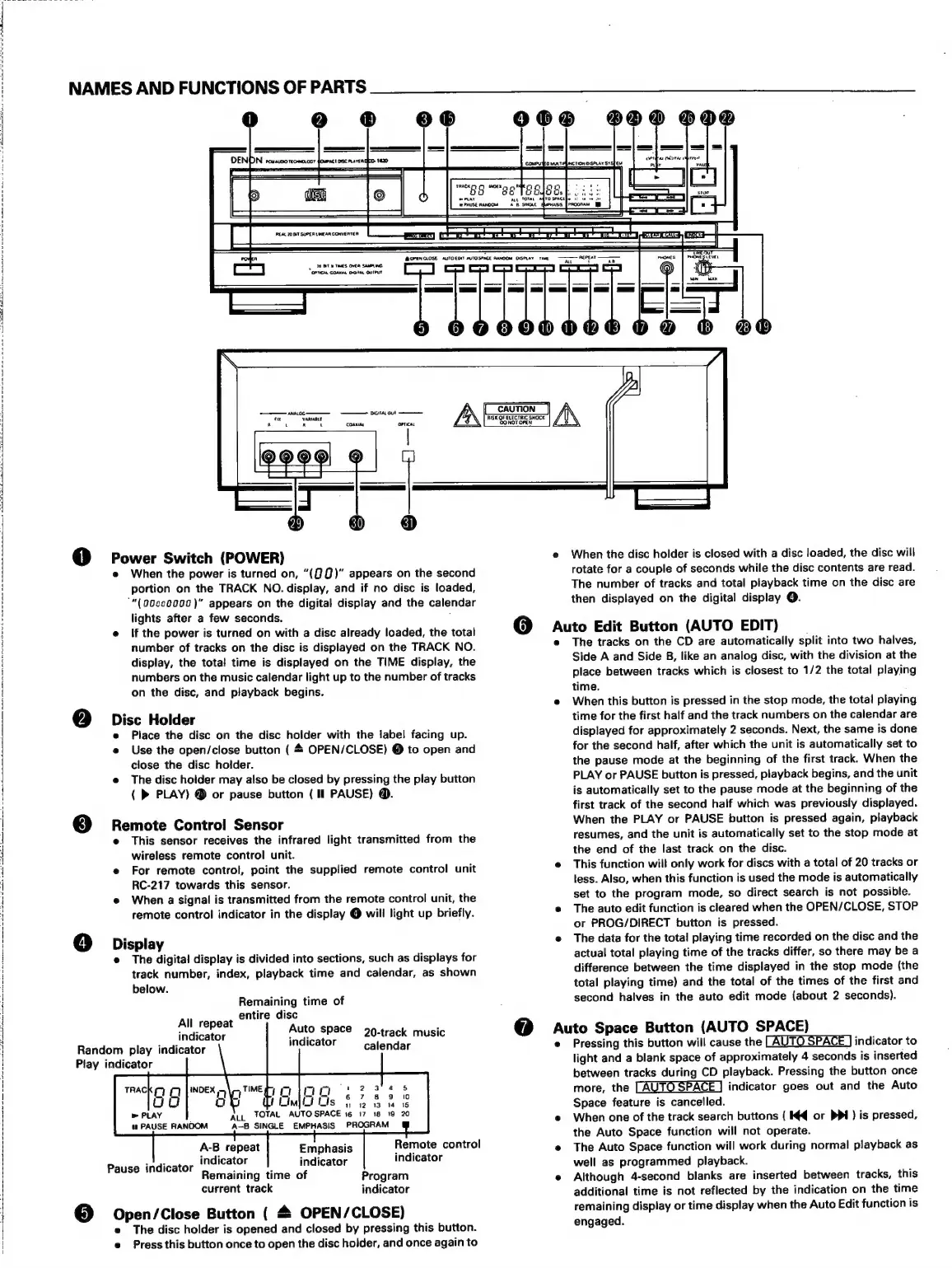
Denon DCD-1420 - Names and Functions of Parts; Core Unit Components; Special Function Buttons

Denon DCD-1420
39 pages
Print Icon
To Next Page IconTo Next Page
To Previous Page IconTo Previous Page
Loading...
A
PS
0,
AE
CAR
HEY
At
AE:
O 0
em:
SRE
nee
Oe
eI
EN
1
AE BA He
OE
A
pele:
oc
an
aa
NAMES
AND
FUNCTIONS
OF
PARTS
eo
®
@
Po
e
00
800
000
OPEN
CLOSE
AUTOEDIT
AUTOSPACE
RANDOM
DISPLAY
TIME
|
PUB
Tats
OVA
SAMPLING
OPTICAL
COAMAL
OGITAL
OUTPUT
=
I
ree
pee
Ed
x k
1
K
h
—T
puones
|
PHONES
tan
——
®
@
wer
Switch
(POWER)
When
the
power
is
turned
on,
“(QQ)”
appears
on
the
second
portion
on
the
TRACK
NO.
display,
and
if
no
disc
is
loaded,
‘“(00se0000)"
appears
on
the
digital
display
and
the
calendar
lights
after
a
few
seconds.
If
the
power
is
turned
on
with
a
disc
already
loaded,
the
total
number
of
tracks
on
the
disc
is
displayed
on
the
TRACK
NO.
display,
the
total
time
is
displayed
on
the
TiME
display,
the
numbers
on
the
music
calendar
light
up
to
the
number
of
tracks
on
the
disc,
and
playback
begins.
2)
Disc
Holder
Place
the
disc
on
the
disc
holder
with
the
label
facing
up.
Use
the
open/close
button
(
&
OPEN/CLOSE)
©
to
open
and
close
the
disc
holder.
The
disc
hoider
may
also
be
closed
by
pressing
the
play
button
(
PLAY)
@
or
pause
button
(Il
PAUSE)
@.
3]
Remote
Control
Sensor
This
sensor
receives
the
infrared
light
transmitted
from
the
wireless
remote
control
unit.
For
remote
control,
point
the
supplied
remote
control
unit
RC-217
towards
this
sensor.
When
a
signal
is
transmitted
from
the
remote
control
unit,
the
remote
control
indicator
in
the
display
@
will
light
up
briefly.
4]
Display
Random
play
indicator
Play
indicator
The
digital
display
is
divided
into
sections,
such
as
displays
for
track
number,
index,
playback
time
and
calendar,
as
shown
below.
Remaining
time
of
All
r
t
entire
disc
TAHIGaOE
Auto
space
0-track
music
indicator
calendar
my
ob
2
as
roe
HIM
sf
2
3
is
ALL
TOTAL
AUTO
SPACE
16
17
18
19
20
A-B8
SINGLE
EMPHASIS
PROGRAM
«
PAUSE
RANDOM
Remote
control
A-B
repeat
Emphasis
indi
adi
indicator
Pause
indicator
ieteator
:
indicator
Remaining
time
of
Program
current
track
indicator
@
Open/Close
Button
(
&
OPEN/CLOSE)
The
disc
holder
is
opened
and
closed
by
pressing
this
button.
Press
this
button
once
to
open
the
disc
holder,
and
once
again
to
=<
eens
hy
CAUTION
A\
RISK
OF
ELECTRIC
SHOCK
DONOT.OPEN
When
the
disc
holder
is
closed
with
a
disc
loaded,
the
disc
will
rotate
for
a
couple
of
seconds
while
the
disc
contents
are
read.
The
number
of
tracks
and
total
playback
time
on
the
disc
are
then
displayed
on
the
digital
display
@.
@
Auto
Edit
Button
(AUTO
EDIT)
The
tracks
on
the
CD
are
automatically
split
into
two
halves,
Side
A
and
Side
B,
like
an
analog
disc,
with
the
division
at
the
place
between
tracks
which
is
closest
to
1/2
the
total
playing
time.
When
this
button
is
pressed
in
the
stop
mode,
the
total
playing
time
for
the
first
half
and
the
track
numbers
on
the
calendar
are
displayed
for
approximately
2
seconds.
Next,
the
same
is
done
for
the
second
half,
after
which
the
unit
is
automatically
set
to
the
pause
mode
at
the
beginning
of
the
first
track.
When
the
PLAY
or
PAUSE
button
is
pressed,
playback
begins,
and
the
unit
is
automatically
set
to
the
pause
mode
at
the
beginning
of
the
first
track
of
the
second
half
which
was
previously
displayed.
When
the
PLAY
or
PAUSE
button
is
pressed
again,
playback
resumes,
and
the
unit
is
automatically
set
to
the
stop
mode
at
the
end
of
the
last
track
on
the
disc.
This
function
will
only
work
for
discs
with
a
total
of
20
tracks
or
tess.
Also,
when
this
function
is
used
the
mode
is
automatically
set
to
the
program
mode,
so
direct
search
is
not
possible.
The
auto
edit
function
is
cleared
when
the
OPEN/CLOSE,
STOP
or
PROG/DIRECT
button
is
pressed.
The
data
for
the
total
playing
time
recorded
on
the
disc
and
the
actual
total
playing
time
of
the
tracks
differ,
so
there
may
be
a
difference
between
the
time
displayed
in
the
stop
mode
(the
total
playing
time)
and
the
total
of
the
times
of
the
first
and
second
halves
in
the
auto
edit
mode
(about
2
seconds).
@
Auto
Space
Button
(AUTO
SPACE)
Pressing
this
button
will
cause
the
indicator
to
light
and
a
blank
space
of
approximately
4
seconds
is
inserted
between
tracks
during
CD
playback.
Pressing
the
button
once
more,
the
indicator
goes
out
and
the
Auto
Space
feature
is
cancelled.
When
one
of
the
track
search
buttons
(
Kq
or
PPI)
is
pressed,
the
Auto
Space
function
will
not
operate.
The
Auto
Space
function
will
work
during
normal
playback
as
well
as
programmed
playback.
Although
4-second
blanks
are
inserted
between
tracks,
this
additional
time
is
not
reflected
by
the
indication
on
the
time
remaining
display
or
time
display
when
the
Auto
Edit
function
is
engaged.

Related product manuals