EasyManua.ls Logo

Denon DCD-1500 - Disassembly and Reassembly Procedures; Unit Disassembly Steps

Denon DCD-1500
42 pages
Print Icon
To Next Page IconTo Next Page
To Previous Page IconTo Previous Page
Loading...
)
e
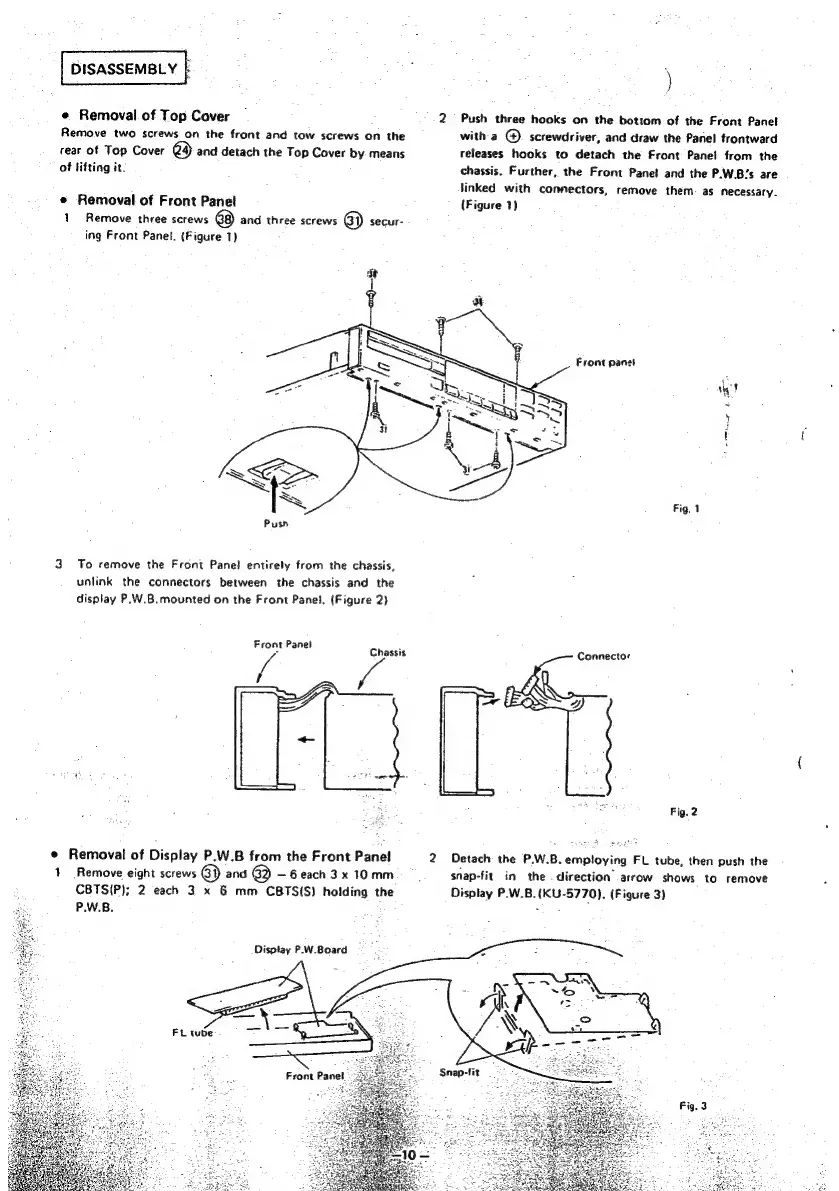
Removal
of
Top
Cover
|
2
Push
three
hooks
on
the
bottom
of
the
Front
Panet
Remove
two
screws
on
the
front
and
tow
screws
on
the
witha
@
screwdriver,
and
draw
the
Panel
frontward
rear
of
Top
Cover
ed
and
detach
the
Top
Cover
by
means
releases
hooks
to
detach
the
Front
Panel
from
the
of
Hifting
it.
chassis.
Further,
the
Front
Panet
and
the
P.W.B’s
are
linked
with
connectors,
remove
them.
as
necessary.
©
Removal
of
Front
Panel
(Figure
1)
1
Remove
three
screws
68)
and
three
screws
6)
secur-
ing
Front
Panel.
(Figure
1)
Front
panet
Wy?
i
i
{
Fig,
1
3
To
remove
the
Front
Panel
entirely
from
the
chassis,
unlink
the
connectors
between
the
chassis
and
the
display
P.W.B.mounted
on
the
Front
Panel.
(Figure
2)
ee
a
Chassis
Connector
a
(
Fig.
2
©
Removal
of
Display
P.W.B
from
the
Front
Panel
2
Detach
the
P.W.B.employing
FL
tube,
then
push
the
1
Remove
eight
screws
6)
and
@
—6each
3x
10
mm
5
snap-fit.
in
the
direction’
.arrow
shows
to
remove
CBTS(P);
2
each
3
x
6
mm
CBTS(S)
holding
the
Display
P.W.B.(KU-5770).
(Figure
3)
P.W.B.
ma
+e
Disptay
P.W.Board
FL
tube
Snap-fit

Other manuals for Denon DCD-1500

Related product manuals