EasyManua.ls Logo

Denon DCD-1500 - Page 20

Denon DCD-1500
42 pages
Print Icon
To Next Page IconTo Next Page
To Previous Page IconTo Previous Page
Loading...
(8)
Adjustment
of
Tracking
Gain
Adjustment
ae
|
@
Adjust
it
in
the
same
condition
as
to
focus
gain
s
®
Set
the
output
of
audio
oscillator
to
2.25
kHz
|
except
the
measuring
equipment
connections.
+120
Hz
2
Vp-p
+0.1
V.
|
@
Aduio
oscillator
should
be
connected
while
the
®
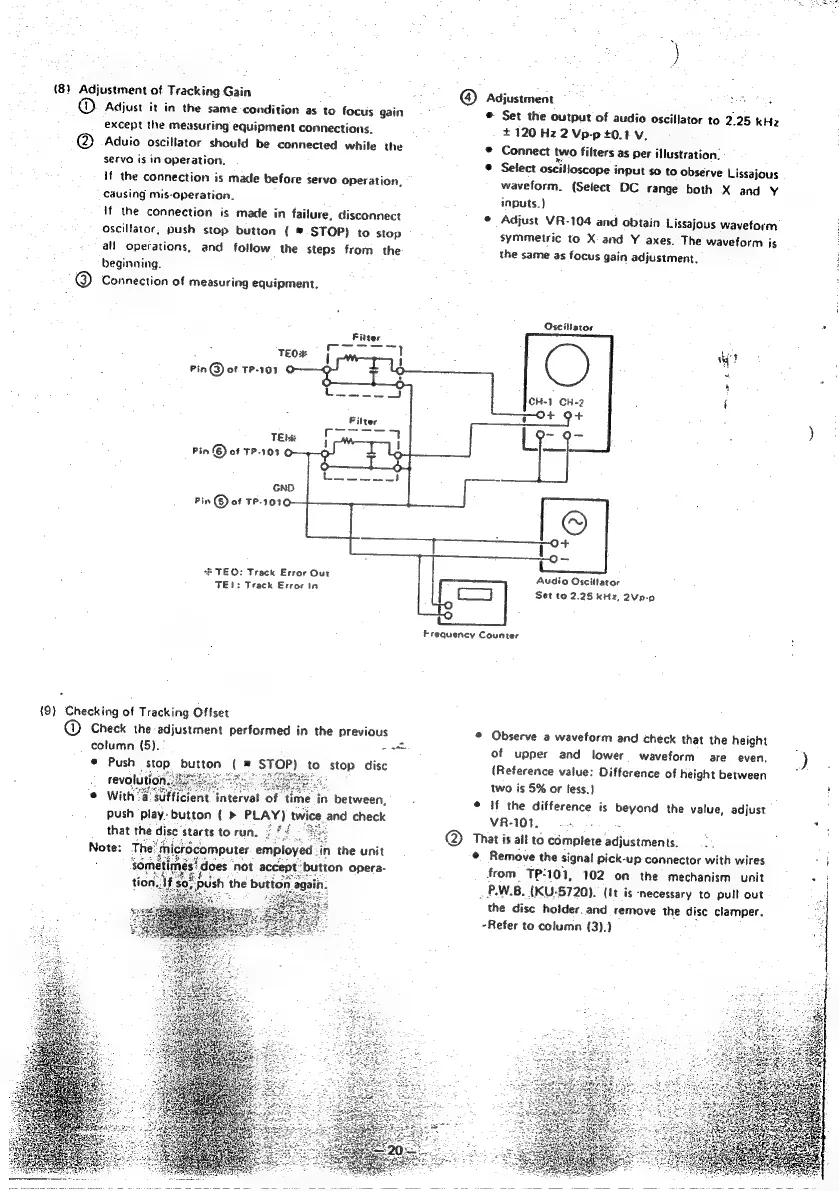
Connect
two
filters
as
per
illustration.
servo
is
in
Operation.
©
Select
oscilloscope
input
so
to
observe
Lissajous
if
the
connection
is
made
before
servo
operation,
waveform.
(Select
DC
range
both
X
and
Y
causing
mis-operation.
inputs.)
{if
the
connection
is
made
in
failure,
disconnect
©
Adjust
VR-104
and
obtain
Lissajous
waveform
Oscillator,
push
stop
button
({
©
STOP)
to
stop
symmetric
to
X
and
Y
axes.
The
waveform
is
all
operations,
and
follow
the
steps
from
the
the
same
as
focus
gain
adjustment.
i
beginning.
@
Connection
of
measuring
equipment.
Oscibator
:
TEO#
uy
Pin
@
of
TP-101
CH-1
CH-2
TEM
Pin
(6)
of
TP-101
©
GND
Pin
©
of
TP-1010
*B
TEO:
Track
Error
Our
TE1:
Track
Error
in
Audio
Osciltator
|
es
Set
to
2.25
kHz,
2Vp-p
Frequency
Counter
£
{9)
Checking
of
Tracking
Offset
@
Check
the
adjustment
performed
in
the
previous
©
Observe
a
waveform
and
check
that
the
height
:
column
(5).
oat
of
upper
and
lower
waveform
are
even.
)
Push
Stop
button
(=
STOP)
to
stop
disc
(Reference
value:
Difference
of
height
between
:
: .
two
is
5%
or
less.)
icient
interval
of
time
in
between,
.
¢
If
the
difference
is
beyond
the
value,
adjust
push
Play.
button
(>
PLAY)
twice
and
check
VR-101.
ane
a
@
That
is
all
to
complete
aapistnvents
©
Remove
the
signal
pick-up
connector
with
wires
a)
from
TP-101,
102
on
the
mechanism
unit
ae
_
P.W.B.
(KU-5720).
(It
is
necessary
to
pull
out
the
disc
holder.
and
remove
the
disc
clamper.
-Refer
to
column
(3),}

Other manuals for Denon DCD-1500

Related product manuals