EasyManua.ls Logo

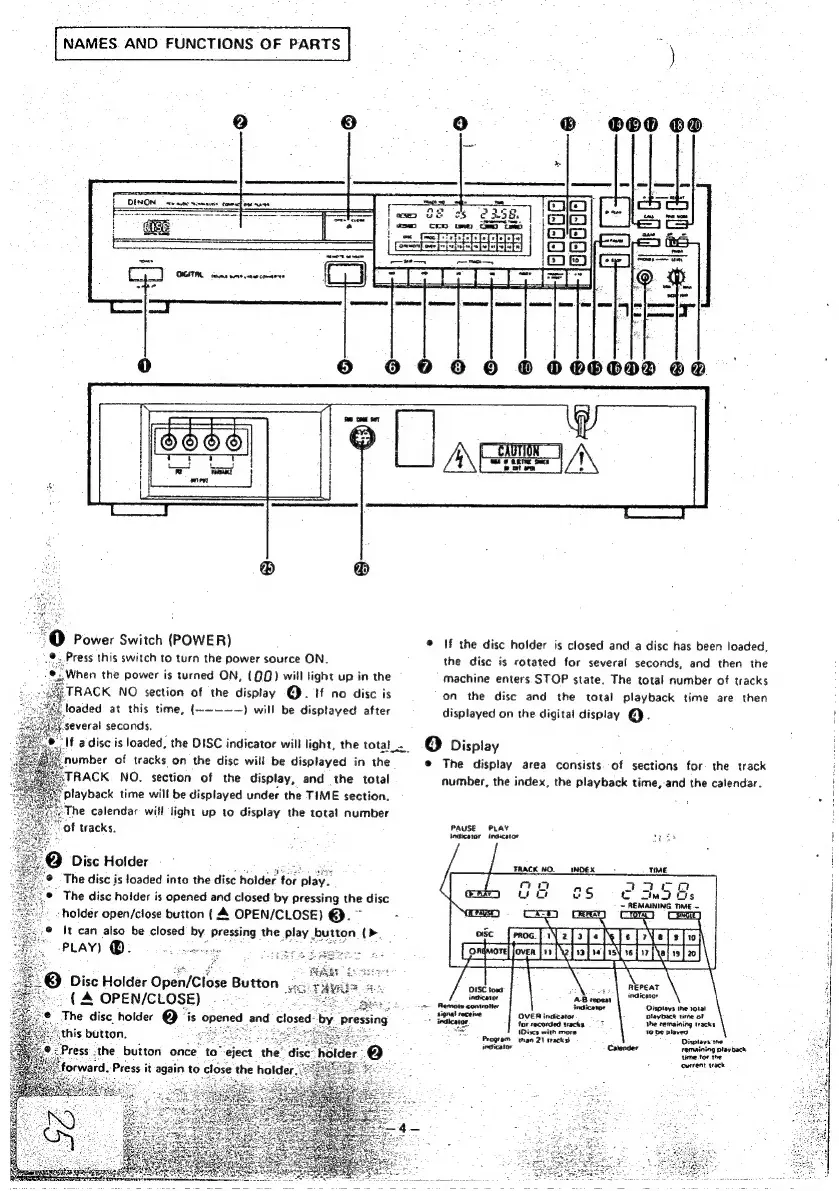
Denon DCD-1500 - Component Identification and Operation; Front Panel Controls and Display

Denon DCD-1500
42 pages
Print Icon
To Next Page IconTo Next Page
To Previous Page IconTo Previous Page
Loading...
-|
NAMES.
AND
FUNCTIONS
OF
PARTS
eet
ee
ae
®
80
oo
Sata
——
0
© ©
0
0
© ©
000000
oe
""@
Power
Switch
(POWER)
Press
this
switch
to
turn
the
power
source
ON.
‘When
the
power
is
turned
ON,
(QQ)
will
light
up
in
the
RACK
NO
section
of
the
display
@.
if
no
disc
is
loaded
at
this
time,
(~~-——)
will
be
displayed
after
several
seconds.
number
of
tracks
on
the
disc
will
be
displayed
in
the
TRACK
NO.
section
of
the
display,
and
the
total
playback
time
will
be
displayed
under
the
TIME
section.
The
calendar
will
light
up
to
display
the
total
number
of
tracks.
@Q
Disc
Holder
The
disc
is
loaded
into
the
disc
holder
for
play
The
disc
holder
is
opened
and
closed
by
pressing
the
disc
:
holder
open/close
button
(A
OPEN/CLOSE)
@.
~
2
It
can
also
be
closed
by
Pressing
the
play
button
(>
3)
Disc
Holder
Open/Close
Button
..
(A
OPEN/CLOSE)
Se
“eject
the:
orward:
Press
it
again
to
close
the
holder
If
a
disc
is
loaded,
the
DISC
indicator
will
light,
the
total_._
@
If
the
disc
holder
is
closed
and
a
disc
has
been
loaded,
the
disc
is
rotated
for
several
seconds,
and
then
the
machine
enters.
STOP
state.
The
total
number
of
tracks
on
the
disc
and
the
total
playback
time
are
then
displayed
on
the
digital
display
@.
(4)
Display
@
The
display
area
consists
of
sections
for
the
track
number,
the
index,
the
playback
time,-and
the
calendar.
PAUSE
PLAY
:
Indicator
indicator
sais
cc
3e2f
oma
Os
-
Thewaninn
TE
~
ogc
_froc
[V2
To
T+
NTs
[eT]
Paseele
Nebel
hte
=
Oispteys
the
11a!
OVER
ingicator
Dlayback
time
of
7?
fncicator.
for
recorded
tacks,
the
remaining
Wacks
iret
(Discs
with
more
10
be
plavea
Program
nan
21
tracks}
Disiavs
the
wpaicalen,
Catender
remaining
playback
time-tor
the
current
wack

Other manuals for Denon DCD-1500

Related product manuals