EasyManua.ls Logo

Denon DCD-1500II - Page 4

Denon DCD-1500II
32 pages
Print Icon
To Next Page IconTo Next Page
To Previous Page IconTo Previous Page
Loading...
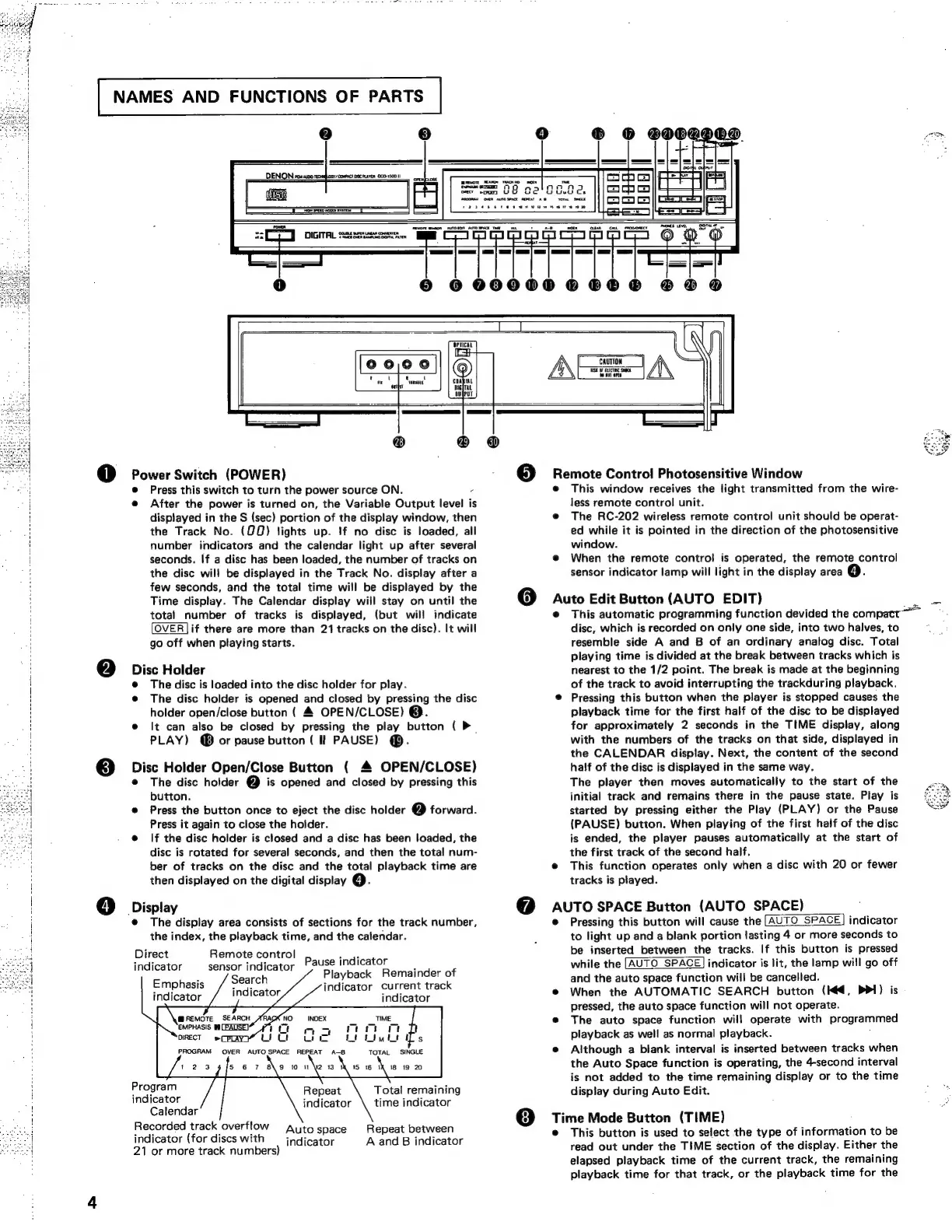
CAUTION
SE
WF
CET
See
sens
orn
@
Power
Switch
(POWER)
e
Press
this
switch
to
turn
the
power
source
ON.
-
e@
After
the
power
is
turned
on,
the
Variable
Output
level
is
displayed
in
the
S
(sec)
portion
of
the
display
window,
then
the
Track
No.
(QQ)
lights
up.
If
no
disc
is
loaded,
all
number
indicators
and
the
calendar
light
up
after
several
seconds.
If
a
disc
has
been
loaded,
the
number
of
tracks
on
the
disc
wil!
be
displayed
in
the
Track
No.
display
after
a
few
seconds,
and
the
total
time
will
be
displayed
by
the
Time
display.
The
Calendar
display
wiil
stay
on
until
the
total
number
of
tracks
is
displayed,
(but
will
indicate
OVER]if
there
are
more
than
21
tracks
on
the
disc).
It
will
go
off
when
playing
starts.
2)
Diet
Holder
The
disc
is
loaded
into
the
disc
holder
for
play.
e
The
disc
holder
is
opened
and
closed
by
pressing
the
disc
holder
open/close
button
(
4
OPEN/CLOSE)
@.
®
It
can
also
be
closed
by
pressing
the
play
button
(
P~
PLAY)
@®
or
pause
button
(
Il
PAUSE)
@®.
@
Disc
Holder
Open/Close
Button
(
4
OPEN/CLOSE)
e@
The
disc
holder
C2]
is
opened
and
closed
by
pressing
this
button.
@
Press
the
button
once
to
eject
the
disc
holder
(2)
forward.
Press
it
again
to
close
the
holder.
@
If
the
disc
holder
is
closed
and
a
disc
has
been
loaded,
the
disc
is
rotated
for
several
seconds,
and
then
the
total
num-
ber
of
tracks
on
the
disc
and
the
total
playback
time
are
then
displayed
on
the
digital
display
@.
4)
Display
e@
The
display
area
consists
of
sections
for
the
track
number,
the
index,
the
playback
time,
and
the
calendar.
Direct
Remote
control
indicator
sensor
indicator
Emphasis
indicator
Pause
indicator
Playback
Remainder
of
indicator
Current
track
indicator
@REMOTE
SEARCH
EMPHASIS
@§
[PAUSE]
DIRECT
»(CPLAY7
u
a
INDEX
aa
ann
Geo
okt
Program
Total
remaining
indicator
indicator
\
time
indicator
Calendar
Recorded
track
overflow
Autospace
Repeat
between
indicator
(for
discs
with
indicator
A
and
B
indicator
21
or
more
track
numbers}
Remote
Control
Photosensitive
Window
This
window
receives
the
light
transmitted
from
the
wire-
less
remote
control
unit.
The
RC-202
wireless
remote
control
unit
should
be
operat-
ed
while
it
is
pointed
in
the
direction
of
the
photosensitive
window.
When
the
remote
control
is
operated,
the
remote
control
sensor
indicator
lamp
will
light
in
the
display
area
Auto
Edit
Button
(AUTO
EDIT)
This
automatic
programming
function
devided
the
compattâ„¢
disc,
which
is
recorded
on
only
one
side,
into
two
halves,
to
resemble
side
A
and
B
of
an
ordinary
analog
disc.
Total
playing
time
is
divided
at
the
break
between
tracks
which
is
nearest
to
the
1/2
point.
The
break
is
made
at
the
beginning
of
the
track
to
avoid
interrupting
the
trackduring
playback.
Pressing
this
button
when
the
player
is
stopped
causes
the
playback
time
for
the
first
half
of
the
disc
to
be
displayed
for
approximately
2
seconds
in
the
TIME
display,
along
with
the
numbers
of
the
tracks
on
that
side,
displayed
in
the
CALENDAR
display.
Next,
the
content
of
the
second
half
of
the
disc
is
displayed
in
the
same
way.
The
player
then
moves
automatically
to
the
start
of
the
initial
track
and
remains
there
in
the
pause
state.
Play
is
started
by
pressing
either
the
Play
(PLAY)
or
the
Pause
(PAUSE)
button.
When
playing
of
the
first
half
of
the
disc
is
ended,
the
player
pauses
automatically
at
the
start
of
the
first
track
of
the
second
half.
This
function
operates
only
when
a
disc
with
20
or
fewer
tracks
is
played.
AuTe
SPACE
Button
(AUTO
SPACE)
Pressing
this
button
will
cause
the
[AUTO
SPACE]
indicator
to
light
up
and
a
blank
portion
tasting
4
or
more
seconds
to
be
inserted
between
the
tracks.
If
this
button
is
pressed
while
the
[AUTO
SPACE]
indicator
is
lit,
the
lamp
will
go
off
and
the
auto
space
function
will
be
cancelled.
When
the
AUTOMATIC
SEARCH
button
(Kd,
PPI)
is
pressed,
the
auto
space
function
will
not
operate.
The
auto
space
function
will
operate
with
Programmed
playback
as
wel!
as
normal
playback.
Although
a
blank
interval
is
inserted
between
tracks
when
the
Auto
Space
function
is
operating,
the
4-second
interval
is
not
added
to
the
time
remaining
display
or
to
the
time
display
during
Auto
Edit.
Time
Mode
Button
(TIME)
This
button
is
used
to
select
the
type
of
information
to
be
read
out
under
the
TIME
section
of
the
display.
Either
the
elapsed
playback
time
of
the
current
track,
the
remaining
playback
time
for
that
track,
or
the
playback
time
for
the

Related product manuals