EasyManua.ls Logo

Denon DCD-3300 - Page 4

Denon DCD-3300
45 pages
Print Icon
To Next Page IconTo Next Page
To Previous Page IconTo Previous Page
Loading...
4)
©
00008
©
REMOTE
DENON
rem
auoro
tecenococy
COMPACT
DISC
PLAYER
0CD-3000
|
z
TRACK
NO
com
7
oe
UO
OF
AUTO
SPACE
REPEAT
TIME MALT
FUNCTION
DSPLAY
26.55;
==
TOTAL
SINGLE
TIME
SEARCH
INDEX
dSe
AL
LOO.
|__|
Be
[ea]
1234567
89
1
1213
1415
16
17
18
1920
=
peeaenre
amar]
DIGITAL
cove
surer
unean
converter
PROGRAMORECT
——
|
——_
2
—_-
3
=
SeoooogoSsooe
ss
es
2
ee
ee
DIGITAL
OUTPUT
Ore,
——_—$—$$<—_<__——)s
——_———_
ANALOG
FIN—VAGIABLE
R—CHANMEL
——
(—CHARRMEL
BALANCE
TYPE
@
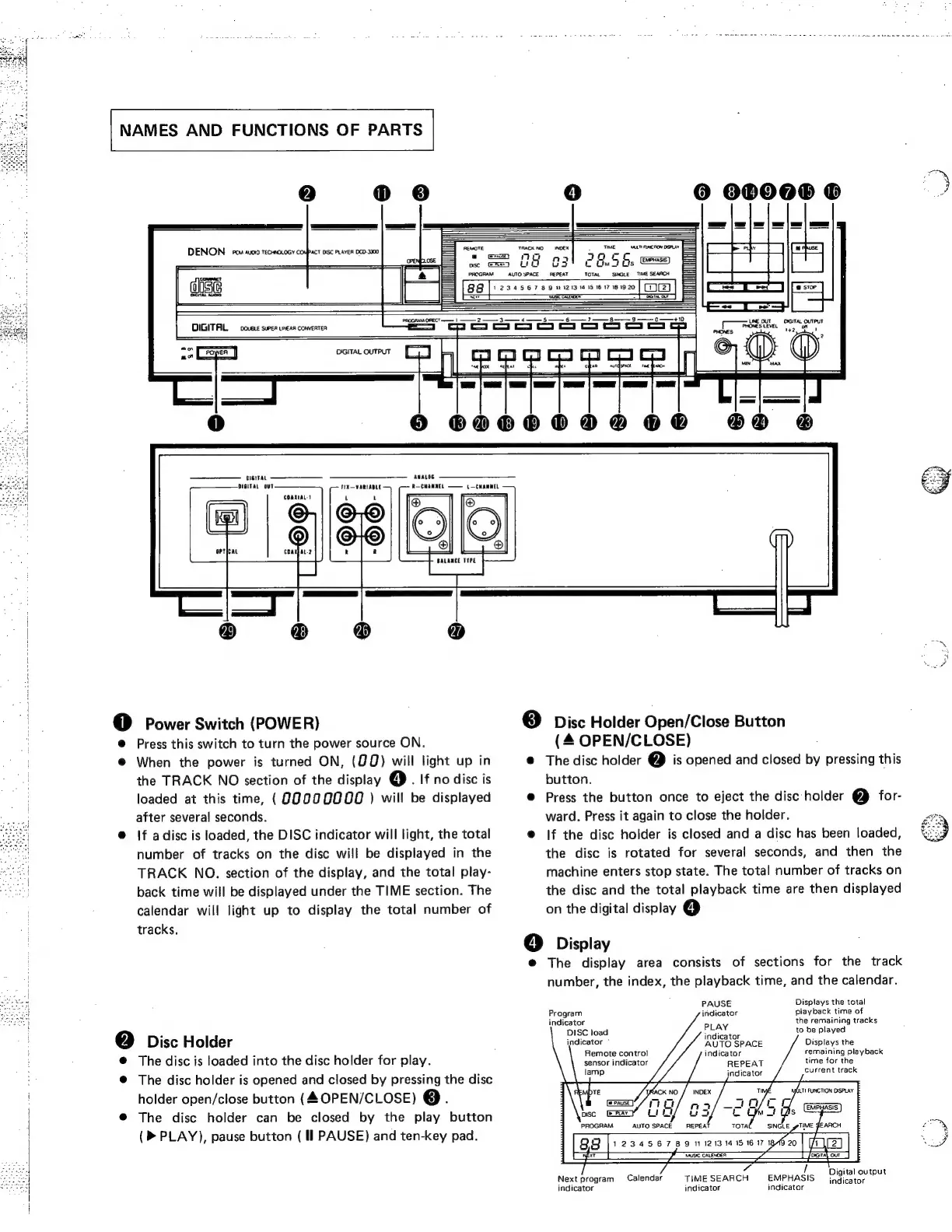
Power
Switch
(POWER)
@
Press
this
switch
to
turn
the
power
source
ON.
@
When
the
power
is
turned
ON,
(@Q)
will
light
up
in
the
TRACK
NO
section
of
the
display
(4)
.
If
no
disc
is
loaded
at
this
time,
(90000000
)
will
be
displayed
after
several
seconds.
@
If
adisc
is
loaded,
the
DISC
indicator
will
light,
the
total
number
of
tracks
on
the
disc
will
be
displayed
in
the
TRACK
NO.
section
of
the
display,
and
the
total
play-
back
time
will
be
displayed
under
the
TIME
section.
The
calendar
will
light
up
to
display
the
total
number
of
tracks.
@
Disc
Holder
@
The
disc
is
loaded
into
the
disc
holder
for
play.
@
The
disc
holder
is
opened
and
closed
by
pressing
the
disc
holder
open/close
button
(4
OPEN/CLOSE)
@.
The
disc
holder
can
be
closed
by
the
play
button
(>
PLAY),
pause
button
(Il
PAUSE)
and
ten-key
pad.
|
ao
®
Disc
Holder
Open/Close
Button
(4
OPEN/CLOSE)
@
The
disc
holder
2)
is
opened
and
closed
by
pressing
this
button.
@
Press
the
button
once
to
eject
the
disc
holder
2}
for-
ward.
Press
it
again
to
close
the
holder.
@
|f
the
disc
holder
is
closed
and
a
disc
has
been
loaded,
the
disc
is
rotated
for
several
seconds,
and
then
the
machine
enters
stop
state.
The
total
number
of
tracks
on
the
disc
and
the
total
playback
time
are
then
displayed
on
the
digital
display
4)
6
Display
e@
The
display
area
consists
of
sections
for
the
track
number,
the
index,
the
playback
time,
and
the
calendar.
PAUSE
Displays
the
total
Program
indicator
playback
time
of
indicator
the
remaining
tracks
DISC
load
fea
to
be
played
indicator”
AUTO
SPACE
Displays
the
Remote
control
indicator
remaining
playback
sensor
indicator
REPEAT
time
for
the
indicator
current
track
Digital
output
/
Next
program
Calendar
TIMESEARCH
EMPHASIS
indicator
indicator
indicator
indicator
/

Related product manuals