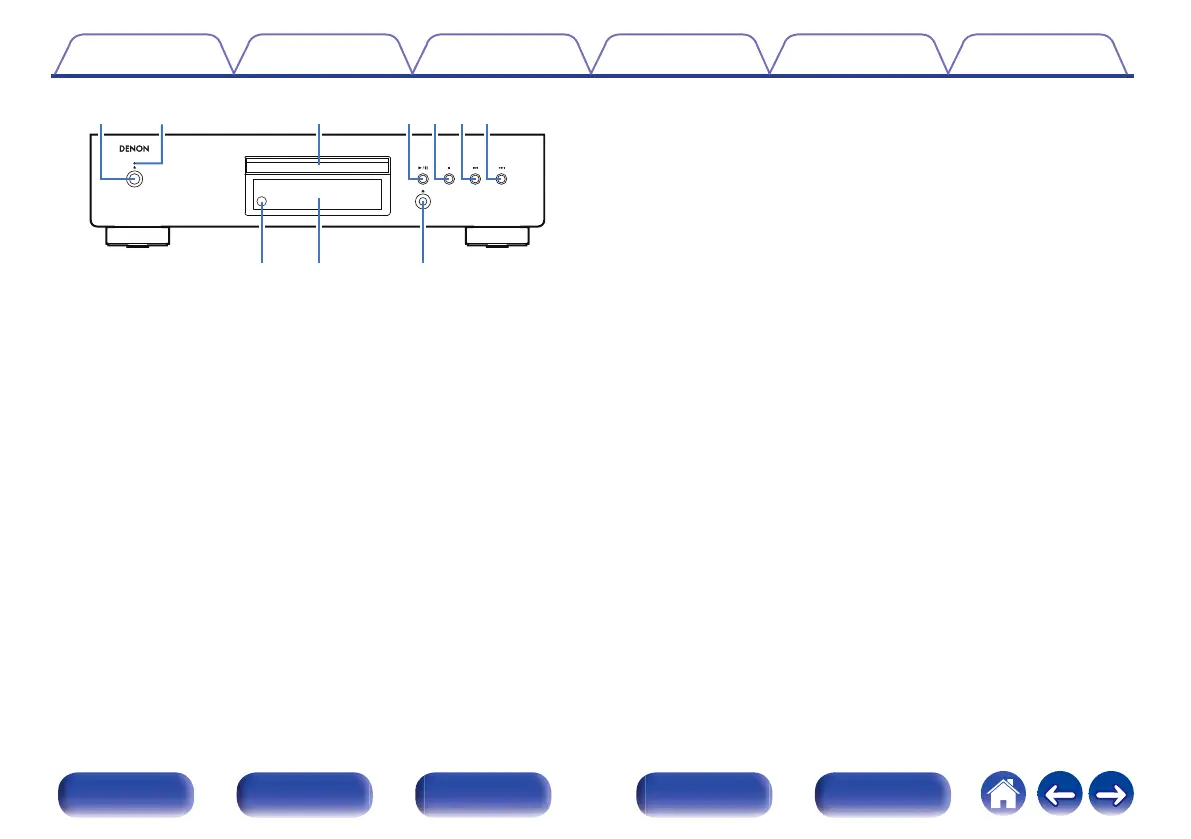
.
A
Power operation button (
X)
This turns the power on/off. (v p. 23)
B
Power indicator
This is lit as follows according to the power status:
0
Power on : Green
0
Standby : Off
0
Power off : Off
C
Disc tray
Used to insert a disc.
D
Play/pause button (
1/3)
Plays the track/Pauses the track.
E
Stop button (
2)
Stops playback.
F
Reverse-skip button (
8)
Returns to the start of the currently playing track.
G
Forward-skip button (
9)
Plays the next track.
H
Remote control sensor
This receives signals from the remote control unit. (v p. 5)
I
Display
Various information is displayed here. (v p. 9)
J
Disc tray open/close button (
5)
Used to open/close the disc tray.
Contents Connections Playback Settings Tips Appendix
8
Front panel Display Rear panel Remote Index



 To Next Page