EasyManua.ls Logo

Denon DCD-860 - Special Playback and Editing Modes; Random Playback Function; Tape Time Editing Features

Denon DCD-860
42 pages
Print Icon
To Next Page IconTo Next Page
To Previous Page IconTo Previous Page
Loading...
@
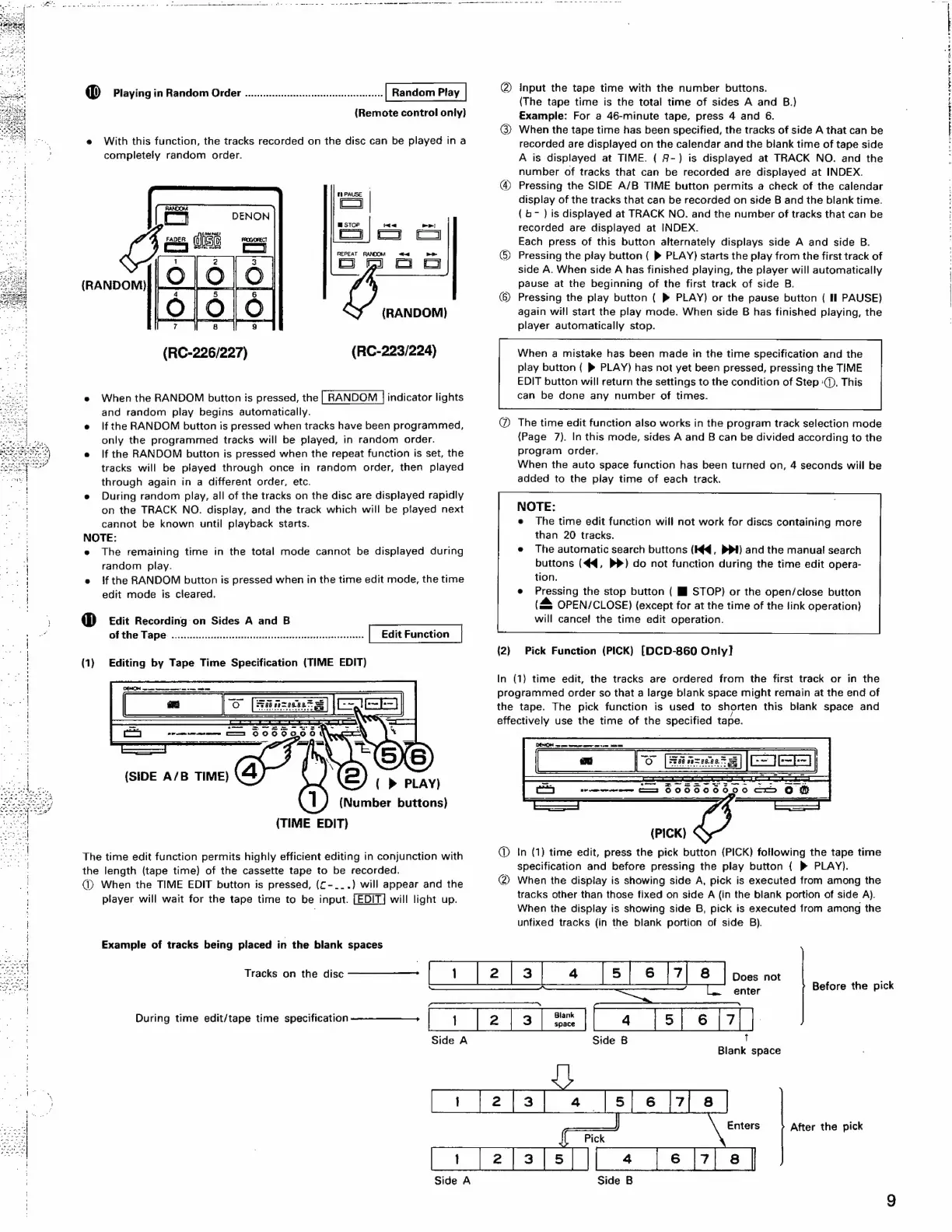
Playing
in
Random
Order
.............:::csccseeesseeesesceseseeesees
Random
Play
(Remote
control
only)
e
With
this
function,
the
tracks
recorded
on
the
disc
can
be
played
in
a
completely
random
order.
STOP
da
REPEAT
RANDOM
(RANDOM)
(RANDOM)
(RC-226/227)
(RC-223/224)
e
When
the
RANDOM
button
is
pressed,
the
indicator
lights
and
random
play
begins
automatically.
e
lfthe
RANDOM
button
is
pressed
when
tracks
have
been
programmed,
only
the
programmed
tracks
will
be
played,
in
random
order.
e
If
the
RANDOM
button
is
pressed
when
the
repeat
function
is
set,
the
tracks
will
be
played
through
once
in
random
order,
then
played
through
again
in
a
different
order,
etc.
e
During
random
play,
all
of
the
tracks
on
the
disc
are
displayed
rapidly
on
the
TRACK
NO.
display,
and
the
track
which
will
be
played
next
cannot
be
known
until
playback
starts.
NOTE:
e
The
remaining
time
in
the
total
mode
cannot
be
displayed
during
random
play.
e
{f
the
RANDOM
button
is
pressed
when
in
the
time
edit
mode,
the
time
edit
mode
is
cleared.
@
Edit
Recording
on
Sides
A
and
B
OR
the
Tape
>
siisciccscdsdncsnccsstettessasiendiccsesess
cotton
ceseastedenseas
(1)
Editing
by
Tape
Time
Specification
(TIME
EDIT)
(TIME
EDIT)
The
time
edit
function
permits
highly
efficient
editing
in
conjunction
with
the
length
(tape
time)
of
the
cassette
tape
to
be
recorded.
@)
When
the
TIME
EDIT
button
is
pressed,
(C-_..)
will
appear
and
the
player
will
wait
for
the
tape
time
to
be
input.
will
light
up.
Example
of
tracks
being
placed
in
the
blank
spaces
Tracks
on
the
aise
————>
|__|
2]
3]
4
[5]
6
[7]
8
|
does
not
@
Input
the
tape
time
with
the
number
buttons.
(The
tape
time
is
the
total
time
of
sides
A
and
B.)
Example:
For
a
46-minute
tape,
press
4
and
6.
@
When
the
tape
time
has
been
specified,
the
tracks
of
side
A
that
can
be
recorded
are
displayed
on
the
calendar
and
the
blank
time
of
tape
side
A
is
displayed
at
TIME.
{
9-)
is
displayed
at
TRACK
NO.
and
the
number
of
tracks
that
can
be
recorded
are
displayed
at
INDEX.
Pressing
the
SIDE
A/B
TIME
button
permits
a
check
of
the
calendar
display
of
the
tracks
that
can
be
recorded
on
side
B
and
the
blank
time.
(6-
)
is
displayed
at
TRACK
NO.
and
the
number
of
tracks
that
can
be
recorded
are
displayed
at
INDEX.
Each
press
of
this
button
alternately
displays
side
A
and
side
B.
G)
Pressing
the
play
button
(
»
PLAY)
starts
the
play
from
the
first
track
of
side
A.
When
side
A
has
finished
playing,
the
player
will
automatically
pause
at
the
beginning
of
the
first
track
of
side
B.
©
Pressing
the
play
button
(
®
PLAY)
or
the
pause
button
(
IH}
PAUSE)
again
will
start
the
play
mode.
When
side
B
has
finished
playing,
the
player
automatically
stop.
When
a
mistake
has
been
made
in
the
time
specification
and
the
play
button
{
®
PLAY)
has
not
yet
been
pressed,
pressing
the
TIME
EDIT
button
will
return
the
settings
to
the
condition
of
Step
‘().
This
can
be
done
any
number
of
times.
@
The
time
edit
function
also
works
in
the
program
track
selection
mode
{Page
7).
In
this
mode,
sides
A
and
B
can
be
divided
according
to
the
program
order.
When
the
auto
space
function
has
been
turned
on,
4
seconds
will
be
added
to
the
play
time
of
each
track.
NOTE:
e
The
time
edit
function
will
not
work
for
discs
containing
more
than
20
tracks.
The
automatic
search
buttons
(K¢q,
PPI)
and
the
manual
search
buttons
(44,
>»)
do
not
function
during
the
time
edit
opera-
tion.
Pressing
the
stop
button
(
HJ
STOP)
or
the
open/close
button
(&
OPEN/CLOSE)
(except
for
at
the
time
of
the
fink
operation)
will
cancel
the
time
edit
operation.
(2).
Pick
Function
(PICK)
[DCD-860
Only]!
In
(1)
time
edit,
the
tracks
are
ordered
from
the
first
track
or
in
the
programmed
order
so
that
a
large
blank
space
might
remain
at
the
end
of
the
tape.
The
pick
function
is
used
to
shorten
this
blank
space
and
effectively
use
the
time
of
the
specified
tape.
@
In
(1)
time
edit,
press
the
pick
button
(PICK)
following
the
tape
time
specification
and
before
pressing
the
play
button
(
PLAY).
@
When
the
display
is
showing
side
A,
pick
is
executed
from
among
the
tracks
other
than
those
fixed
on
side
A
(in
the
blank
portion
of
side
A).
When
the
display
is
showing
side
B,
pick
is
executed
from
among
the
unfixed
tracks
(in
the
blank
portion
of
side
B).
Enters
After
the
pick
Before
the
pick
|S
RRETE
ITO
ARICA

Related product manuals