EasyManua.ls Logo

Denon DCM-360 - Disassembly and Servo System; Unit Disassembly Instructions; Activating the Service Program; Service Program Operation

Denon DCM-360
35 pages
Print Icon
To Next Page IconTo Next Page
To Previous Page IconTo Previous Page
Loading...
CM-360/260
Ts
CN
360/2
6
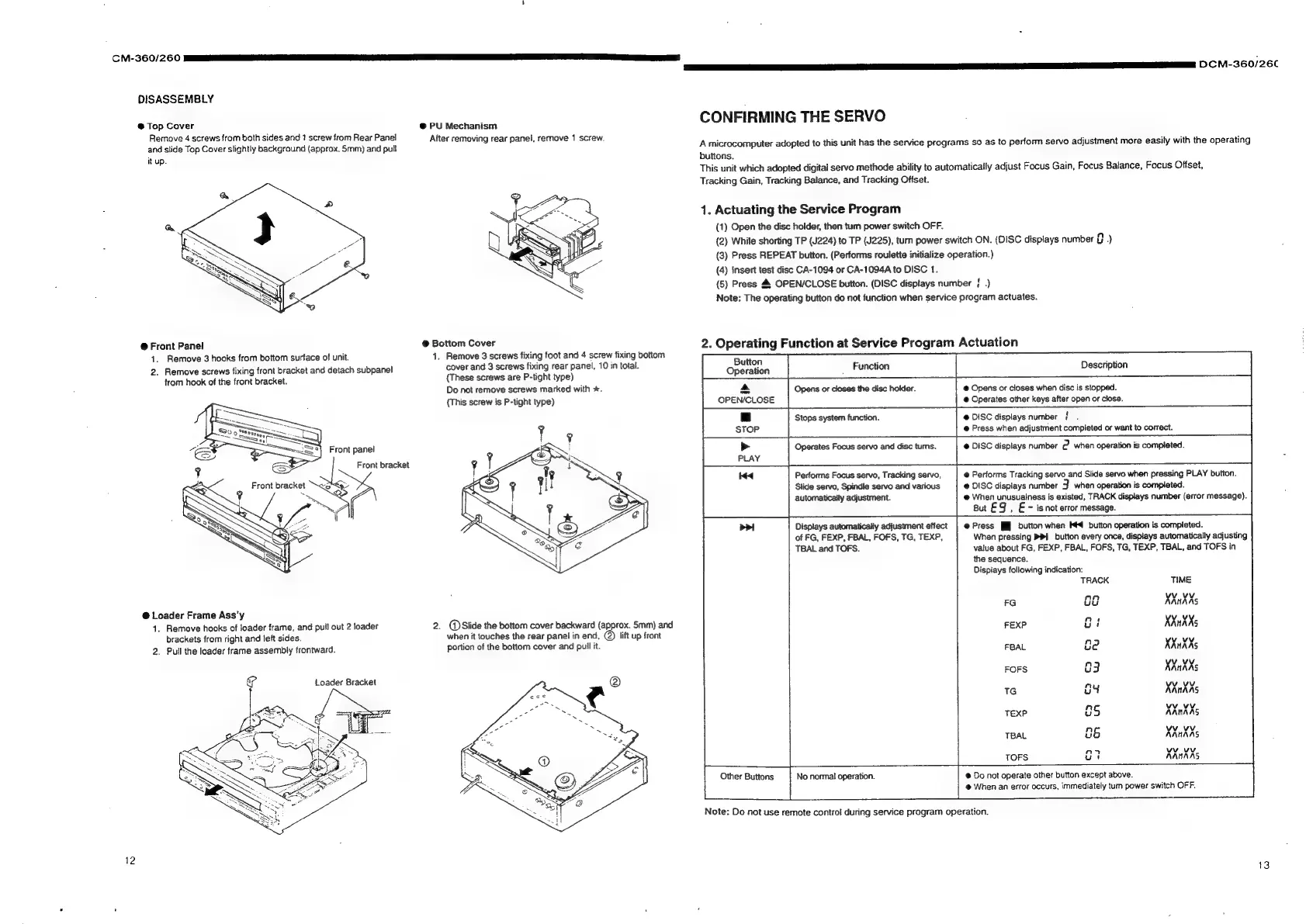
DISASSEMBLY
@
Top
Cover
@
PU
Mechanism
CONFIRMING
THE
SERVO
Remove
4
screws
from
both
sides
and
1
screw
from
Rear
Panel
After
removini
|,
remove
1
screw.
:
y
;
;
;
:
and
slide
Top
Cover
slightly
background
(approx.
Smm)
and
pult
pide
eee
M
i
A
microcomputer
adopted
to
this
unit
has
the
service
programs
so
as
to
perform
servo
adjustment
more
easily
with
the
operating
it
up.
buttons.
This
unit
which
adopted
digital
servo
methode
ability
to
automatically
adjust
Focus
Gain,
Focus
Balance,
Focus
Offset,
Tracking
Gain,
Tracking
Balance,
and
Tracking
Offset.
1.
Actuating
the
Service
Program
(1)
Open
the
disc
holder,
then
tum
power
switch
OFF.
(2)
While
shorting
TP
(J224)
to
TP
(J225),
turn
power
switch
ON.
(DISC
displays
number
o)
(3)
Press
REPEAT
button.
(Performs
roulette
initialize
operation.)
(4)
Insert
test
disc
CA-1094
or
CA-1094A
to
DISC
1.
(5)
Press
4
OPEN/CLOSE
button.
(DISC
displays
number
}
.)
Note:
The
operating
button
do
not
function
when
service
program
actuates.
@
Front
Panel
@
Bottom
Cover
2.
Operating
Function
at
Service
Program
Actuation
1.
Remove
3
hooks
from
bottom
surface
of
unit.
1.
Remove
3
screws
fixing
foot
and
4
screw
fixing
bottom
ut
2.
Remove
screws
fixing
front
bracket
and
detach
subpanel
cover
and
3
screws
fixing
rear
panel,
10
in
total.
0
peralion
Function
Description
from
hook
of
the
front
bracket.
(These
screws
are
P-tight
type)
Do
not
remove
screws
marked
with
*.
A
Opens
or
closes
the
disc
holder.
@
Opens
or
closes
when
disc
is
stopped.
{This
screw
is
P-tight
type)
OPEN/CLOSE
@
Operates
other
keys
after
open
or
close.
|_|
Stops
system
function.
DISC
displays
number
{
.
STOP
Press
when
adjustment
completed
or
want
to
correct.
Operates
Focus
servo
and
disc
tums.
@
DISC
displays
number
2
when
operation
is
completed.
PLAY
Pertorms
Focus
servo,
Tracking
servo,
@
Performs
Tracking
servo
and
Slide
servo
when
pressing
PLAY
button.
Slide
servo,
Spindle
servo
and
various
@
DISC
displays
number
3
when
operation
is
completed.
automatically
adjustment.
@
When
unusualness
is
existed,
TRACK
displays
number
(error
message).
But
£9
,
E
-
is
not
error
message.
Displays
automatically
adjustment
effect
|
@
Press
[J
button
when
I44
button
operation
is
completed.
of
FG,
FEXP,
FBAL,
FOFS,
TG,
TEXP,
When
pressing
PPI
button
every
once,
displays
automatically
adjusting
TBAL
and
TOFS.
value
about
FG,
FEXP,
FBAL,
FOFS,
TG,
TEXP,
TBAL,
and
TOFS
in
the
sequence.
Displays
following
indication:
TRACK
FG
oc
@
Loader
Frame
Ass’y
1.
Remove
hooks
of
loader
frame,
and
pull
out
2
loader
2.
@)Slide
the
bottom
cover
backward
(approx.
5mm)
and
ci
brackets
from
right
and
left
sides.
when
it
touches
the
rear
panel
in
end,
lift
up
front
2.
Puil
the
loader
frame
assembly
frontward.
portion
of
the
bottom
cover
and
pull
it.
be
AMAA
3
XXukXs
g
Loader
Bracket
<=
38
=
2=s¢
2s
TG
2<
TEXP
><
th
TBAL
co
Cp
cp
C2
CD
a
OW
35
35
35
=x
=
Se
Se
Se
=<
=
ta
TOFS
Other
Buttons
No
normal
operation.
@
Do
not
operate
other
button
except
above.
@
When
an
error
occurs,
immediately
tum
power
switch
OFF.
Note:
Do
not
use
remote
control
during
service
program
operation.
12
13

Related product manuals