EasyManua.ls Logo

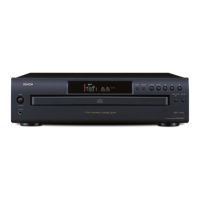
Denon DCM-360 - Notes on Use and Observations; Handling Precautions; Installation and Environmental Notes; Compact Disc Handling

Denon DCM-360
35 pages
Print Icon
To Next Page IconTo Next Page
To Previous Page IconTo Previous Page
Loading...
fh
NOTE
ON
USE
/
OBSERVATIONS
RELATIVES
A
L'UTILISATION
/
NOTAS
SOBRE
EL
USO
©
Avo
Ingh
teinperatures
Alla
lot
sutficent
heat
dspersian
whan
snstatied
an
#
tack
©
Evite
des
temperatures
Glavees
Ten
campty
d'une
dispel
sun
dy
chalur
sutlisenta
lors
du
linstaliavan
su
une
@lagare
©
Evie
altas
tomperaturas
Potala
ta
Suticounte
dropursi0n
dul
calor
Cuarnto
as
fa
wistalocho
art
We
CONSOLE
©
Handlathe
power
cod
carefully.
Hold
the
plug
when
unplugguy
Ine
cord
©
Mampuly:
te
cordon
d’sinnunt
avel
precaution
Ten
la
prise
lors
du
dévranchement
du
cordon
©
Maney
ul
cordon
de
eneigia
con
cudado
Soslany.t
vl
enichuty
cuanda
desconecis
#)
codon
da
viiwigte
fy
©
Keup
the
set
(ee
tram
morsture,
water,
and
dust
©
Provegar
(apparel
contre
/
humdi,
I’
eau
@t13
BOUS-
sere
©
Mantengs
#t
equipo
hire
ue
humedad.
ague
y
Polvo
|
Easy
tong
pefiods
of
ume
her
le
cordon
d’akmentation
lorsque
l'apoe
tps
utibsé
pendant
de
longues
penodes
¥F
oqUIpO
POL
MUCH
twiNpO
“(For
sets
with
ventilation
holes)
©
Do
not
obstruct
the
ventiation
holes,
©
Ne
pes
obsiruer
les
ous
d'advation
@
No
obstiuye
tos
onhcius
de
vantiecin.
©
Unpiug
ine
power
cord
when
nat
using
the
set
for
@
Desconacte
al
cordén
de
energia
cusnde
no
wilhice
la
00
x<
©
Do
not
let
toregn
objects
in
the
set
Ne
pas
larsser
des
objeis
dtrangers
dans
I'appare:
No
deje
objetos
extratos
dentro
del
equips.
are
®
Do
nol
let
msacticidas,
benzens,
and
thinner
come
1
contact
wath
the
set
®
Ne
pas
motive
en
contact
des
insecticides,
du
ben-
-
zene
@l
UN
Giuant
avec
I'spparel,
©
No
permits
6)
contacto
de
insecticidas,
gasolina
y
d.-
fuyantes
con
ef
aquipo.
eal
ae
@
Never
disassemble
or
modily
the
set
in
any
way.
©
Ne
jamais
démonter
ou
modilies
l'appareil
d'une
ma-
nidre
ou
d'une
autre.
@
Nunca
desarme
o
modifique
el
equipo
de
ninguna
maneta.
Thank
you
for
purchasing
the
DENON
compact
disc
player.
Read
the
Operating
Instructions
thoroughly,
and
operate
this
player
properly
TABLE
OF
CONTENTS
FEATURES
i ,
CAUTIONS
OURING
USE
is
spt
at
oust
:
NAMES
OF
PARTS
AND
THEIR
FUNCTIONS
..........
6.
OPENING
AND
CLOSING
THE
DRAWER
AND
LOADING
ADISC
.........
ee
ee
eres
8
CONNECTIONS
NORMAL
PLAY
....
saga
OTHER
PLAY
METHODS
.............-0005
INSTALLATION
PRECAUTIONS
...........5-
PLAY
USING
THE
REMOTE
CONTROL
UNIT
.
COMPACT
DISCS
........
she
sketeacd
acevascre
bk
TROUBLE?
CHECK
THE
PLAYER
TO
FIND
WHAT'S
WRONG
.......
15
SPECIFICATIONS
...........-.05
16
In
addition
to
the
CO
Player
unit,
please
check
to
make
sure
the
following
Items
sre
included
in
the
packing
box.
(1)
Operating
Instructions
{2}
Connection
Cords
..
(3)
Remote
Control
Unit
RC-258
.
(4)
REP
{AA
size)
Dry
batteries
IMPORTANT
(CANADIAN
MODEL
ONLY)
This
digital
apparatus
does
not
exceed
the
Class
B
limits
for
ra-
dio
noise
emissions
from
digital
apperatus
setout
in
the
Radio
interference
Regulations
of
the
Canadian
Department
of
Com-
munication.
CAUTIONS
DURING
USE
@
This
compact
disc
player
is
capable
of
playing
discs
which
have
the
mark
at
right.
COM
e@
During
sack
selection,
during
search
and
when
the
player
Sustains
a
strong
impact,
the
disc's
(|
rotauonal
speed
changes
greatly,
causing
a
smali
noise
lo
be
emitted.
This
is
not
a
malfunc-
tion
of
the
player.
®
ifthe
CO
player
is
operated
while
an
FM
or
AM
broadcast
is
being
teceived,
there
may
be
noise
in
the
FM
or
AM
reception.
Please
switch
the
power
to
the
CD
pleyer
off
at
such
times.
e
The
OCM-360/260
has
8
broad
dynamic
range.
Please
exercise
caution
when
turning
up
the
volume
on
the
amplifier
in
cases
when
the
playback
volume
is
low.
If
the
volume
is
turned
up
too
high,
it
could
damage
the
speakers.
©
ODonot
use
any
discs
but
exclusive
audio
discs
with
this
CD
player.
Ga
DIGITAL
AUDI:
FEATURES
The
DCM-360
and
OCM-260
are
CO
Players
equipped
with
DENON's
umque
ALPHA
Processor
and
AM.N
S$
(Advanced
Multdevel
hose
Shaping)
for
eliminating
sound
quality
deteGoration
m
tne
PCI
piay-
back
system
in
older
to
faithfully
recreate
tbe
Sound
eid
of
ive
nails
of
studios
where
compact
discs
are
recorded.
These
models
asi:
are
fully
selected
parts
to
provide
nigh
performance
and
sound
tela
rece:
ation
with
ach
musical
expression
{1}
ALPHA
Processor
(OCM-360)
The
high
speed
interpolation
operations
of
the
newly
develuped
ALPHA
Processor
reproduce
the
LSB
[lowest
significant
bit)
data
tost
from
the
disc
upon
recording
to
provide
a
smooth
wavelonn
The
audibie
effects
of
ALPHA
Processing
are
particularly
qreat
dunng
playback
at
low
levels
at
the
instant
the
sound
fades
aul
(2)
A.M.N.S
(Advanced
Multilevel
Noise
Shaping)
(OCM-260}
The
use
of
DENON’s
unique
system
tor
preventing
2860
Clos.
is
tortion,
the
main
factor
in
lass
of
sound
quality
in
tna
PCM
piay
back
section,
plus
multilevel
noise
shaping/4
XY
D/A
converters
with
superior
resolution,
offers
reproduction
of
the
onguial
sound
field
with
rich
musical
expression.
(3}
High
performance
digital
filter
The
OCM-360/260
uses
high
precision
B-lMes
OvErsan
ptnig
digital
filters.
14)
Simple
Playback
of
8cm
CD
Singles
8cm
CO
singles
can
be
played
without
using
an
adaptor
{5}
Programming
of
up
to
20
tracks
All
of
the
tracks
on
a
CD
can
be
programmed
to
ptay
in
any
order
Programming
in
units
of
discs
{all
racks
On
a
disc}
ss
also
pos
sibie
{6)
Nowly
developed
carousel-type
changer
mechanism
in-
cluded
This
mechanism
can
house
five
discs,
and
whilg
onu
asc
15
Playing
the
ramaining
four
discs
can
be
changed.
In
aduilian,
thu
carousel
can
be
rotated
either
clockwise
of
counterclockwisa,
so
searcning
between
discs
is
fast
(7)
Wireless
Remote
Control
Accessory
In
addition
to
generat
operations
Such
as
Play,
Stopand
Pause
thes
remote
control
unit
enables
direct
selection,
duvect
programming,
and
other
functions.
Use
of
the
remote
control
unit
adds
greatly
to
the
operating
ease
of
the
OCM-360/260,
enhancing
45
Gul
standing
features.
©
Placing
this
player
or
its
connection
cords
near
a
TV
of
other
auaia
device
could
cause
a
humming
sound
to
be
emutted.
if
tis
occurs,
relocate
the
player
or
reroute
the
connection
cords.
©
Be
sure
to
remove
the
disc
from
the
player
betora
moving
«
The
disc
could
be
damaged
i!
left
in
ine
player
while
Ht
is
bewiy
Moved
©
Do
not
place
any
object
in
the
Way
in
the
position
where
the
disc
is
loaded,
or
open.and
close
the
tray
with
anything
inside.
Foreign
ob
jects
in
the
tray
could
damage
the
play
mechanism.
e
Donot
move
the
player
from
a
cold
place
to
a
warm
place
suddenly
If
the
player
is
cold
when
brought
into
a
warm
oom,
condensation
could
form,
preventing
proper
operation
of
the
player
If
condensa-
ton
does
form
on
the
player
when
it
ss
brought
into
a
warm
:oom,
wait
at
least
30
minutes
before
use.
SL
I
Le
A
OR
ee
A
a
re
OFC
/OIS-WNOC
|

Related product manuals