EasyManua.ls Logo

Denon DN-951FA - Page 56

Denon DN-951FA
92 pages
Print Icon
To Next Page IconTo Next Page
To Previous Page IconTo Previous Page
Loading...
ONS
1
EA/SS
1A
Sa
e@
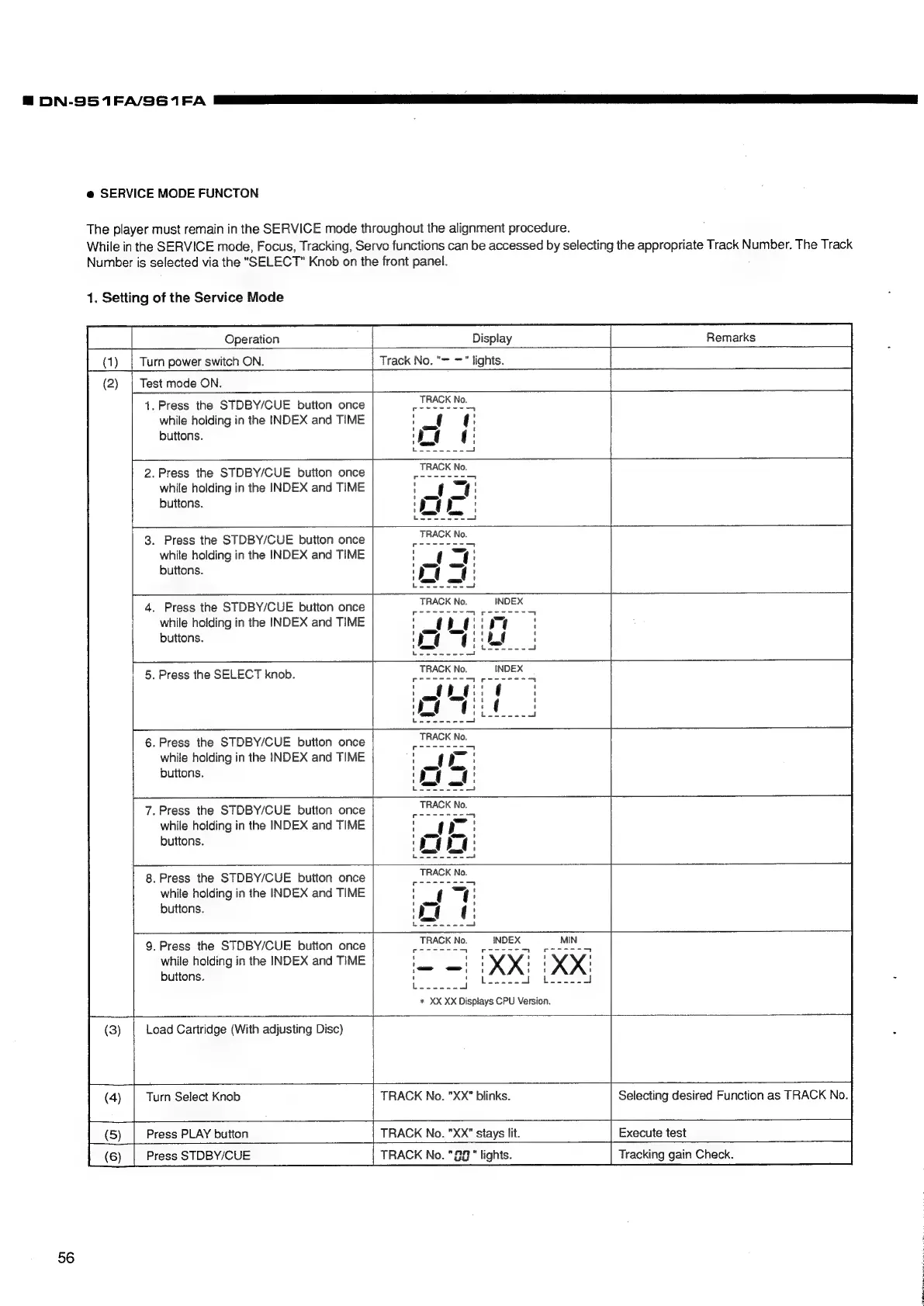
SERVICE
MODE
FUNCTON
The
player
must
remain
in
the
SERVICE
mode
throughout
the
alignment
procedure.
While
in
the
SERVICE
mode,
Focus,
Tracking,
Servo
functions
can
be
accessed
by
selecting
the
appropriate
Track
Number.
The
Track
Number
is
selected
via
the
"SELECT"
Knob
on
the
front
panel.
1.
Setting
of
the
Service
Mode
Operation
Display
Remarks
Turn
power
switch
ON.
Track
No.
"=
="
lights.
Test
mode
ON.
1.
Press
the
STDBY/CUE
button
once
while
holding
in
the
INDEX
and
TIME
buttons.
.Press
the
STDBY/CUE
button
once
while
holding
in
the
INDEX
and
TIME
buttons.
.
Press
the
STDBY/CUE
button
once
while
holding
in
the
INDEX
and
TIME
buttons.
.
Press
the
STDBY/CUE
button
once
while
holding
in
the
INDEX
and
TIME
buttons.
.
Press
the
SELECT
knob.
.Press
the
STDBY/CUE
button
once
while
holding
in
the
INDEX
and
TIME
buttons.
——
7.
Press
the
STDBY/CUE
button
once
while
holding
in
the
INDEX
and
TIME
buttons.
_
8.
Press
the
STDBY/CUE
button
once
while
holding
in
the
INDEX
and
TIME
buttons.
9.
Press
the
STDBY/CUE
button
once
while
holding
in
the
INDEX
and
TIME
buttons.
moh
apy
Si
“|
a
*
XX
XX
Displays
CPU
Version.
Load
Cartridge
(With
adjusting
Disc)
Turn
Select
Knob
TRACK
No.
"XX"
blinks.
Selecting
desired
Function
as
TRACK
No.
Press
PLAY
button
TRACK
No.
"XX"
stays
lit.
Execute
test
Press
STDBY/CUE
TRACK
No.
"92"
lights.
Tracking
gain
Check.
56

Related product manuals