EasyManua.ls Logo

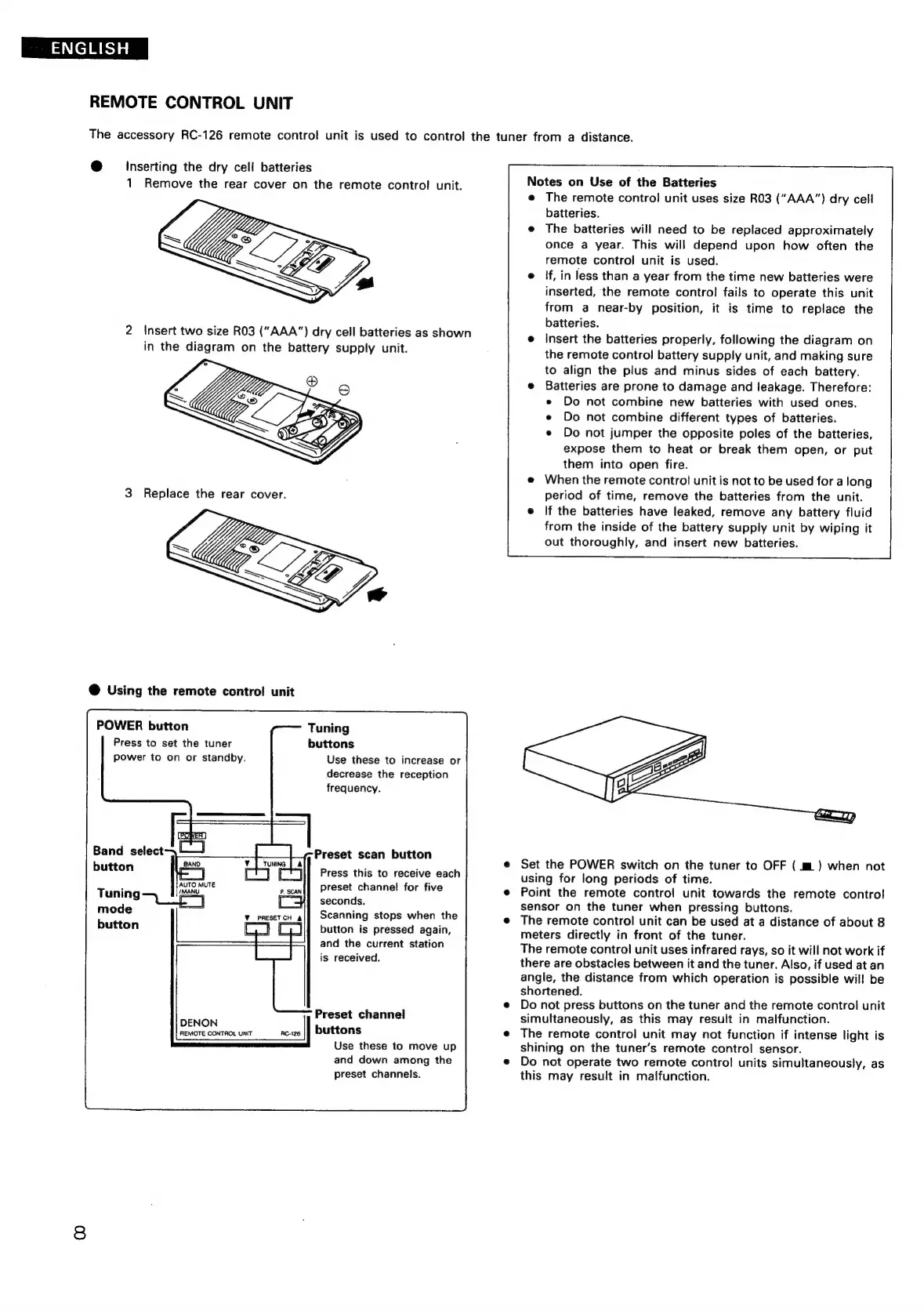
Denon TU-560 - REMOTE CONTROL UNIT; Inserting the dry cell batteries; Notes on Use of the Batteries; Using the remote control unit

Denon TU-560
29 pages
Print Icon
To Next Page IconTo Next Page
To Previous Page IconTo Previous Page
Loading...
ENGLISH
REMOTE
CONTROL
UNIT
The
accessory
RC-126
remote
control
unit
is
used
to
control
the
tuner
from
a
distance.
@
Inserting
the
dry
cel!
batteries
1
Remove
the
rear
cover
on
the
remote
control
unit.
Notes
on
Use
of
the
Batteries
—
e
The
remote
control
unit
uses
size
RO3
(“AAA”)
dry
cell
batteries.
e
The
batteries
will
need
to
be
replaced
approximately
once
a
year.
This
will
depend
upon
how
often
the
remote
control
unit
is
used.
e
if,
in
less
than
a
year
from
the
time
new
batteries
were
inserted,
the
remote
control
fails
to
operate
this
unit
from
a
near-by
position,
it
is
time
to
replace
the
batteries.
e
Insert
the
batteries
properly,
following
the
diagram
on
the
remote
control
battery
supply
unit,
and
making
sure
to
align
the
plus
and
minus
sides
of
each
battery.
e
Batteries
are
prone
to
damage
and
leakage.
Therefore:
e
Do
not
combine
new
batteries
with
used
ones.
e
Do
not
combine
different
types
of
batteries.
e
Do
not
jumper
the
opposite
poles
of
the
batteries,
expose
them
to
heat
or
break
them
open,
or
put
them
into
open
fire.
e@
When
the
remote
control
unit
is
not
to
be
used
for
a
long
period
of
time,
remove
the
batteries
from
the
unit.
e
If
the
batteries
have
leaked,
remove
any
battery
fluid
from
the
inside
of
the
battery
supply
unit
by
wiping
it
out
thoroughly,
and
insert
new
batteries.
2
Insert
two
size
RO3
(“AAA”)
dry
cell
batteries
as
shown
in
the
diagram
on
the
battery
supply
unit.
@
Using
the
remote
contro!
unit
POWER
button
Tuning
Press
to
set
the
tuner
buttons
power
to
on
or
standby.
Use
these
to
increase
or
decrease
the
reception
frequency.
Band
select
Preset
scan
button
button
BAND
Vv
|
tonne
[a
.
:
e@
Set the
POWER
switch
on
the
tuner
to
OFF
(
m)
when
not
EJ
Press
this
to
receive
each
using
for
long
periods
of
time.
MAN
p.scan{]
Preset
channel
for
five
e@
Point
the
remote
contro!
unit
towards
the
remote
control
Tuning
ep ee
|
seconds.
v
presetcH
alf
Scanning
stops
when
the
button
button
is
pressed
again,
and
the
current
station
is
received.
sensor
on
the
tuner
when
pressing
buttons.
e@
The
remote
control
unit
can
be
used
at
a
distance
of
about
8
meters
directly
in
front
of
the
tuner.
The
remote
control
unit
uses
infrared
rays,
so
it
will
not
work
if
there
are
obstacles
between
it
and
the
tuner.
Also,
if
used
at
an
angle,
the
distance
from
which
operation
is
possible
will
be
shortened.
e
Do
not
press
buttons
on
the
tuner
and
the
remote
control
unit
simultaneously,
as
this
may
result
in
malfunction.
e
The
remote
control
unit
may
not
function
if
intense
light
is
shining
on
the
tuner’s
remote
control
sensor.
©
Do
not
operate
two
remote
control
units
simultaneously,
as
this
may
result
in
malfunction.
Preset
channel
DENON
REMOTE
CONTROL
UNIT
acizs
|
Duttons
Use
these
to
move
up
and
down
among
the
preset
channels.