3. Wiring
4. Nozzle adjustment
Use a 14 wrench to loosen the nozzle nut.
Use a screwdriver inserted in the nozzle hole for
adjusting to the correct angle.
While holding the nozzle in the correct position
using the screwdriver, then gently tighten the nut
with the wrench.
Watch a video
showing how to ajust
the nozzle.
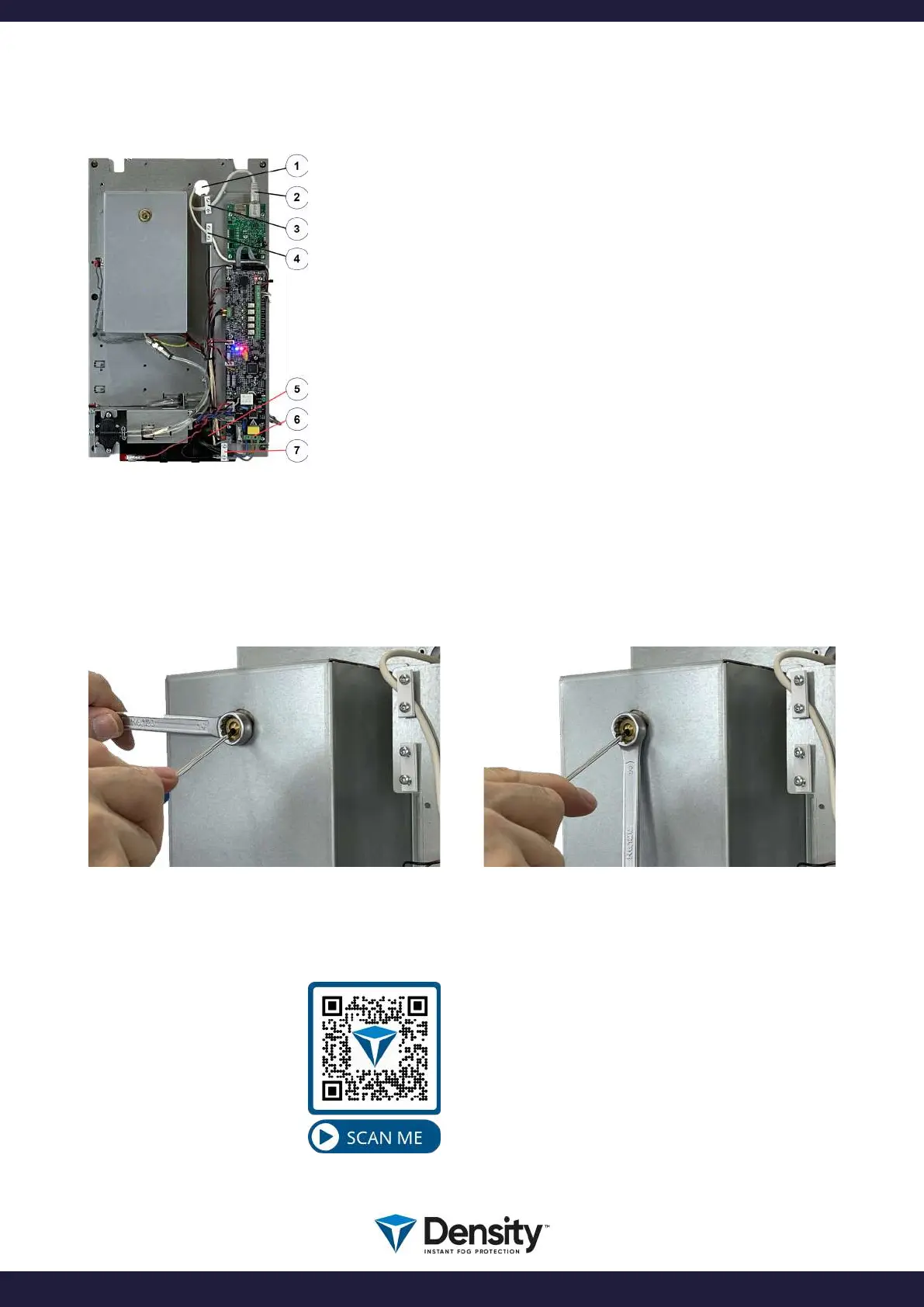
Signal cables and IP/LAN cable to inserted on top of the machine. Use
cable relief to fasten the cables.
Live, Neutral, and Earth to be connected as shown. Mains cables to be
inserted in the bottom plate of the machine. Use cable relief to fasten
the cable.
1. Hole to insert signal cables.
2. IP/LAN cable.
3. Cable relief for the signal cable.
4. Cable relief for the signal cable.
5. Hole to insert the main cable.
6. Main power connection.
7. Cable relief for main cable.
page 5/20
www.densityglobal.com | help@densityglobal.com
Version 1.1.4



 To Next Page