
 Need help?
Do you have a question about the Denver Electronics BTS-110 and is the answer not in the manual?
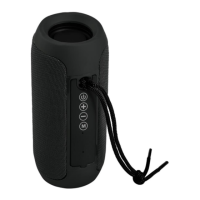
Details the function of each button and port on the speaker, including power, volume, mode, and input jacks.
Instructions on how to recharge the speaker using the provided USB cable and its LED indicator.
Guides on powering on the speaker and selecting operational modes like Bluetooth or Micro SD.
Instructions on how to increase or decrease the audio volume using the dedicated buttons.
Steps to connect external audio devices using the AUX IN jack for playback.
How to insert and play music files from Micro SD cards or USB drives.
Detailed steps for connecting the speaker to a Bluetooth-enabled device.
How to control playback, answer calls, and end calls when connected via Bluetooth.
Instructions for tuning into radio stations and selecting them.
Guide to connect two speakers for True Wireless Stereo audio playback.
Instructions on how to activate the mobile voice assistance function.
Lists key specifications of the speaker, including battery, power, and dimensions.
Covers important safety guidelines, cleaning advice, and handling precautions.
Information on proper disposal of electronic equipment and batteries according to regulations.
 General
| Brand | Denver Electronics |
|---|---|
| Model | BTS-110 |
| Category | Speakers |
| Type | Portable Bluetooth Speaker |
| Connectivity | Bluetooth |
| Output Power | 3W |
| Frequency Response | 100Hz - 20kHz |
| Battery | Built-in Rechargeable Battery |
| Battery Capacity | 300 mAh |
| Bluetooth Version | 4.2 |
| Bluetooth Range | 10 meters |
| Color | Black |
| Additional Features | Built-in Microphone |
| Power Source | USB |

 To Next Page