ENG-
2
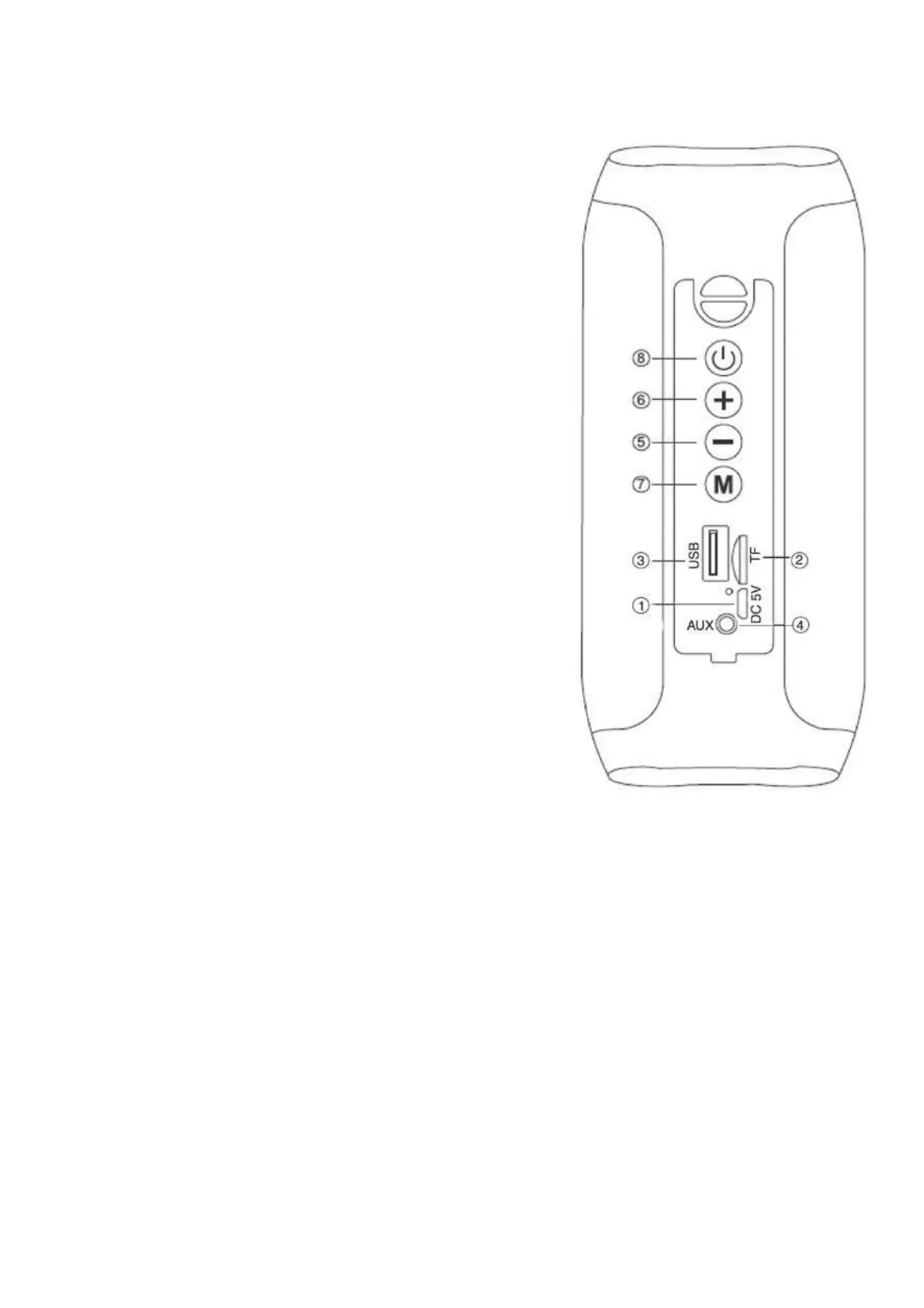
CONTROLS
1. Micro USB socket for charging with LED
indicator:
Red: Charging, turn off when charging is
completed.
2. Micro SD memory input
3. USB input
4. AUX IN input
5. Volume-/Previous Track button
6. Volume +/Next track button
7. MODE button
8. Power On/Off/Play/Pause button
CHARGING
The speaker must be recharged when switched off.
1. Using the supplied USB cable, connect the end with the Micro USB jack to
the micro-USB jack (1) of the speaker and the other end to the USB port of a
PC or USB charger (5V, 1A, not included).
2. The LED indicator will light up red to indicate the charging status of the
speaker, when fully charge the speaker, the LED indicator will turn off.
BASIC OPERATION
To turn on the speaker, press and hold the power button (8).
Press the MODE button (7) to choose from:
1. Bluetooth mode.
2. Micro SD mode, if a micro SD type memory card is inserted into the micro


 To Next Page