-
1 Overview
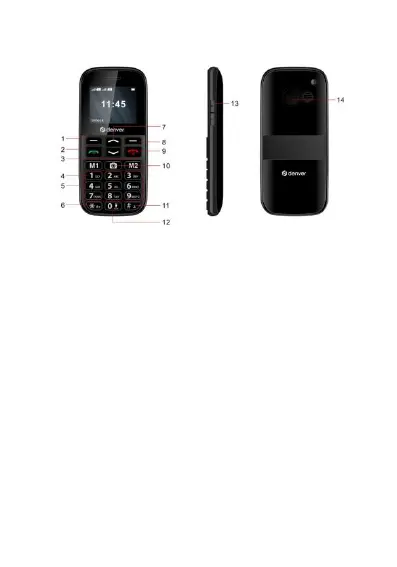
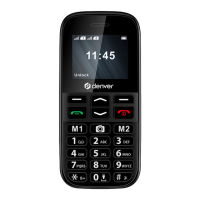
1. Enter sub menu 1. To select the Option that is shown at the
bottom right of the screen and confirm a selection.
2. Answer or start a call button, In Standby: press to open Call History
3. Speed-dial key-M1 M2.
4. Long press to call voicemail.
5. Nummeric and alphabetic buttons.
6. Star button. Lock or unlock keypad.
7. Up and down. Use this key to select the menu up and down
8. Enter submenu 2. To select the Option that is shown at the
bottom right of the screen.
9. Press and hold for power on or off, press to end call, in menu
press to exit.
10.Camera.
11.Use the key to switch between the abc, ABC, Abc and 123
input methods.and Press and hold this key to switch between
ringing and mute
12. Press and hold button to turn Flashlight on or off.
13. Volume controls.
ENG-02


 To Next Page