Need help?
Do you have a question about the Denver GSP-120 and is the answer not in the manual?
Instructions for inserting and removing the phone's battery.
Instructions for inserting and removing the SIM card.
Procedure for charging the phone's battery.
Explanation of the phone's standby mode operation.
Explanation of icons displayed on the phone screen.
Instructions for making international calls.
How to dial extension numbers for fixed lines.
Information on setting up and using speed dial numbers.
 General
| Display type | TFT |
|---|---|
| Display diagonal | 1.77 \ |
| Display resolution | - pixels |
| Flash card support | Yes |
| Compatible memory cards | MicroSD (TransFlash) |
| Data network | GSM |
| SIM card capability | - |
| 2G bands (primary SIM) | 900, 1800 MHz |
| Mobile network generation | 2G |
| Multimedia Messaging Service (MMS) | Multimedia Messaging Service (MMS) is a standard way to send messages that include multimedia content to and from a mobile phone over a cellular network |
| Talk time (2G) | 3 h |
| Battery voltage | 3.7 V |
| Battery capacity | 600 mAh |
| Standby time (2G) | 120 h |
| Subscription type | No subscription |
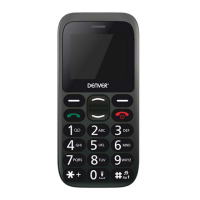
| Type | Senior phone |
| Product color | Black |
| Form factor | Bar |
| Personal info management (PIM) | Alarm clock, Calendar |
| Keyboard layout | Alphanumeric keypad |
 Weight and Dimensions
| Depth | 14 mm |
|---|---|
| Width | 52 mm |
| Height | 105 mm |
| Weight | 78 g |


 To Next Page