DSB-4020 IB20210503 PAGE:2
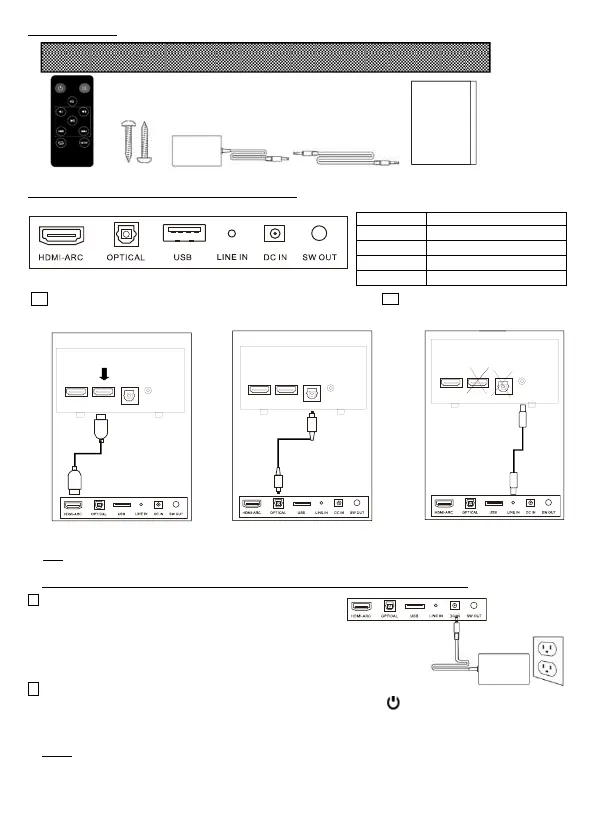
What’s in the Box?
Remote Control Screws Power Supplies Aux Cable User Manual
Connecting Your Sound Bar to Your TV or other sources:
Illustration of the Soundbar connectors for different connections:
NOTE: All cables what you needed should be plugged in before Power Supplies connected.
2. Connect the Power Supplies to Sound Bar
then power Insert Power Supplies to an AC outlet.
3. Turn on your sound bar.
Placing the Soundbar on a flat and solid surface. Hold the Power button /MODE at the right side of the
sound bar or Press RED key on the remote control to turn it on. Selecting Mode (input source) as the following
instruction to enjoy your powerful sound. When the Soundbar is switched to standby, the red dot is turned on.
NOTE: 1. RESET: Hang up is solved by disconnecting and reconnected the power supplies.
2. It will be standby within 10 munities if no signal from Line In, BT, USB, ARC and Optical inputs. It also
will be standby if the low sound from Line In need to be heard within about 15cm distance.
Use HDMI cable (V1.4 above) to
connect the sound bar to the TV
ARC socket.
Use Optical cable to connect the
sound bar to the TV, DVD player or
set top box.
Connecting the sound bar
identified LINE IN to the TV with
the provided AUX cable.
A red LED will pulse on the
front of the sound bar
HD MI
TV
ARC
OPT IC AL
HD MI
AUX
HEA DP HO NE
HDMI
TV
OPTIC ALHDMI
AUX
HEA DP HO NE
HDMI
TV
ARC
OPTIC ALHDMI
AUX
HEA DP HO NE
1a. Is an HDMI input jack on your TV labeled “ARC”?
1b. Don’t have ARC or Optical output
available on your TV?


 To Next Page
 Loading...