DSB-4020 IB20210503 PAGE:3
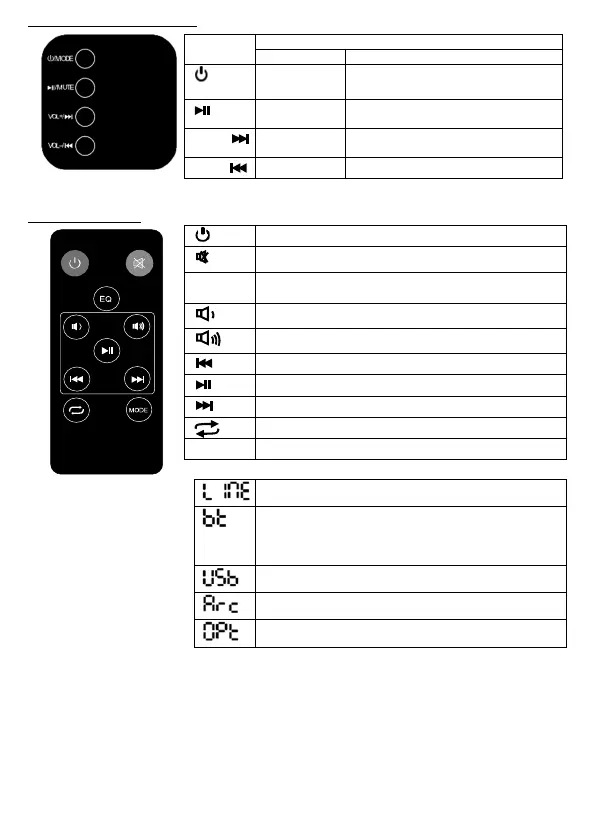
The control panel on the Soundbar:
Symbol
/MODE
Standby
Toggle the Mode change: LINE IN
Bluetooth USB Drive ARC Optical
/MUTE
Pause/Play (USB/Bluetooth Mode)
Mute / No Mute
VOL+ /
Next USB Drive/Bluetooth Song
VOL- /
Next USB Drive/Bluetooth Song.
Remote control buttons
Switch the product on or to standby
EQ
Equalizer: Eq0: Normal, Eq1: Rock, Eq2: Pop, Eq3: Classic,
Eq4: Jazz, Eq5: Country, Eq6: Music
Skip to previous audio file during USB/BT play
Pause or play USB/BT audio file
Skip to next audio file during USB/BT play
Repeat audio during USB play
MODE
*MODE (source) selection shown on the LED display.
Flashes if the Soundbar is not paired or connected to a
bluetooth device.
Lights up if the Soundbar is paired.
USB source when connecting to a USB drive


 To Next Page