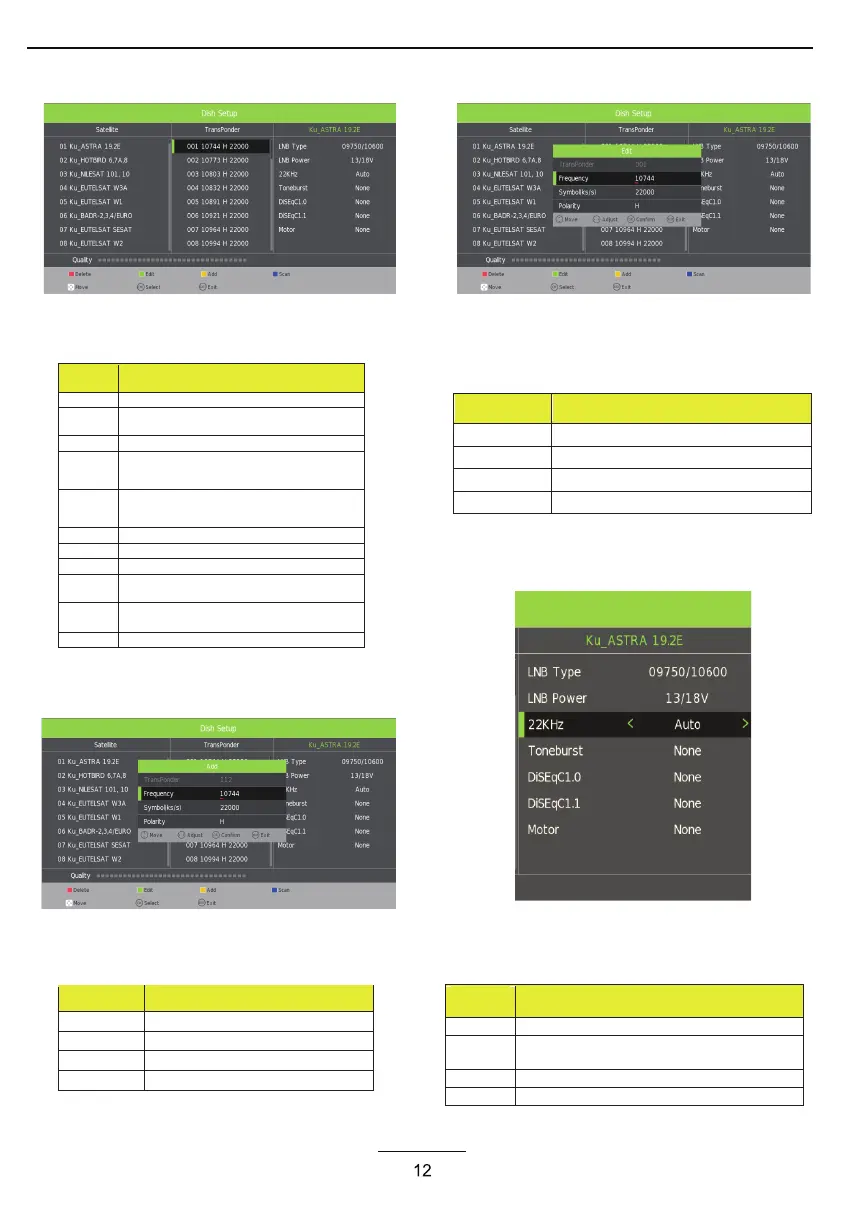
Transponder List
Operations in Transponder List Menu are shown in
the following table:
Key
Stroke
Action
KEY_UP use cursor to up
KEY_DOW
N
use cursor to down
KEY_LEFT switch operation to Satellite list
KEY_RIGH
T
switch operation to satellite system parameters setting
list
KEY_ENTE
R
Select/unselect cursor item Transponder.
KEY_MENU Back to Satellite list.
KEY_EXIT Exit Main Menu.
KEY_RED Enter Transponder Add menu
KEY_GREE
N
Enter Transponder Edit menu
KEY_YELLO Enter Transponder Delete confirm menu
W
KEY_BLUE Enter Transponder scan menu
Transponder Add menu
Operations in Transponder Add menu are shown in
the following table:
Option
Value
Transponder Can’t edit .Auto addition
Frequency Press num key to edit
Symbol(ks/s) Press num key to edit
Polarity H,V
Transponder Edit menu
Operations in Transponder Edit menu are shown in
the following table:
Option
Value
Transponder Current edit item.Auto select
Frequency Press num key to edit
Symbol(ks/s) Press num key to edit
Polarity H,V
Setting
Operations in Setting Menu are shown in the
following table:
Key
Stroke
Action
KEY_UP use cursor to up
KEY_DOW
N
use cursor to down
KEY_MENU Back to Transponder list.
KEY_EXIT Exit Main Menu.



 To Next Page