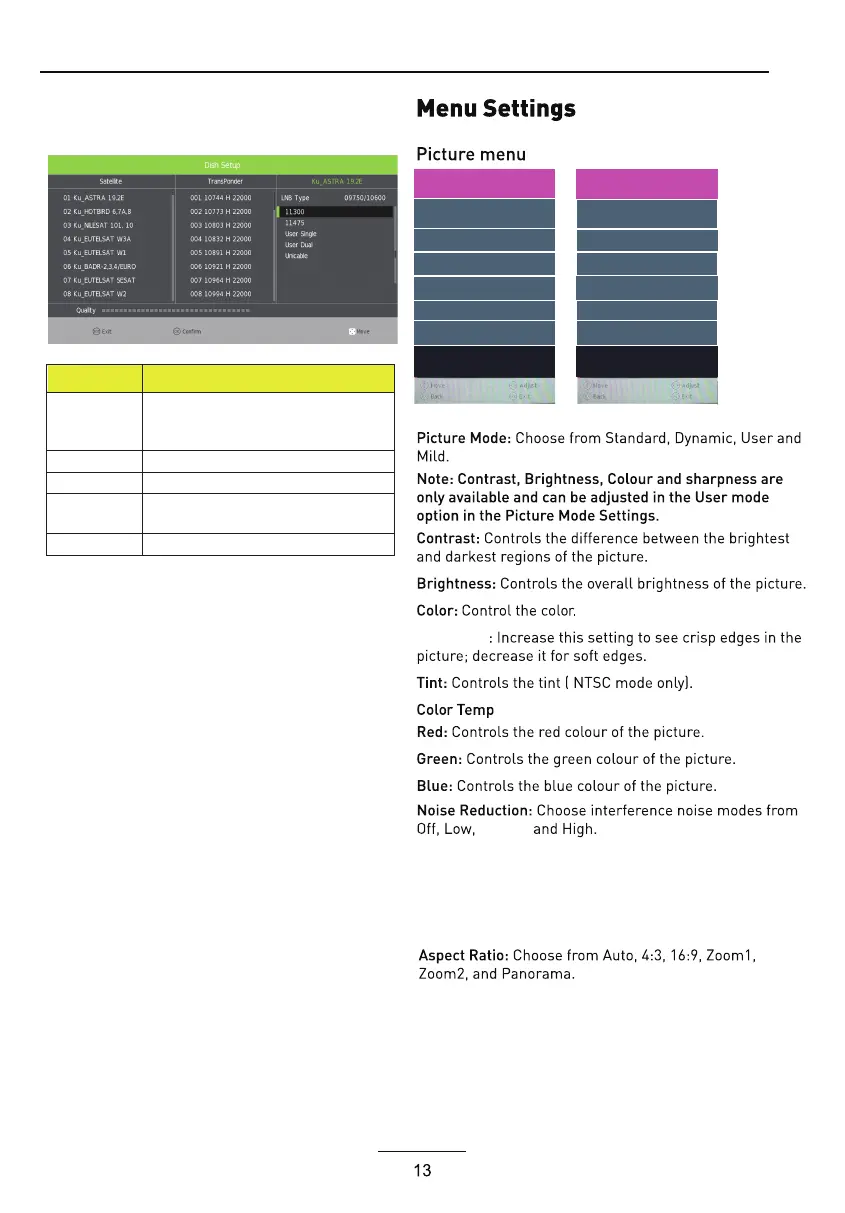
Operations in Setting item menu are shown in the
following table:
Option
Value
LNB Type 9750/10600,9750/10750,05150,05750,
5150/5750,09750,10600,10750,11300,1
1475,User Single,User Dual
LNB Power On,Off
22KHz Auto,off,on
DisEqC Mode Off,LNB1,LNB2,LNB3,LNB4,Burst A,Burst
B
Motor None,DisEqC1.2,DisEqC1.3
:Choose from Warm,Personal ,Cold and Normal
Medium
SCREEN
Sharpness
:(Only available in PC)Press the OK button to select main
menu to adjust the screen.
PICTURE
Noise Reduction Medium
SCREEN
Dynamic CR < On >
Face Color < 0 >
MoCom < On >
Aspect Ratio < Off >
PICTURE
Picture Mode < Standard >
Contrast 50
Brightness 50
Colour 50
Tint 50
Sharpness 50
Colour Temp < Normal >
>
>
Dynamic CR: A
ON or Off.
vailable options:On or Off.
Face Co
MoCom(Motion compensation ):
Available options: ON or Off.Blue Screen:
lor: Controls the Face Color of the picture.
Blue Screen < Off >


 To Next Page