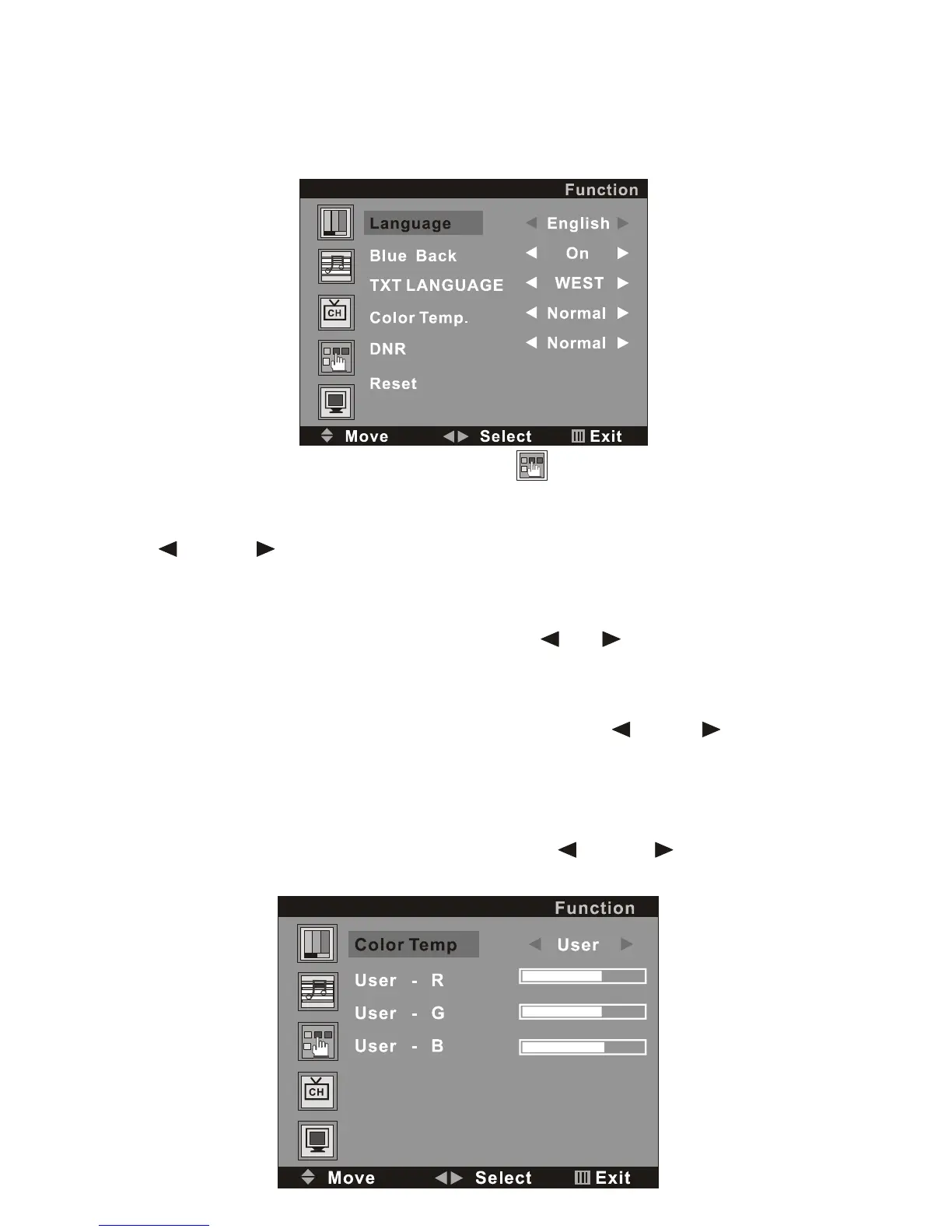
Press the MENU button on the remote control, and then press the P- button
to select the Function setting, the Menu will be shown as below:
On this menu, the Function setting icon of is in red frame.
(1).Language
Use the V+ button firstly, the cursor will be on the line of “Language
English ”. And then, press the V+ or V - button repeatedly to select
the language you need
(2).Blue Back
Move the cursor to the line of “Blue Back On ”. And then, press
the V+ or V - button repeatedly to select the On or Off
(3).TXT LANGUAGE
Move the cursor to the line of “TXT LANGUAGE WEST ”. And
then, press the V+ or V - button repeatedly to select the
WEST,RUSSIAN,ARABIC,FARSI or EAST according to your meaning.
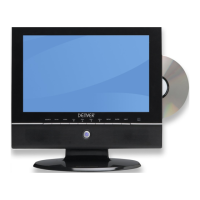
(4).Color Temp.
Move the cursor to the line of “Color Temp. Normal ”. And then,
press the V+ or V - button , a menu will be displayed as followed:


 To Next Page